우리가 섬기는 이유 팟캐스트: 에피소드 140
CLIPr의 CEO 험프리 첸이 최근 경찰 업무의 동기, 도전 과제, 현실을 탐구하는 팟캐스트 'Reasons We Serve'에 출연해 인터뷰를 진행했습니다. 유튜브에서 전체 인터뷰를 시청하세요!



법 집행 분야 AI 블로그에서는 AI 기술의 최신 혁신과 이를 통해 법 집행이 어떻게 변화하고 있는지 탐구합니다. 경찰을 위한 생성형 AI부터 바디캠 활용 및 자동 보고 시스템에 이르기까지, 기술 중심의 세상에서 법 집행 기관이 선도적 위치를 유지하도록 돕는 첨단 혁신을 다룹니다. 전문가의 통찰, 실제 적용 사례, 그리고 경찰 업무에서의 AI 미래를 계속 지켜봐 주십시오.

오디오 녹음 도구의 궁극적인 무기를 발견하고, 음향 녹음 경험을 한 단계 끌어올릴 완벽한 솔루션을 찾아보세요.

오디오 녹음의 세계에 뛰어드는 것은 마치 미로를 헤매는 듯한 느낌을 줄 수 있습니다. 특히 손끝에 닿는 수많은 도구들 앞에서 더욱 그렇죠. 여러분의 오디오 장비가 가진 잠재력을 최대한 활용하고 있는지 궁금한 적이 있으신가요? 아니면 여러분의 창작 과정에 딱 맞는, 마치 맞춤 제작된 듯한 완벽한 소프트웨어를 찾고 계신가요? 어느 쪽이든, 저희가 도와드리겠습니다.
이 글에서는 다음을 살펴보겠습니다:
추신: 수많은 오디오 클립 속에서 길을 잃은 적 있나요? CLIPr가 해결해 드립니다. 스마트 영상 대본 검색과 자동 인덱싱 기능으로 핵심 오디오 부분을 순식간에 찾아낼 수 있습니다. 끝없는 스크롤링은 이제 그만, 창의적인 작업의 세계로 들어오세요.
{{cta}}
오디오 녹음 도구는 단순한 기기가 아닌 음악, 팟캐스팅, 보이스오버 작업과 같은 산업에서 창의성의 생명선입니다. 음악 분야에서는 이 도구들이 원시적인 멜로디를 완성도 높은 걸작으로 변모시킵니다. 지난 5년간 300% 증가한 팟캐스팅의 폭발적 성장은 대부분 이러한 도구들에 힘입어 누구나 전문적인 음질을 누릴 수 있게 되었습니다. 보이스오버 전문가들은 원격으로 작업하는 경우가 많은데, 캐릭터와 내러티브에 생명을 불어넣기 위해 이 도구들에 의존합니다.
따라서 팟캐스터의 성공 가이드를 찾고 있다면, 최고의 오디오 녹음 도구가 시작점입니다.
전문가 팁: 실시간 공연과 역동적인 대화에 필수적인 원활한 녹음 환경을 보장하려면 지연 시간이 짧은 장비를 우선적으로 선택하세요.
오디오 녹음의 영역에 뛰어들 때, 모든 수준의 창작자에게 필수적인 몇 가지 핵심 기능이 두드러집니다.
다양한 운영 체제와의 호환성
녹화 품질 및 해상도
편집 및 믹싱 능력
전문가들의 도구 상자를 살펴보세요. 음악, 영화, 방송을 선도하는 업계 최고의 하드웨어와 소프트웨어를 소개합니다:
소프트웨어와 하드웨어로 구분하여 각각을 자세히 살펴보겠습니다:

개요: CLIPr는 전문 오디오 도구 키트에서 두각을 나타내며, 특히 영상 콘텐츠 내 오디오 구성 요소 관리에 대한 혁신적인 접근 방식으로 유명합니다. 이 플랫폼은 AI를 활용해 오디오 주제를 색인화함으로써 제작자, 영화 제작자 및 방송사에게 필수적인 자산이 됩니다.

전문적인 환경에서 영상 콘텐츠가 증가함에 따라, CLIPr과 같은 고급 오디오 관리 기능을 제공하는 도구는 고품질 제작 기준을 유지하는 데 필수적인 요소로 자리 잡고 있습니다.
주요 특징:
장점:
단점:
가격: 최신 가격 정보는 CLIPr 웹사이트에서 확인하시기 바랍니다.
전문가 팁: CLIPr의 인덱싱 기능을 활용하면 비디오 프로젝트에서 오디오 요소를 빠르게 찾아 정제할 수 있어 시간을 절약하고 창작 과정을 향상시킬 수 있습니다.

{{cta}}

개요: Pro Tools는 단순한 소프트웨어가 아닙니다. 오디오 업계의 상징과도 같은 존재입니다. 고급 기능과 폭넓은 호환성으로 유명한 이 프로그램은 수많은 전문 스튜디오의 핵심 기반을 이루고 있습니다.
Pro Tools는 강력한 편집 기능, 광범위한 플러그인 지원, 그리고 전문가용 하드웨어와의 완벽한 연동으로 두각을 나타냅니다. 음악 및 영화 산업의 높은 요구 사항을 충족하도록 설계되어 오디오 제작에 정밀성과 유연성을 제공합니다.
주요 특징:
장점:
단점:
가격 정책: Pro Tools는 개인 아티스트부터 대형 스튜디오까지 다양한 사용 수준에 맞춰 설계된 여러 구독 플랜을 제공합니다.
전문가 팁: 프로 툴스의 방대한 플러그인 생태계를 활용하여 새로운 사운드와 효과를 실험해 보세요. 이를 통해 창의적인 한계를 넓힐 수 있습니다.

개요: Mac 전용으로 설계된 Logic Pro는 오디오 전문가들을 위한 지표 역할을 합니다. 직관적인 인터페이스와 방대한 기능 세트를 결합하여 음악가, 프로듀서, 사운드 엔지니어의 다양한 요구를 충족시킵니다.
주요 특징:
장점:
단점:
가격: Logic Pro는 30,000엔의 일회성 구매로 이용 가능하며, 이는 반복적인 구독료 없이 모든 기능을 갖춘 DAW를 원하는 사용자에게 매력적입니다. 무료 업데이트가 포함되어 있어 사용자는 항상 최신 기능과 개선 사항을 이용할 수 있습니다.
전문가 팁: Logic Pro의 '스마트 템포' 기능을 활용하면 프로젝트의 타이밍을 손쉽게 관리할 수 있습니다. 이를 통해 다양한 소스의 오디오 녹음을 단일 템포에 맞출 필요 없이 매끄럽게 통합할 수 있습니다.

개요: Ableton Live는 전자 음악 제작 분야에서 기능성뿐만 아니라 음악 창작에 대한 혁신적인 접근 방식으로 두각을 나타냅니다. 세션 뷰는 비선형 인터페이스를 제공하여 라이브 공연의 핵심 도구로 자리매김했으며, 아티스트들이 실시간으로 실험하고 작곡할 수 있도록 지원합니다.
이 기능 하나만으로도 Ableton Live는 전자 음악 커뮤니티에서 필수적인 존재가 되었으며, 기존 선형 DAW들이 따라올 수 없는 수준의 유연성과 창의성을 제공합니다.
주요 특징:
장점:
단점:
가격: Ableton Live는 다양한 요구와 예산에 맞춰 팩(pack) 이라는 이름의 여러 에디션으로 제공되며, 각 에디션마다 더 많은 기능과 성능이 추가됩니다.

개요: Audacity는 단순한 도구가 아닙니다. 오디오 편집의 달인이 되는 관문입니다. 무료 오픈소스인 이 프로그램은 소리의 세계로 발을 내딛는 이들에게 등대 역할을 하며, 다재다능하면서도 접근성이 뛰어난 강력한 플랫폼을 제공합니다.
초보 팟캐스터부터 노련한 음악 프로듀서까지, Audacity는 초보자에게는 간편함을, 오디오 전문가에게는 깊이를 완벽하게 조화시켜 어떤 오디오 도구 세트에서도 귀중한 자산이 됩니다.
주요 특징:
장점:
단점:
가격: 완전 무료 오디오 녹음 소프트웨어로, 예산이 제한적이거나 막 시작하는 분들에게 이상적인 선택입니다.

개요: GarageBand는 Mac 사용자를 위해 특별히 설계된 음성 녹음 소프트웨어의 세계에서 사용자 친화성의 정수라 할 수 있습니다. 초보자부터 전문가까지 모두를 아우르며, 창의성을 불러일으키는 직관적인 인터페이스를 제공합니다.
음악가, 팟캐스터, 성우 등 어떤 분이든 GarageBand는 오디오 프로젝트를 생생하게 구현할 수 있는 원활한 플랫폼을 제공합니다. 방대한 가상 악기 라이브러리와 미리 녹음된 루프를 통해 소리를 손쉽게 탐구하고 실험할 수 있도록 지원합니다.
주요 특징:
장점:
단점:
가격 정책: GarageBand는 모든 Apple 사용자에게 무료로 제공되므로, Apple 생태계 내 사용자에게 탁월한 가치 제안을 제공합니다.

개요: Windows 사용자를 위해 특별히 제작된 Cakewalk by BandLab은 전문 오디오 녹음 소프트웨어 분야에서 강력한 성능을 자랑하는 솔루션으로 부상하고 있습니다. 이 견고한 소프트웨어는 음악가, 작곡가, 오디오 엔지니어를 위한 안식처로, 포괄적인 녹음 및 편집 기능을 제공합니다.
복잡한 멜로디를 작곡하든, 정교한 사운드스케이프를 제작하든, 완벽한 믹스를 완성하든, Cakewalk는 여러분의 창의적인 비전을 현실로 만들 수 있는 필수 도구를 제공합니다.
주요 특징:
장점:
단점:
가격 정책: BandLab의 Cakewalk는 완전한 디지털 오디오 워크스테이션(DAW)을 완전히 무료로 제공함으로써 차별화됩니다. 이는 Windows 사용자가 구독이나 일회성 구매 없이도 전문적인 수준의 녹음 및 편집 기능을 이용할 수 있음을 의미하며, 음악가와 오디오 전문가에게 탁월한 가치를 제공합니다.

개요: Adobe Audition은 전문 오디오 편집 및 복원 소프트웨어 분야의 정점에 서 있습니다. 이 다재다능하고 강력한 도구는 오디오 엔지니어, 팟캐스터, 음악가, 사운드 디자이너의 요구를 충족시키며, 정밀한 오디오 조작 및 향상을 위한 포괄적인 기능 세트를 제공합니다.
음악 제작, 팟캐스트 에피소드, 오디오 복원 프로젝트 등 어떤 작업을 하든 Adobe Audition은 탁월한 음질을 구현하는 데 필요한 도구를 제공합니다.
주요 특징:
장점:
단점:
가격: Adobe Audition은 Adobe의 Creative Cloud 구독 서비스를 통해 이용 가능하며, 이 서비스는 다양한 Adobe 소프트웨어에 대한 접근 권한을 제공합니다. 사용자는 단일 애플리케이션 옵션과 모든 애플리케이션 옵션 등 다양한 요구 사항에 맞춰 선택할 수 있는 여러 구독 플랜 중에서 선택할 수 있습니다.
Adobe Audition은 독립형 제품으로 구매할 수 없지만, 구독을 통해 지속적인 업데이트와 최신 기능을 이용할 수 있어 오디오 업계 전문가들에게 가치 있는 선택지입니다.

개요: Omnisphere는 소프트웨어 신디사이저 분야에서 권위 있는 강자로 인정받고 있습니다. 음악가와 프로듀서에게 다재다능하고 창의적인 도구로서의 명성은 당연한 평가입니다. 이 가상 악기는 비교할 수 없는 사운드 라이브러리를 제공하여 음악 제작을 새로운 차원으로 끌어올리고자 하는 이들에게 필수 선택지로 자리매김하고 있습니다.
주요 특징:
장점:
단점:
가격: Omnisphere는 공식 Spectrasonics 웹사이트에서 구매할 수 있습니다. 가격은 버전 및 진행 중인 프로모션이나 번들에 따라 달라질 수 있습니다. 이는 전문 음악 프로듀서와 작곡가를 위한 최상급 음질과 창의적 잠재력에 대한 투자입니다.

개요: FL Studio(일반적으로 Fruity Loops로 불림)는 혁신적인 음악 제작 방식으로 전자 음악 프로듀서들 사이에서 선호되는 프로그램입니다. 패턴 기반 시퀀싱 기능으로 유명하여 전자 비트를 만들고 멜로디를 구성하는 데 이상적인 선택입니다.
사용자 친화적인 인터페이스와 방대한 가상 악기 및 효과 라이브러리를 갖춘 FL Studio는 음악가들이 자신만의 전자 음악 비전을 현실로 구현할 수 있도록 지원합니다.
주요 특징:
장점:
단점:
가격: FL Studio는 다양한 기능과 가격대를 가진 여러 버전을 제공합니다. Fruity Edition은 99달러라는 합리적인 가격으로 시작할 수 있는 입문용 버전이며, 고급 기능이 추가된 Producer 및 Signature Edition도 선택 가능합니다. 사용자는 자신의 필요와 예산에 가장 적합한 버전을 선택할 수 있습니다.
전문가 팁: FL Studio의 피아노 롤을 활용해 멜로디와 코드 진행을 손쉽게 실험해 보세요. 사용자 친화적인 디자인이 창의적인 음악 탐구를 돕습니다.

개요: 온라인 음성 녹음기는 사용하기 쉬운 브라우저 기반 도구로, 간편한 오디오 녹음을 위한 편리한 솔루션을 제공합니다. 간단한 메모, 음성 메모 또는 간단한 인터뷰를 녹음해야 할 때, 이 도구를 사용하면 복잡한 소프트웨어 설치 없이도 이를 수행할 수 있습니다.
주요 특징:
장점:
단점:
가격: 온라인 음성 녹음기는 일반적으로 무료로 사용할 수 있어 기본적인 오디오 녹음 요구 사항에 비용 효율적인 옵션입니다.
전문가 팁: 이 도구는 빠른 음성 메모, 인터뷰 또는 즉석에서 오디오를 캡처하고 편집해야 하는 모든 상황에 사용하세요. 디지털 도구 상자에 꼭 챙겨두면 유용한 도구입니다.

개요: 사운드 포지(Sound Forge)는 오디오 녹음, 편집, 마스터링을 위한 포괄적인 도구 모음을 제공하는 유명하고 최고의 전문 오디오 편집 소프트웨어입니다. 고품질 오디오 콘텐츠 제작을 원하는 오디오 전문가와 음악가들이 선호하는 선택지입니다.
주요 특징:
장점:
단점:
가격 정책: Sound Forge는 일회성 구매와 구독 플랜을 포함한 다양한 가격 옵션을 제공하여 서로 다른 사용자 요구와 예산에 부응합니다. 최고 수준의 오디오 편집 기능을 원하는 분들에게는 가치 있는 투자입니다.
전문가 팁: 오래되거나 손상된 오디오 녹음을 복구하고 향상시키려면 Sound Forge의 오디오 복원 도구를 활용해 보세요. 오디오 콘텐츠를 되살리는 데 유용한 도구입니다.
알아두면 좋은 통계: 사운드 포지 오디오 스튜디오는 음악 앨범, 팟캐스트, 영화 및 TV용 오디오를 포함한 수많은 오디오 프로젝트 제작에 사용되어 왔습니다. 전문적인 수준의 오디오 품질을 구현하는 데 있어 그 마스터링 도구는 신뢰받고 있습니다.

개요: Omnisphere는 탁월한 음질과 방대한 사운드 라이브러리로 유명한 소프트웨어 신디사이저입니다. 다양한 표현력 있는 사운드를 창조하는 데 있어 음악가, 프로듀서, 사운드 디자이너들 사이에서 가장 선호하는 도구입니다.
옴니스피어는 수많은 히트곡, 영화 음악, 사운드트랙에 사용되었습니다. 방대한 사운드 라이브러리와 강력한 합성 기능 덕분에 음악 전문가와 사운드 애호가 모두에게 소중한 도구로 자리매김했습니다.
주요 특징:
장점:
단점:
가격: Omnisphere는 구매가 가능하며, 최상급 사운드 합성 기능을 추구하는 이들에게 투자 가치가 있는 제품으로 평가됩니다. 음악가와 사운드 디자이너에게 풍부한 창의적 가능성을 제공합니다.
전문가 팁: Omnisphere의 변조 옵션을 활용해 진화하고 역동적인 사운드를 만들어 보세요. 다양한 변조 소스를 조합해 독특한 음향 질감을 구현해 보세요.

개요: Zoom H6는 뛰어난 다용성과 탁월한 음질로 두각을 나타내는 휴대용 오디오 레코더입니다. 현장 녹음, 팟캐스팅, 이동 중 오디오 제작을 위해 설계된 이 제품은 다양한 녹음 상황에 맞춰 교체 가능한 마이크 캡슐을 제공합니다. 인터뷰 녹음, 음악 녹음, 고품질 음향 효과 제작 등 어떤 작업이든 Zoom H6는 컴팩트하고 휴대성이 뛰어난 패키지에 프로급 오디오를 구현합니다.
줌 H6는 신뢰성과 탁월한 음질로 현장 녹음 전문가와 팟캐스터들 사이에서 가장 선호되는 제품입니다. 다양한 환경에서 오디오를 캡처하는 데 유용한 도구로, 그 다재다능함이 장점입니다.
주요 특징:
장점:
단점:
가격: Zoom H6는 전문적인 기능과 다용도성을 고려할 때 Riverside나 SquadCast와 비교해 합리적인 가격대를 형성합니다. 교체 가능한 마이크 캡슐을 갖춘 휴대용 레코더를 찾는 이들에게 탁월한 가성비를 제공합니다.
전문가 팁: 다양한 마이크 캡슐을 실험해 보며 녹음 요구에 맞는 최적의 설정을 찾아보세요. 각 캡슐은 독특한 음색 특성을 제공하여 녹음을 완벽하게 맞춤 설정할 수 있게 해줍니다.

개요: TASCAM DR-40X는 다양한 녹음 환경에서 탁월한 성능을 발휘하도록 설계된 다목적 휴대용 사운드 레코더입니다. 라이브 음악 녹음, 인터뷰 진행, 현장 음향 효과 녹음 등 어떤 작업이든 필요한 기능과 품질을 제공합니다. 듀얼 녹음 모드, 조절 가능한 마이크, 사용자 친화적인 인터페이스를 갖춘 DR-40X는 손쉽게 선명한 오디오를 캡처할 수 있도록 보장합니다.
주요 특징:
장점:
단점:
가격: TASCAM DR-40X는 다용도 녹음 기능에 비해 탁월한 가격 대비 성능을 제공합니다. 경쟁력 있는 가격으로 전문가급 기능을 제공하여 다양한 사용자가 접근할 수 있습니다.
전문가 팁: 듀얼 녹음 모드를 실험해 보며 녹음 환경에 맞는 균형을 찾아보세요. 이 기능은 까다로운 상황에서 클리핑과 왜곡을 방지하는 데 도움이 될 수 있습니다.

개요: 로드 NT-USB는 팟캐스팅, 보이스오버, 스튜디오 녹음 분야에서 뛰어난 성능을 발휘하는 최상급 USB 마이크입니다. 탁월한 음질과 사용자 친화적인 기능을 제공하여 전문가와 애호가 모두에게 선호되는 선택지입니다.
로데 NT-USB는 탁월한 음질과 사용 편의성으로 팟캐스팅 및 보이스오버 커뮤니티에서 강력한 명성을 쌓았습니다. 완벽한 녹음을 원하는 전문가들이 신뢰하는 도구입니다.
주요 특징:
장점:
단점:
가격: 로드 NT-USB는 보급형 USB 마이크보다 가격이 높지만, 탁월한 음질과 포함된 액세서리로 인해 팟캐스팅과 보이스오버 작업을 진지하게 고려하는 사람들에게 가치 있는 투자입니다.
전문가 팁: 내장 헤드폰 잭과 제로 레이턴시 모니터링 기능을 활용하여 라이브 세션 중에도 녹음 품질이 완벽하도록 하세요.

개요: 포커스라이트 스칼렛 2i2는 전 세계 음악가, 프로듀서, 콘텐츠 제작자들의 마음을 사로잡은 유명한 USB 오디오 인터페이스입니다. 탁월한 프리앰프와 다재다능한 기능으로 오디오 녹음 분야의 판도를 바꾸는 제품입니다.
포커스라이트 스칼렛 2i2는 다양한 녹음 환경에서 탁월한 음질과 안정성을 제공한다는 평판을 얻으며, 많은 뮤지션과 프로듀서들의 필수 선택이 되었습니다.
주요 특징:
장점:
단점:
가격: 포커스라이트 스칼렛 2i2는 품질과 가격 대비 성능의 탁월한 균형을 제공하여, 신뢰할 수 있는 오디오 인터페이스를 찾는 음악가와 크리에이터들에게 인기 있는 선택입니다.
전문가 팁: 초보자든 노련한 전문가든, 포함된 소프트웨어 번들을 활용하여 녹음 및 오디오 제작 소프트웨어 기능을 향상시키세요.

개요: Shure SM7B는 보컬리스트, 방송인, 오디오 전문가들 사이에서 가장 선호되는 제품으로 입증된 다이나믹 스튜디오 마이크입니다. 다용도성, 내구성, 뛰어난 음질로 다양한 용도에 최적의 선택입니다.
주요 특징:
장점:
단점:
가격: Shure SM7B는 투자 가치가 있는 제품으로 평가받지만, 뛰어난 성능과 내구성이 가격을 정당화하여 어떤 스튜디오 설비에도 가치 있는 추가 장비가 됩니다.
전문가 팁: Shure SM7B 마이크의 성능을 극대화하고 스튜디오 수준의 녹음을 얻으려면 고품질 오디오 인터페이스와 팝 필터와 함께 사용하세요.

개요: PreSonus Studio One은 직관적인 작업 흐름과 강력한 기능 세트로 두각을 나타내는 디지털 오디오 워크스테이션(DAW)으로, 음악가와 팟캐스터에게 탁월한 선택입니다. 음악 작곡, 보컬 녹음, 팟캐스트 에피소드 편집 등 어떤 작업을 하든 Studio One은 창의적인 아이디어를 효율적으로 구현하는 데 필요한 도구를 제공합니다.
PreSonus Studio One은 사용자 친화적인 인터페이스와 효율적인 작업 흐름으로 명성을 얻어 초보자부터 경험 많은 음악 프로듀서까지 모두를 끌어모으고 있습니다. 협업 및 클라우드 기반 기능을 통해 음악 프로젝트의 원격 팀워크에 다재다능한 선택지가 됩니다.
주요 특징:
장점:
단점:
가격 정책: 프리소너스 스튜디오 원은 무료 버전을 포함한 다양한 버전을 제공하여 예산이 다른 사용자들도 접근할 수 있습니다. 유료 버전은 추가 기능과 가상 악기를 사용할 수 있게 해줍니다.
전문가 팁: 포함된 가상 악기와 효과 플러그인을 활용하여 타사 플러그인 없이도 독특한 사운드와 창의적인 가능성을 발견해 보세요.

개요: 스타인버그 큐베이스는 MIDI 및 오디오 편집을 위한 다양한 도구를 탁월하게 제공하는 것으로 유명한 디지털 오디오 워크스테이션(DAW)으로, 음악 프로듀서와 작곡가들이 가장 선호하는 선택지입니다. 강력한 기능과 포괄적인 성능을 바탕으로 큐베이스는 음악가들이 자신의 음악적 비전을 정밀하게 구현할 수 있도록 지원합니다.
큐베이스는 포괄적인 MIDI 기능과 고급 악보 작성 능력으로 음악 작곡가 및 편곡자들 사이에서 선호되는 선택입니다. 방대한 가상 악기 라이브러리는 창의적 가능성을 확장하여 다양한 음악 장르에 활용 가능한 다목적 도구로 자리매김하고 있습니다.
주요 특징:
장점:
단점:
가격: Steinberg Cubase는 Cubase Elements, Cubase Artist, Cubase Pro 등 다양한 버전을 제공하며, 각 버전은 서로 다른 사용자 요구에 맞춰 설계되었습니다. 가격은 이에 따라 상이합니다.
전문가 팁: Cubase의 MIDI 시퀀싱 기능을 활용하여 여러 트랙을 만들고, 정교한 음악 구성을 완성하며, 독특한 음악적 아이디어를 실험해 보세요.

개요: 리퍼(Reaper )는 높은 수준의 맞춤 설정과 유연성으로 유명한 비용 효율적인 디지털 오디오 워크스테이션(DAW)입니다. 이 다재다능한 소프트웨어는 음악가, 프로듀서, 사운드 엔지니어의 요구를 충족시키며, 다양한 기능을 제공하면서도 합리적인 가격을 유지합니다.
리퍼는 비용 효율성과 다용도성으로 음악가와 사운드 엔지니어들 사이에서 충성도 높은 팬층을 확보했습니다. 지속적인 업데이트와 광범위한 플러그인 지원으로 예산이 제한된 오디오 전문가들에게 매력적인 선택지입니다.
주요 특징:
장점:
단점:
가격 정책: 리퍼는 넉넉한 평가 기간을 제공하며, 라이선스 구매를 선택할 경우 합리적인 일회성 비용으로 이용할 수 있습니다. 이는 구독료 없이 전문가급 오디오 소프트웨어를 찾는 사용자에게 매력적인 선택지입니다.
전문가 팁: 리퍼의 사용자 지정 옵션을 활용하여 인터페이스를 특정 작업 흐름에 맞게 조정하면 생산성과 효율성을 높일 수 있습니다.
실용적인 팁과 기법으로 오디오 녹음 도구의 잠재력을 최대한 발휘하세요. 초보자든 노련한 전문가든, 이 통찰력을 통해 고품질 오디오를 녹음하고 작업 흐름을 효율화할 수 있습니다.
1. 마이크 위치 완벽하게 잡기
2. 실내 음향 최적화
3. 신호 처리의 힘을 활용하라
4. 효율적인 업무 프로세스 구축
5. 창의적인 사운드 디자인을 수용하라
6. 품질 모니터링에 투자하십시오
7. 연습, 연습, 또 연습
8. 협력하고 피드백을 구하세요
이러한 팁과 요령을 오디오 녹음 작업 과정에 적용하면 녹음 품질을 높이고 눈에 띄는 오디오를 제작할 수 있습니다. 음악가, 팟캐스터, 사운드 엔지니어 등 누구든 이 기법들을 통해 원하는 음향적 목표를 달성할 수 있습니다. 청중이 없어도 시작할 수 있습니다! 이 가이드를 통해 순식간에 팔로워를 늘릴 수 있을 것입니다.
음악 프로듀서, 팟캐스터, 성우 등 어떤 분야를 막론하고 오디오 녹음 도구의 세계는 흥미로운 가능성으로 가득합니다. 적합한 소프트웨어와 장비를 활용하면 창의적인 비전을 현실로 구현하고 전문가 수준의 결과물을 얻을 수 있습니다.
기억하세요, 핵심은 여러분의 특정 요구와 목표에 부합하는 도구를 선택하여 팟캐스트를 돋보이게 만드는 것입니다 ! 업계 표준의 탁월함을 자랑하는 Pro Tools부터 다재다능함과 경제성을 갖춘 Audacity까지, 선택지는 무궁무진합니다.
주요 내용:
자, 이제 CLIPr에 대해 이야기해 보겠습니다. 오디오 녹음 및 편집 세계에서는 효율성이 핵심입니다. 오디오 콘텐츠를 분석하고 색인화하여 완벽한 순간을 쉽게 찾고, 협업을 간소화하며, 시청자 참여도를 높일 수 있는 도구를 상상해 보십시오.
CLIPr는 바로 그 역할을 합니다. 복잡한 작업 과정을 단순화하고 녹음물을 최대한 활용할 수 있도록 도와줍니다. 그렇다면 다중 채널 오디오 녹음 작업을 한 단계 업그레이드해 보시는 건 어떨까요? 청중은 최고의 결과물을 받을 자격이 있으며, CLIPr가 이를 실현하도록 지원합니다.
{{cta}}
Q: 오디오 녹음에 가장 적합한 기기는 무엇인가요?
A: 가장 적합한 음성 녹음 소프트웨어는 필요에 따라 다릅니다 . 스튜디오에서는 마이크와 오디오 인터페이스가 잘 작동합니다. Zoom H6 같은 휴대용 레코더는 현장 녹음에 탁월합니다. USB 마이크는 보이스오버와 팟캐스팅에 이상적입니다. 아이폰으로도 팟캐스트를 녹음할 수 있습니다 !
Q: 오디오 녹음에는 어떤 장비를 사용하나요?
A: 마이크, 오디오 인터페이스, 헤드폰, 녹음 소프트웨어가 필요합니다 .
Q: 오디오 녹음에는 어떤 소프트웨어를 사용해야 하나요?
A: 필요에 따라 다릅니다. 음악 작업에는 Pro Tools, Logic Pro, Ableton Live가 훌륭합니다. Audacity는 다용도로 활용 가능한 무료 옵션입니다. GarageBand는 Mac 사용자에게 적합하며, Adobe Audition은 고급 편집 기능을 제공합니다.
Q: 음성 녹음에 가장 적합한 무료 소프트웨어는 무엇인가요?
A: Audacity는 무료 음성 녹음 소프트웨어 중 최고의 선택입니다. GarageBand(Mac용)와 Cakewalk by BandLab(Windows용)도 좋은 옵션입니다.

이 필수 편집 도구들로 원활한 팟캐스트 편집의 문을 열고, 팟캐스트 제작을 새로운 차원으로 끌어올리세요.
팟캐스트를 완벽하게 다듬기 위한 노력은 현실입니다. 다른 많은 팟캐스터들처럼 여러분도 평범한 팟캐스트를 인상적인 콘텐츠로 탈바꿈시켜 줄 마법 같은 편집 도구를 찾고 계실 겁니다. 하지만 정밀함이 중요하다는 건 모두가 아는 사실이니, 수준 이하의 도구로는 절대 충분하지 않습니다.
자, 좋은 소식이 있습니다: 편집에 대해 알고 있다고 생각했던 것들은 잊어버리세요. 여러분의 팟캐스트 문제를 해결해 드릴 테니까요. 이 글에서는 여러분의 오디오 퀄리티를 한층 업그레이드해 줄 최고의 팟캐스트 편집 도구를 소개합니다.
내용물:
추신: 편집하기 어려운 긴 동영상 팟캐스트가 있으신가요? CLIPr를만나보세요—동영상 분석의 판도를 바꾸는 도구이자, 탁월한 오디오 경험을 만드는 당신의 비밀 무기입니다. 인공지능 기반의 이 도구는 동영상 팟캐스트를 대신 시청하며 주제별 색인을 생성하고 게스트를 인식하여 편집 과정을 간소화합니다.
{{cta}}
자, 이제 당신은 죽여주는 팟캐스트 아이디어를 멋진 오디오 녹음으로 완성했습니다. 이제 두려운 편집 과정을 마주할 때입니다. 성공적인 팟캐스트 전략에서 가장 중요한 부분 중 하나죠. 하지만 두려워하지 마세요, 동료 팟캐스터 여러분. 지금부터 팟캐스트 편집을 훨씬 덜 지루한 경험으로 만들어줄 11가지 최고의 팟캐스트 편집 도구를 소개해 드리겠습니다:
전문가 팁: 팟캐스트를 실제로 편집하기 전에 , 최상의 팟캐스트 녹음 도구를 갖추고 있는지 확인하세요. 이렇게 하면 음질 걱정 없이 매끄러운 편집에 집중할 수 있습니다!

CLIPr는 AI 기반 동영상 관리 플랫폼으로, 동영상 콘텐츠를 검색 가능한 클립으로 변환합니다. 팟캐스트나 동영상을 더 쉽게 소화하고 공유할 수 있도록 활용하세요.
장점:
단점:
최고의 팁: CLIPr을 사용해 동영상 콘텐츠에서 오디오 클립을 찾아 추출하고, 팟캐스트 스니펫에 시각적 효과를 더하세요.
Audacity는 오픈소스 무료 오디오 편집 소프트웨어입니다. 이 오래도록 사랑받는 소프트웨어는 비용 한 푼 들이지 않고도 강력한 도구 세트를 제공합니다. 지갑 사정을 걱정하지 않고 팟캐스팅을 시작하려는 분들에게 이상적입니다.
장점:
단점:
최고의 팁: Audacity의 단순함은 강력한 성능을 해치지 않습니다. 전문가 편집자처럼 자신 있게 트리밍, 커팅, 음질 개선을 수행하세요.
{{cta}}
GarageBand는 음악 및 팟캐스트 제작을 간편하게 해주는 애플의 디지털 오디오 워크스테이션입니다. 이 오디오 편집 소프트웨어는 간편함과 고급 기능을 결합하여 팟캐스터들에게 든든한 선택지가 되고 있습니다.
장점:
단점:
실행 가능한 인사이트: GarageBand의 풍부한 루프 및 악기 라이브러리를 활용하여 팟캐스트를 향상시키세요.
힌덴부르크 저널리스트는 기자를 위해 설계된 오디오 편집 소프트웨어로, 간편함과 전문가 수준의 음질을 최우선으로 합니다. 가파른 학습 곡선 없이 방송 수준의 품질을 요구하는 팟캐스터를 위한 최고의 팟캐스트 편집 도구 중 하나입니다.
장점:
단점:
전문가 팁: 방송 수준의 일관성을 위해 Hindenburg Journalist의 음성 프로파일링 기능을 활용하세요 . 청중이 여러분의 최상의 목소리를 들을 수 있도록 보장합니다.
리퍼는 사용자 정의와 유연성으로 유명한 디지털 오디오 워크스테이션 소프트웨어입니다. 이 팟캐스트 편집 소프트웨어 옵션은 탐구하고 창의력을 발휘하려는 이들에게 무한한 가능성의 장을 열어줍니다.
장점:
단점:
실행 가능한 인사이트: 리퍼를 맞춤 설정하여 특정 편집 요구사항에 맞춰진 나만의 독특한 팟캐스팅 도구 세트를 만들어 보세요.
Descript는 텍스트 기반 편집과 협업을 지원하는 온라인 팟캐스트 편집 소프트웨어입니다. 이 팟캐스트 편집 도구는 오디오 편집에 독특한 접근 방식을 제공하여 말솜씨가 뛰어난 이들에게 편집 작업을 손쉽게 만들어 주므로, 글쟁이들에게는 기쁨이 될 것입니다.
장점:
단점:
최고의 팁: Descript를 사용해 오디오 녹음을 매끄러운 내러티브로 전환하세요. 시각적 인터페이스를 통해 아이디어와 대화를 더 창의적으로 재배치할 수 있습니다.
어도비 오디션은 어도비 크리에이티브 클라우드의 일부인 포괄적인 오디오 편집 소프트웨어입니다. 이 팟캐스트 편집 소프트웨어는 스튜디오 수준의 오디오 품질을 달성하고자 하는 진지한 팟캐스터에게 이상적입니다.
장점:
단점:
실행 가능한 인사이트: Adobe Audition의 '진단' 도구를 활용해 오디오 트랙의 침묵 부분을 빠르고 쉽게 삭제하여 시간을 절약하세요 .

Auphonic은 오디오 품질을 향상시키는 자동 오디오 포스트 프로덕션 웹 서비스입니다. 이 오디오 편집 도구의 자동 향상 기능은 마법처럼 작동하여 오디오 녹음의 품질을 즉시 개선합니다 .
장점:
단점:
전문가 팁: 두 스피커 간의 사운드 밸런스를 맞추려면 Auphonic의 'Adaptive Leveler' 도구를 사용하세요 .
Pro Tools는 음악 및 방송 분야에서 널리 사용되는 디지털 오디오 워크스테이션 소프트웨어입니다. 이 베테랑 오디오 편집 소프트웨어는 80년대 후반에 처음 출시되었으며 2023년에 재출시되었습니다. 정밀하게 팟캐스트를 다듬을 수 있는 고급 기능들을 활용해 보세요.
장점:
단점:
전문가 팁: 오디오 편집 속도를 높이기 위해 키보드 단축키를 익히고 활용하세요.
로직 프로 X는 고급 기능을 갖춘 애플의 전문 음악 제작 소프트웨어입니다. 이 팟캐스트 편집 소프트웨어 옵션은 음악 편집에도 탁월하며 오디오 파일에 전문적인 마무리를 선사합니다.
장점:
단점:
실행 가능한 통찰: Logic Pro X는 업계에서 매우 인기 있는 도구입니다. 이 도구에 익숙해지면 여러분에게 새로운 기회를 열어줄 가능성이 높습니다.
오세나우디오는 사용하기 쉬운 크로스 플랫폼 오디오 편집기입니다. 이 오디오 편집 소프트웨어는 복잡한 도구를 배우는 번거로움 없이 강력한 기능과 효율적인 편집을 원하는 사용자에게 이상적입니다.
장점:
단점:
프로 팁: "정규화" 기능을 사용하여 사운드의 음량을 균일하게 조정하세요.

팟캐스트 제작을 시작하는 것은 흥미진진하지만, 적합한 편집 소프트웨어를 선택하는 것은 부담스러울 수 있습니다. 하지만 걱정하지 마세요. 여러분의 특정 요구에 맞는 완벽한 도구를 찾는 데 도움이 될 필수 팁을 모아봤습니다.

팟캐스트 편집 소프트웨어를 선택할 때는 원활한 편집 환경을 보장하기 위해 다음과 같은 요소들을 고려하는 것이 중요합니다:
이 11가지 팟캐스트 편집 도구를 나란히 비교해 보겠습니다. 기능, 가격, 사용자 리뷰를 꼼꼼히 살펴보면서:
이러한 옵션을 비교함으로써, 귀하의 독특한 팟캐스팅 요구사항에 가장 잘 부합하는 소프트웨어를 정확히 찾아낼 수 있습니다.
최고의 무료 팟캐스트 편집 소프트웨어 도구를 찾아보세요. 다음은 최고의 선택과 그 특징입니다:

손을 떼고 싶은 팟캐스터를 위해, 저렴한 팟캐스트 편집 서비스는 예산을 초과하지 않으면서도 전문적인 완성도를 선사합니다:
매력적인 팟캐스트를 제작하는 데 막대한 재정적 투자가 필요하지 않습니다. 무료 소프트웨어를 선택하든, 저렴한 도구의 장점을 탐구하든, 아니면 예산에 맞는 편집 서비스의 도움을 받든, 팟캐스팅 세계는 모든 예산의 제작자를 환영합니다.

팟캐스트 편집은 마법이 일어나는 순간입니다. 팟캐스트 편집을 손쉽게 만드는 실용적인 팁을 알아보겠습니다:
팟캐스트 음질은 가장 중요합니다. 다음 기술과 도구로 오디오 품질을 한 단계 업그레이드하세요:

끊임없이 진화하는 팟캐스팅 기술 환경에서 최신 정보를 파악하는 것이 새로운 가능성을 열어가는 열쇠입니다. 최신 동향을 놓치지 않는 방법은 다음과 같습니다:
팟캐스팅 커뮤니티의 일원이 된다는 것은 업계의 비하인드에 접근할 수 있는 것과 같습니다. 온라인 포럼에 참여해야 하는 이유는 다음과 같습니다:
팟캐스팅 커뮤니티에 참여해야 하는 이유는 무엇인가요? 레딧의 r/podcasting 이나 팟캐스트 전용 포럼은 통찰력의 보물창고입니다. 동료 팟캐스터들과 교류하고, 경험을 공유하며, 추천 콘텐츠를 모으세요.

팟캐스팅 뉴스 소스와 블로그는 팟캐스트 기술 분야의 최신 동향을 접할 수 있는 창구입니다. 이를 최대한 활용하는 방법은 다음과 같습니다:
인공지능 기반 편집 도구로 팟캐스팅의 미래를 경험하세요. 이들이 편집 작업에 선사하는 마법 같은 효율성을 함께 살펴보겠습니다:
팟캐스팅의 인공지능 혁명:
CLIPr로 손쉬운 색인 및 협업:

AI 도구는 팟캐스팅의 조력자로, 노이즈 감소부터 트랜스크립션까지 다양한 작업을 처리합니다. 편집 능력을 한 단계 끌어올리는 방법은 다음과 같습니다:
팟캐스트 편집 과정에서 AI를 활용해야 하는 이유는 무엇일까요? 부인할 수 없는 이점을 살펴보겠습니다:
팟캐스트 편집 도구에서 인공지능의 힘을 활용하세요. 자동화부터 협업까지, 이 도구들은 효율성의 기준을 재정의하며 창의력을 마음껏 발휘할 수 있는 자유를 선사합니다.

이제 도구, 전문가 팁, AI가 편집 경험을 어떻게 재정의할 수 있는지 알게 되었으니, 새로 얻은 지식을 활용할 때입니다. 배운 내용을 간단히 복습해 보겠습니다.
주요 내용:

그리고 잊지 마세요, CLIPr로 팟캐스트 편집 경험을 혁신할 수 있습니다—인공지능 기반의 게임 체인저입니다. 영상 콘텐츠를 검색 가능한 오디오 보석으로 손쉽게 변환하고, 협업을 간소화하며, 편집이 단순한 작업이 아닌 몰입형 여정이 되는 세계를 경험해 보세요. 팟캐스팅의 수준을 한 단계 끌어올리세요—지금 바로 CLIPr를 사용해 보세요!
{{cta}}
1. 팟캐스트 편집에는 무엇이 필요할까요?
팟캐스트 편집에는 기술적 능력, 창의성, 그리고 적절한 도구의 활용이 필요합니다. 팟캐스트 편집자로서 여러분은 팟캐스트 편집 소프트웨어가 제공하는 고급 기능을 활용해야 합니다. 여기에는 별도의 트랙 처리, 음질 향상을 위한 마스터링 도구 활용, 오디오 피크 제어 기능 사용 등이 포함될 수 있습니다.
사용자 친화적인 인터페이스를 갖춘 도구는 초보자에게 더 쉽게 다가갈 수 있습니다.
2. 팟캐스트 편집자는 여러 파일과 개별 트랙을 어떻게 효율적으로 처리할 수 있을까요?
고급 팟캐스트 편집 도구를 사용하면 여러 트랙을 동시에 작업할 수 있으며, 각 요소를 시각적으로 확인할 수 있습니다. 전문 사용자이든 막 시작하는 초보자이든, 여러 파일을 관리하고 편집하는 과정을 숙달할 수 있도록 무료 튜토리얼이나 동영상 가이드를 제공하는 도구를 찾아보세요.
3. 팟캐스트 편집 소프트웨어가 오디오 피크와 음질 개선에 도움이 될 수 있나요?
물론입니다! 최고의 팟캐스트 편집 소프트웨어는 오디오 피크 같은 일반적인 문제를 해결하도록 설계된 고급 오디오 편집 도구를 갖추고 있습니다. 이러한 도구로 갑작스러운 볼륨 급증을 부드럽게 처리하여 일관되고 쾌적한 청취 경험을 보장할 수 있습니다.
4. 팟캐스트 편집 소프트웨어의 인터페이스와 관련된 문제점이 있습니까?
팟캐스트 편집 소프트웨어의 사용자 인터페이스는 다양하며, 사용자의 선호도와 숙련도에 맞춰 제공됩니다. 일부 도구는 직관적인 인터페이스를 제공하여 편집 과정을 간편하게 만들며, 일부는 더 복잡한 인터페이스를 가집니다. 무료 버전이나 체험판을 사용해 보시면 자신에게 맞는 도구를 선택하는 데 도움이 될 것입니다.
5. 팟캐스트 편집을 위한 무료 튜토리얼이나 동영상 가이드를 어떻게 이용할 수 있나요?
팟캐스트 편집 소프트웨어 제공업체는 기본 및 고급 편집을 다루는 동영상 튜토리얼과 사용자 가이드를 제공하는 경우가 많습니다. 사용법 가이드를 찾을 때는 YouTube, Vimeo, Google 검색, 소프트웨어 개발사 웹사이트와 같은 무료 플랫폼을 활용하여 편집 기술을 연마하는 데 도움이 되는 무료 자료를 얻으세요.

초보자부터 전문가까지, 여러분의 비전을 쉽고 정밀하게 구현할 수 있는 완벽한 편집 솔루션을 찾아보세요.
비디오 편집은 끊임없이 진화하는 디지털 환경에서 단순히 클립을 자르고 합치는 작업이 아닙니다. 이는 예술 형식이자 소통의 수단이며, 올바른 메시지를 전달하는 도구입니다. 매력적인 이야기를 고민하는 콘텐츠 전략가이든 미래를 설계하는 기술 혁신가이든, 이 가이드는 방대한 비디오 편집 도구 바다에서 여러분의 나침반이 될 것입니다.
귀하의 특정 요구 사항을 해결하기 위해 선별한 목록을 준비했습니다:
추신: 단순히 편집만 하는 게 아니라 영상을 지능적으로 탐색하고 색인까지 해주는 최고의 비디오 편집기를 찾고 계시다면, CLIPr가 단연 돋보입니다. AI 기반 색인 기능으로 특정 장면을 손쉽게 찾거나 중요한 순간을 북마크해 빠르게 참조할 수 있다고 상상해 보세요. CLIPr는 비디오 편집을 간소화된 협업 과정으로 탈바꿈시킵니다.
함께 알아보면서 이 기능과 다른 기능들이 어떻게 여러분의 영상 편집 경험을 혁신적으로 바꿀 수 있는지 살펴봅시다.
{{cta}}
디지털 시대에 비디오 편집 도구는 이야기를 만들고 메시지를 전달하며 시각적 서사를 강화하는 데 없어서는 안 될 존재가 되었습니다. 이들은 현대 이야기꾼들의 붓과도 같으며, 생생한 원본 영상을 매력적이고 완성도 높은 콘텐츠로 변모시키는 데 필수적입니다.
알아두면 좋은 통계: 소비자의 54%가 자신이 지지하는 브랜드의 동영상 콘텐츠를 더 많이 보고 싶어 하는 만큼 , 동영상 편집의 중요성은 아무리 강조해도 지나치지 않습니다.
비디오 편집 도구는 원본 클립에 생명을 불어넣어 영상과 음향을 조작함으로써 관객에게 특정 감정과 행동을 이끌어냅니다. 명확성, 속도 조절, 서사 구조를 위한 편집에서 핵심적인 역할을 하며, 메시지가 단순히 전달되는 것을 넘어 시청자에게 강력하게 공명하도록 보장합니다.
CLIPr 같은 도구는 AI를 통합해 편집 과정을 간소화함으로써 한 걸음 더 나아갑니다. 이를 통해 동영상 속 핵심 장면이 단순히 강조될 뿐만 아니라 쉽게 접근하고 편집할 수 있도록 보장합니다.
이러한 혁신은 오늘날 콘텐츠 중심의 세계에서 비디오 편집 도구의 진화하는 역할을 부각시킵니다. 비디오 편집 도구의 중요성을 더욱 강조하기 위해:
비디오 편집 도구의 영역은 다양하며, 서로 다른 요구사항, 숙련도 수준 및 목적에 부응하는 다양한 유형을 포괄합니다.
각 카테고리별로 도구의 복잡성과 목적은 다양합니다. Adobe Premiere Pro와 같은 도구는 광범위한 편집 기능을 제공하는 반면, CLIPr과 같은 AI 기반 도구는 편집 과정을 보다 접근하기 쉽고 효율적으로 만드는 데 중점을 둡니다.
예를 들어, CLIPr의 라이브러리 검색 및 사용자 지정 목록 기능은 대규모 영상 프로젝트 관리에 매우 유용하며, 편집자가 다양한 세그먼트를 손쉽게 정리하고 접근할 수 있게 해줍니다.

경험 많은 영화 제작자, 마케팅 전문가, 또는 비디오 팟캐스트를 녹화하는 분이라면, 적합한 영상 편집 소프트웨어가 콘텐츠의 수준을 한 단계 끌어올릴 수 있습니다.
아래 카테고리를 살펴보며 여러분의 특별한 요구에 부응하는 다양한 비디오 편집 앱과 도구를 탐색해 보세요. 전문가 수준의 솔루션부터 사용자 친화적인 애플리케이션까지, 이 도구들은 시청자에게 공감을 불러일으키고 오래도록 기억에 남는 영상을 제작할 수 있도록 지원합니다.
개요
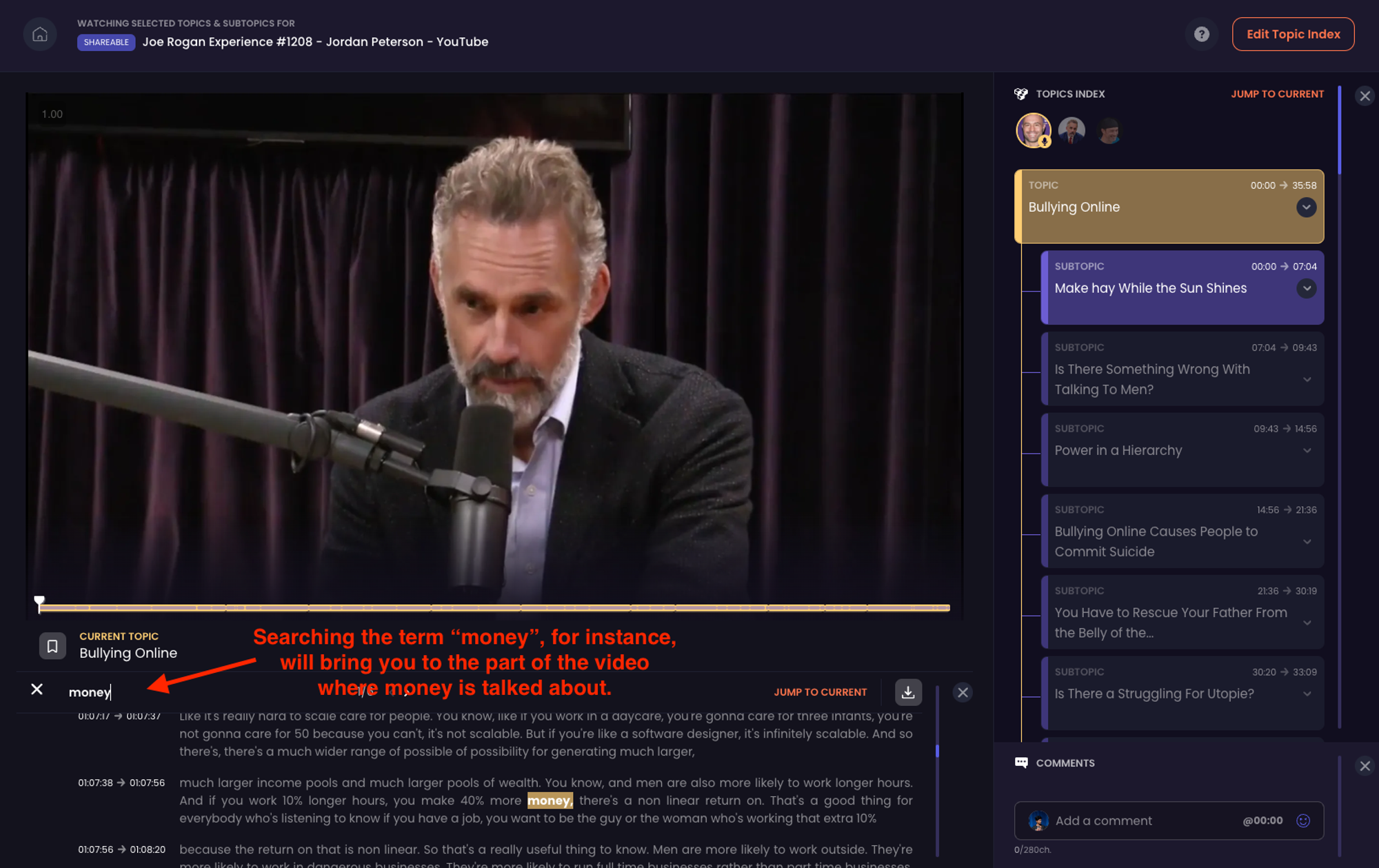
CLIPr는 긴 콘텐츠를 핵심 순간과 검색 가능한 데이터로 압축하여 영상 편집에 혁신을 가져옵니다. 이 AI 기반 플랫폼은 방대한 영상 프로젝트의 효율적인 관리 및 편집을 추구하는 전문가들을 위해 설계되었으며, 콘텐츠 가치와 시청자 참여도를 높여줍니다.
주요 기능

장점
단점
가격 책정
CLIPr는 다양한 사용자 요구에 맞춰 여러 가격대를 제공합니다. 최신 가격 정보는 해당 웹사이트에서 확인하는 것이 좋습니다.
전문가 팁: 바쁜 일정 속에서도 시간을 절약할 수 있도록, 긴 동영상의 핵심 내용을 빠르게 파악하려면 CLIPr의 AI 주제 색인 기능을 활용하세요.
알아두면 좋은 통계: 디지털 세계에서 영상 콘텐츠는 왕이다. 91%의 기업이 마케팅 도구로 영상을 활용하고 있다. CLIPr 같은 효율적인 편집 도구는 시간을 절약하고 영상 콘텐츠의 품질을 향상시켜 시청자의 관심을 더욱 끌 수 있게 한다.
비디오 편집을 시작하려는 Mac 사용자에게 적합한 도구는 여러분의 비전을 현실로 만들어줍니다. 영화 같은 걸작을 제작하든 간단한 동영상 블로그를 꾸미든, Mac 생태계는 다양한 기술 수준과 창의적 요구에 맞춰진 풍부한 편집 소프트웨어를 제공합니다. 다음은 Mac에서 창의력을 마음껏 발휘할 수 있도록 도와주는 가장 인기 있는 비디오 편집 도구들입니다.

개요
iMovie는 애플의 사용자 친화적인 동영상 편집 소프트웨어로, 주로 초보자를 위해 설계되었습니다. 직관적인 인터페이스와 간소화된 편집 기능을 통해 동영상 편집을 시작하는 모든 이에게 탁월한 선택입니다.
주요 기능
단점
가격 책정
iMovie는 macOS 및 iOS 기기 사용자 모두에게 무료로 제공됩니다.
전문가 팁: iMovie의 트레일러 템플릿을 활용하면 편집 기술이 부족해도 단 몇 분 만에 놀랍고 전문적인 느낌의 영상 티저를 만들 수 있습니다.
비디오 편집은 더 이상 소수의 기술이 아닙니다. iMovie 같은 도구 덕분에 초보자도 이 트렌드에 효과적으로 기여할 수 있게 되었습니다.

개요
파이널 컷 프로는 고급 기능으로 유명하며 전문 영상 편집자들 사이에서 널리 선호됩니다. 강력한 편집 기능으로 잘 알려져 있어 고급 제작 요구 사항을 충족시킵니다.
주요 기능
장점
단점
가격 책정
Final Cut Pro는 일회성 결제로 구매할 수 있으며, 구매 후 무료 업데이트가 제공됩니다.
전문가 팁: Final Cut Pro의 색상 보정 기능을 활용하여 동영상에 전문적인 느낌을 더하고 시각적 매력을 크게 향상시키세요.
알아두면 좋은 통계: 비디오 마케팅 분야에서 품질은 핵심 요소입니다. 보고서에 따르면 시청자는 텍스트로 읽을 때 10%만 기억하는 반면, 비디오로 시청할 때는 메시지의 95%를 기억한다고 합니다. 파이널 컷 프로(Final Cut Pro)와 같은 도구를 활용하면 제작자가 오래도록 기억에 남을 고품질 비디오를 제작할 수 있습니다.

개요
어도비 프리미어 프로는 영상 편집을 위한 최상위 선택지로, 포괄적인 기능과 다른 어도비 크리에이티브 클라우드 애플리케이션과의 원활한 연동으로 널리 인정받고 있습니다.
주요 기능
장점
단점
가격 책정
Adobe Premiere Pro는 구독 모델로 운영되며, 사용자 요구에 따라 다양한 플랜을 제공합니다.
전문가 팁: 프리미어 프로의 다이내믹 링크 기능을 최대한 활용하면 렌더링 없이도 프리미어에서 영상 편집과 애프터 이펙트에서 효과 추가를 손쉽게 전환할 수 있습니다.
알아두면 좋은 통계: 어도비의 크리에이티브 시장 지배력은 명백합니다. 전 세계 크리에이티브 전문가의 90% 이상이 어도비 포토샵을 사용합니다. 어도비 프리미어 프로는 이러한 도구들과의 연동성을 바탕으로 전문 비디오 편집자들에게 강력한 작업 환경을 제공합니다.
돈을 들이지 않고도 무료 동영상 편집 소프트웨어의 세계를 열어보세요! 동영상 편집의 세계에 발을 담그고 싶은 Windows 사용자라면, 기대해도 좋습니다. Windows 플랫폼에 맞춤화된 강력하면서도 무료인 동영상 편집 도구들을 만나보세요.

개요
Shotcut은 다양한 기능과 여러 운영 체제에서의 호환성으로 유명한 다목적 동영상 편집 도구입니다. 직관적이면서도 강력한 편집 환경을 원하는 사용자에게 탁월한 선택입니다.
주요 기능
단점
가격 책정
Shotcut은 오픈소스이며 모든 사용자에게 무료로 제공됩니다.
전문가 팁: 추가 플러그인 없이도 Shotcut의 방대한 필터 라이브러리를 활용해 영상의 시각적 매력을 높여보세요.
알아두면 좋은 통계: 오픈소스 소프트웨어 시장은 급속히 성장 중이며, 전 세계적으로 2,400만 명 이상의 활성 오픈소스 개발자가 Shotcut 같은 다양한 프로젝트에 기여하고 있습니다. 이는 가까운 시일 내에 지원이 중단될 걱정을 할 필요가 없다는 뜻입니다.

개요
OpenShot은 단순함과 포괄적인 비디오 편집 기능으로 유명합니다. 비디오 편집을 처음 접하지만 강력한 기능 세트를 필요로 하는 사람들에게 이상적인 도구입니다.
주요 기능
장점
단점
가격 책정
OpenShot은 다운로드 및 사용이 완전히 무료입니다.
전문가 팁: OpenShot의 무제한 트랙 기능을 활용하여 여러 비디오 트랙과 오디오 클립을 레이어링하면 창의적이고 복잡한 프로젝트 구성이 가능합니다.
알아두면 좋은 통계: 오픈샷(OpenShot)과 같은 동영상 편집 소프트웨어는 디지털 콘텐츠 시대에 필수적입니다. 2022년에는 동영상 콘텐츠가 전체 소비자 인터넷 트래픽의 82% 이상을 차지할 것으로 예상됩니다.

개요
다빈치 리졸브는 전문적인 수준의 기능, 특히 타의 추종을 불허하는 컬러 그레이딩 능력으로 영상 편집 업계에서 명성이 높습니다. 고급 편집, 색보정, 오디오 포스트 프로덕션이 필요한 전문가들에게 최고의 선택지입니다.
주요 기능
장점
단점
가격 책정
다빈치 리졸브는 무료 버전을 제공하며, 추가 기능을 갖춘 스튜디오 버전은 구매할 수 있습니다.
전문가 팁: 다빈치 리졸브의 다이내믹 타임라인을 활용하면 편집 작업의 나머지 부분에 영향을 주지 않고 타임라인에서 직접 비디오 클립을 트리밍하고 편집할 수 있습니다.
알아두면 좋은 통계: 마케팅과 스토리텔링에서 영상 콘텐츠의 중요성이 커짐에 따라, 63%의 기업이 영상 콘텐츠 예산을 증액했으며, 이는 고품질 영상 제작을 위해 DaVinci Resolve와 같은 강력한 도구의 필요성을 강조합니다.
매력적인 YouTube 콘텐츠를 제작하려면 적합한 영상 편집 도구가 필요합니다. YouTube 콘텐츠 제작자를 지원하기 위해 엄선된 영상 편집 소프트웨어 및 리소스 컬렉션을 살펴보려면 이 섹션을 확인하세요.
이 도구들은 시각적 매력을 높이는 것부터 오디오를 완벽하게 다듬는 것까지, 시청자를 사로잡는 고품질 동영상 제작의 핵심을 제공합니다. 유튜브 여정을 막 시작했든, 편집 실력을 한 단계 업그레이드하고 싶든, 이 도구들과 팁들은 온라인 동영상 세계에서 눈에 띄는 콘텐츠를 제작하는 데 도움이 될 것입니다.

개요
어도비 프리미어 러시는 이동 중에도 편리하게 동영상을 편집할 수 있어 빠르고 효율적인 편집이 필요한 콘텐츠 제작자들에게 인기 있는 도구입니다. 유튜브와의 원활한 연동 기능은 소셜 미디어 애호가들에게 더욱 매력적인 요소로 작용합니다.
주요 기능
장점
단점
가격 책정
Adobe Premiere Rush는 Adobe Creative Cloud 구독의 일부로 제공됩니다.
전문가 팁: 프리미어 러시의 내장 템플릿을 활용해 소셜 미디어 채널용으로 세련되고 매력적인 콘텐츠를 빠르게 제작하세요.
알아두면 좋은 통계: 유튜브의 월간 로그인 사용자 수가 27억 명을 넘어서면서, 프리미어 러시 같은 플랫폼은 크리에이터들이 콘텐츠를 신속하고 효율적으로 제작 및 공유할 수 있도록 하는 데 핵심적인 역할을 합니다.

개요
소니 베가스 프로는 강력한 기능으로 유명하며, 특히 유튜브를 위한 전문적인 수준의 영상 제작을 목표로 하는 콘텐츠 제작자들에게 적합합니다.
이 제품의 매력은 사용자에게 편집 과정에 대한 광범위한 제어권을 제공한다는 점에 있습니다. 이를 뒷받침하는 것은 상세한 편집을 위한 포괄적인 고급 도구 모음, 방대한 시각 효과, 정교한 오디오 편집 기능, 그리고 원활한 4K 영상 처리 능력입니다. 이로 인해 품질과 창의성 면에서 두각을 나타내는 콘텐츠를 제작하고자 하는 이들에게 이상적인 선택이 됩니다.
주요 기능
장점
단점
가격 책정
소니 베가스 프로는 전문가 수준의 성능을 반영하여 프리미엄 가격대로 구매할 수 있습니다.
전문가 팁: 소니 베가스 프로의 고급 합성 도구를 활용하여 유튜브 영상에 시각적으로 놀라운 효과를 연출하세요. 이를 통해 품질과 창의성 면에서 차별화된 콘텐츠를 제작할 수 있습니다.
유튜브 크리에이터들은 동영상 편집 시장의 중요한 부분을 차지하며, 유튜브는 전 세계에서 두 번째로 많이 방문하는 웹사이트로, 소니 베가스 프로와 같은 고품질 편집 도구의 필요성을 강조합니다.
최첨단 AI 기반 동영상 편집 도구를 만나보세요. 창작자들이 자신의 비전을 정밀하게 구현할 수 있도록 지원합니다. 전문 영화 제작자든 콘텐츠 크리에이터든, AI의 힘을 활용하여 동영상을 새로운 차원으로 끌어올리세요.

개요
Magisto는 AI 기반 편집과 사용자 친화적 기능을 결합하여 영상 제작을 한 단계 끌어올려, 손쉽게 완성도 높은 콘텐츠를 제작하는 데 이상적입니다.
자동화된 시스템이 영상 하이라이트를 지능적으로 선별하며, 테마별 템플릿과 사용자 정의 가능한 요소를 통해 개인화할 수 있습니다. 간편한 공유 기능으로 소셜 플랫폼에 손쉽게 동영상을 배포할 수 있어 개인적 용도와 업무적 용도 모두에 적합합니다.
주요 기능
장점
단점
가격 책정
Magisto는 구독 모델로 운영되며, 사용자 요구에 따라 다양한 등급을 제공합니다.
전문가 팁: Magisto의 감정 인식 기술을 활용하여 타겟 고객과 공감대를 형성하는 동영상을 제작하세요. 이를 통해 더 높은 참여도와 영향력을 확보할 수 있습니다.
알아두면 좋은 통계: 비디오 마케팅의 부상으로, 소비자의 54%가 지지하는 브랜드나 기업으로부터 더 많은 비디오 콘텐츠를 보고 싶어하는 가운데, 매지스토(Magisto)와 같은 도구는 매력적인 콘텐츠를 효율적으로 제작하는 데 필수적입니다.

개요
어도비 센세이는 어도비 제품군에 인공지능을 접목하여 비디오 편집 작업의 생산성과 정밀도를 높이는 자동화 기능을 구현함으로써 창의적인 세계에 혁신을 가져옵니다. 이 인공지능 프레임워크는 창작자의 요구를 이해하고 예측하도록 설계되어 시간이 지남에 따라 진화하는 더 스마트한 솔루션을 제공합니다.
주요 기능
장점:
단점
가격 책정
Adobe Sensei는 Adobe Creative Cloud 제품군의 일부이며 다양한 구독 플랜을 통해 이용할 수 있습니다.
전문가 팁: Adobe Premiere Pro에서 Adobe Sensei 기능을 활용하여 다양한 소셜 플랫폼에 맞게 동영상을 자동으로 재프레임하는 등의 작업을 수행하세요. 최소한의 수동 작업으로 최적의 표현을 보장합니다.
알아두면 좋은 통계: 창의적 분야에서의 AI 활용이 급속히 확대되고 있으며, 미디어 및 엔터테인먼트 분야의 AI 시장은 2025년까지 994억 8천만 달러 규모에 이를 것으로 전망됩니다. 이는 어도비 센세이(Adobe Sensei)와 같은 도구가 창의적 작업 흐름에서 차지하는 중요성이 커지고 있음을 반영합니다 .

개요
Lumen5는 AI 기반 기능, 특히 텍스트 기반 콘텐츠로 자동 동영상 생성 능력으로 두각을 나타냅니다. 블로그 게시물, 기사, 대본을 매력적인 동영상으로 변환하고자 하는 마케터와 콘텐츠 제작자를 위해 설계되었습니다.
주요 기능
장점
단점
가격 책정
Lumen5는 기본 기능을 제공하는 무료 버전과 고급 기능을 위한 다양한 월간 또는 연간 구독 플랜을 제공합니다.
전문가 팁: Lumen5를 활용해 인기 블로그 게시물을 동영상 콘텐츠로 재활용하여 소셜 미디어 플랫폼에서의 도달률과 참여도를 높여보세요.
알아두면 좋은 통계: 동영상이 텍스트와 이미지를 합친 것보다 1200% 더 높은 공유율을 기록하며 소셜 미디어를 계속해서 장악함에 따라, Lumen5와 같은 도구는 글로 된 콘텐츠를 더 많이 공유될 수 있는 동영상 형식으로 전환하는 데 필수적입니다.
비디오 편집 도구는 시각적으로 매력적인 콘텐츠를 제작하는 데 핵심적인 역할을 합니다. 이 도구들은 창의적인 비전을 현실로 구현하여 원본 영상을 다듬어 전문적인 완성도를 갖춘 영상으로 변모시킵니다. 이를 통해 시청자를 사로잡고 효과적으로 메시지를 전달할 수 있습니다. 초보자든 전문가든, 적합한 도구를 선택하는 것은 아이디어를 시청자와 공감할 수 있는 시각적 이야기로 전환하는 데 결정적인 차이를 만들어 냅니다.
탐색을 통해 얻은 주요 내용:
비디오 편집에 있어 CLIPr과 같은 도구는 특히 AI 기반 비디오 인덱싱 및 협업 편집 기능 덕분에 판도를 바꿀 수 있습니다. CLIPr은 효율성과 창의성 사이의 완벽한 균형을 찾는 데 도움을 줍니다.
그러니 탐구하고 실험하며, 기술적 요구사항을 충족할 뿐만 아니라 창의적인 비전과도 부합하는 도구를 찾아보세요.
즐거운 편집 되세요!
{{cta}}
어떤 비디오 편집에 가장 적합한 비디오 편집 도구는 무엇인가요?
이상적인 동영상 편집 도구는 사용자의 요구 사항에 따라 달라집니다. Adobe Premiere Pro는 포괄적인 기능과 유연성으로 전문가들 사이에서 선호되는 도구입니다. Final Cut Pro는 특히 Mac에서 뛰어난 고급 기능으로 또 다른 최상위 선택지입니다. 초보자나 가벼운 사용자에게는 iMovie가 단순함과 사용 편의성을 제공하며, Filmora9는 사용자 친화적인 인터페이스와 다양한 기능 사이의 균형을 제공합니다.
대부분의 유튜버들은 영상 편집을 할 때 가장 먼저 무엇을 사용하나요?
많은 유튜버들은 다재다능함과 전문가 수준의 편집 기능으로 어도비 프리미어 프로를 선호합니다. 파이널 컷 프로 역시 사용자 친화적인 인터페이스와 고급 기능을 제공하며 인기가 높습니다. 일부 콘텐츠 제작자들은 편의성을 위해 필모라9 같은 더 간단한 도구나 심지어 모바일 앱을 선택하기도 합니다.
동영상 편집에 가장 좋은 프로그램은 무엇인가요?
전문적인 영상 편집을 위해서는 Adobe Premiere Pro와 Final Cut Pro가 널리 인정받고 있습니다. 고급 색상 보정, 효과, 다중 포맷 지원 등 다양한 기능을 제공합니다. 초보자에게는 iMovie와 Filmora9가 훌륭한 온라인 영상 편집기로, 직관적인 인터페이스와 필수 편집 기능을 제공하여 사용자를 압도하지 않습니다.
어떤 어도비 도구가 동영상 편집에 가장 적합할까요?
어도비 프리미어 프로는 영상 편집을 위한 최고의 어도비 도구로 널리 인정받고 있습니다. 간단한 편집부터 복잡한 영화적 편집까지 모든 작업에 적합한 방대한 기능을 제공합니다. 어도비 프리미어 러시는 특히 속도와 사용 편의성을 중시하는 콘텐츠 제작자에게 적합한, 간편하고 이동 중에도 가능한 편집을 위한 훌륭한 선택지입니다.

오디오 콘텐츠의 품질을 한 단계 끌어올리고 팟캐스트를 완전히 새로운 차원으로 발전시킬 이상적인 녹음 솔루션을 발견하세요!
미국 인구의 최소 41%가 매달 팟캐스트를 청취한다는 사실을 알고 계셨나요? 팟캐스팅은 틈새 취미에서 주류 미디어의 강자로 변모했지만, 수많은 도구들 속에서 자신의 프로그램에 맞는 도구를 어떻게 선택해야 할까요?
적합한 녹음 도구를 선택하는 것은 고품질 콘텐츠를 제작하고 팟캐스트를 돋보이게 하는 데 매우 중요합니다. 하지만 걱정하지 마세요! 오늘은 강력한 소프트웨어부터 고성능 장비까지, 팟캐스트를 한 단계 업그레이드하는 데 필요한 통찰력을 제공해 드릴 17가지 최고의 팟캐스트 녹음 도구를 자세히 살펴보겠습니다.
이 글에서 여러분은 다음을 발견하게 될 것입니다:
추신: 팟캐스터라면 CLIPr이 후반 작업 단계에 유용할 수 있습니다. 긴 에피소드를 더 짧고 흥미로운 부분으로 나누는 편리한 도구로, 청취자의 관심을 유지하는 데 탁월합니다. 또한 인덱싱 및 북마크 기능은 팟캐스트의 중요한 부분을 강조하는 데 매우 유용합니다.
{{cta}}
팟캐스트 녹음 소프트웨어를 선택할 때 고려해야 할 몇 가지 중요한 요소가 있습니다. 초보자든 경험이 풍부한 팟캐스터든, 이러한 기능들은 청취자의 관심을 사로잡는 고품질 팟캐스트를 제작하는 데 도움이 될 것입니다.
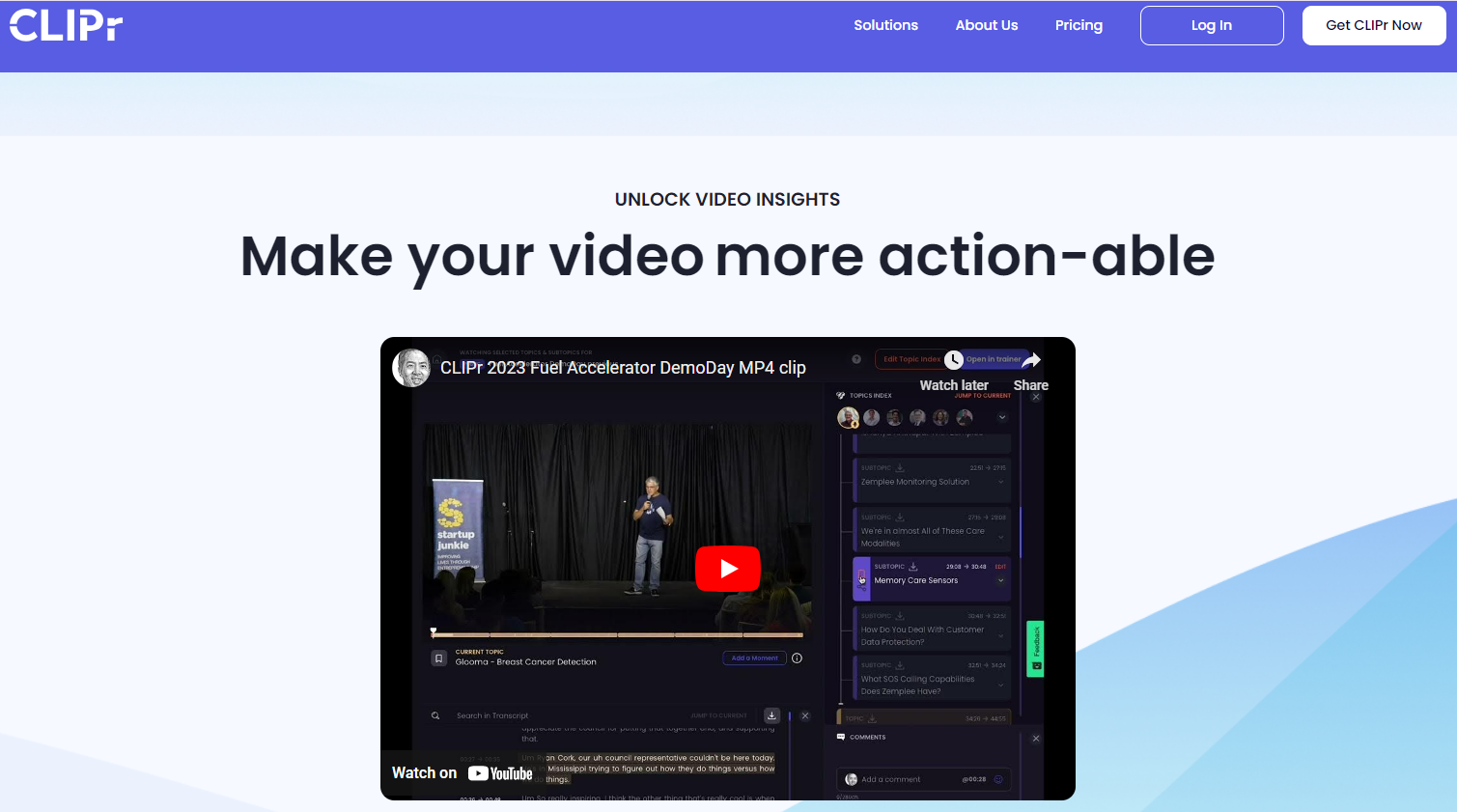
CLIPr는 고급 AI 및 머신러닝 기술을 활용하여 사용자가 비디오 콘텐츠와 상호작용하는 방식을 간소화하는 비디오 분석 및 관리(VAM) 플랫폼입니다.
이 혁신적인 도구는 영상 분석 방식을 변화시켜, 짧은 영상과 긴 영상 모두에서 핵심 장면을 신속하게 식별하고 추출할 수 있게 합니다. 이 기능은 방대한 영상 콘텐츠를 훑어보며 관련 정보를 찾는 데 필요한 시간과 노력을 획기적으로 줄여줍니다.
CLIPr는 동영상 라이브러리에 대한 상세한 통찰력을 제공하여 동영상 데이터의 접근성과 관리 효율성을 높입니다. 사용자 친화적인 인터페이스를 통해 맞춤형 동영상 클립 생성, 효율적인 북마크 기능, 중요한 순간 공유를 지원함으로써 협업을 개선하고 생산성을 증대시킵니다.
호환성:
가장 적합한 대상:
주요 특징:
장점:
단점:
리뷰:
{{cta}}

Alitu는 팟캐스터에게 쉽고 효율적인 솔루션을 제공하는 최고의 팟캐스트 녹음 소프트웨어 중 하나입니다. 녹음 및 편집 과정을 간소화하여 시간과 노력을 절약해 줍니다. Alitu를 사용하면 기술적인 문제에 얽매이지 않고 매력적인 콘텐츠 제작에 집중할 수 있습니다.
가격:
호환성: 모든 웹 브라우저.
가장 적합한 대상:
주요 특징:
장점:
단점:
리뷰:

가격:
호환성:
가장 적합한 대상:
주요 특징:
장점:
단점:
리뷰:

리버사이드는 팟캐스터와 영상 콘텐츠 제작자를 위한 혁신적인 플랫폼으로, 고품질 오디오 및 영상 콘텐츠의 녹음, 편집, 제작을 위한 고급 기능을 제공합니다. 고해상도 오디오와 영상을 캡처하는 능력으로 두각을 나타내는 리버사이드는 전문가와 애호가들 사이에서 인기를 얻고 있습니다. 최대 7명의 원격 게스트를 초대할 수 있으며, 각 게스트별로 별도의 오디오 및 영상 트랙을 받을 수 있습니다.
가격:
호환성:
가장 적합한 대상:
주요 특징:
장점:
단점:
리뷰:
프로 팁: 리버사이드가 원하는 것은 있지만 꼭 필요한 것은 아닌 것 같다면, 더 많은 옵션을 위해 리버사이드 대안 목록을 확인해 보세요 .

젠캐스트(Zencastr)는 팟캐스트 녹음 및 제작을 위해 맞춤화된 웹 기반 도구입니다. 원격 인터뷰/토론 내용을 고음질로 녹음하며, 참가자별로 별도의 오디오 트랙을 생성합니다. VoIP 기능 외에도 노이즈 감소 및 사운드 레벨링과 같은 후반 작업 도구를 포함합니다. 젠캐스트는 다양한 파일 형식을 지원하고 클라우드 스토리지와 연동되어 녹음부터 게시까지 팟캐스팅 과정을 간소화합니다.
가격:
호환성:
가장 적합한 대상:
주요 특징:
장점:
단점:
리뷰:
전문가 팁: Zencastr와 유사하지만 더 포괄적인 기능을 갖춘 도구를 찾고 계신다면, 항상 대안이 있습니다! Zencastr와 유사한 도구에 대한 저희의 상세한 분석을 확인하고 여러분에게 딱 맞는 도구를 찾아보세요!

스쿼드캐스트는 팟캐스터와 영상 제작자를 위한 클라우드 기반 녹음 플랫폼입니다. 고품질 오디오와 비디오로 원격 인터뷰를 가능하게 하여 전문적인 제작을 보장합니다. 이 플랫폼은 게스트별로 별도의 트랙을 제공하여 후반 작업 편집을 간소화합니다.
비밀 팁: 개별 트랙을 분리하지 못했다면, CLIPr을 사용해 녹음에서 개별 화자를 강조할 수 있습니다:

또한 SquadCast는 스케줄링 기능과 자동 백업을 제공하여 사용자 편의성을 높입니다.
가격:
호환성:
가장 적합한 대상:
주요 특징:
장점:
단점:
리뷰:

Auphonic은 다양한 플랫폼의 음질과 제작 과정을 개선하는 데 전념하는 선도적인 오디오 기술 기업입니다. 자동화된 오디오 포스트 프로덕션 웹 서비스를 제공함으로써, Auphonic은 복잡한 매개변수 설정이나 오디오 전문 지식 없이도 사용자가 팟캐스트, 방송, 인터뷰 등의 음질을 향상시킬 수 있도록 합니다.
가격:
호환성:
가장 적합한 대상:
주요 특징:
장점:
단점:
리뷰:

줌은 인터넷을 통해 영상, 음성, 전화 및 채팅 연결을 제공하는 종합 커뮤니케이션 플랫폼입니다. 다양한 기능을 통해 사용자는 집에서 편안하게 회의, 웨비나를 개최하고 팟캐스트를 호스팅할 수 있습니다. 주요 업데이트로는 맞춤형 SDK, 줌 앱(Zapps) 출시, 수익 창출 이벤트용 OnZoom 등이 있습니다.
가격:
호환성:
가장 적합한 대상:
주요 특징:
장점:
단점:
리뷰:

오디시티는 Windows, macOS, Linux와 호환되는 무료 오픈소스 디지털 오디오 편집기 및 녹음 애플리케이션입니다. 사용자 친화적인 인터페이스로 유명한 이 프로그램은 멀티트랙 편집, 다양한 디지털 효과, 플러그인 호환성을 지원합니다. 팟캐스터, 음악가, 오디오 엔지니어에게 이상적인 오디시티는 사운드 믹싱, 노이즈 감소, 오디오 분석 등의 작업을 용이하게 하여 초보자부터 숙련된 사용자까지 모두를 위한 도구입니다.
가격:
호환성:
가장 적합한 대상:
주요 특징:
장점:
단점:
리뷰:

로직 프로는 애플이 개발한 전문 디지털 오디오 워크스테이션(DAW) 및 MIDI 시퀀서 소프트웨어 애플리케이션입니다. macOS 전용으로 제공됩니다. 음악 프로듀서와 오디오 엔지니어들이 널리 사용하며, 고급 오디오 편집, MIDI 시퀀싱, 방대한 가상 악기, 효과 및 루프를 제공합니다.
가격:
호환성:
가장 적합한 대상:
주요 특징:
장점:
단점:
리뷰:

어도비 오디션은 어도비 시스템즈에서 개발한 전문 오디오 편집 및 믹싱 소프트웨어입니다. 어도비 크리에이티브 클라우드 제품군의 일부로, 팟캐스팅, 음악 제작, 사운드 디자인 등 다양한 오디오 편집 작업에 사용됩니다. 강력한 노이즈 감소 및 오디오 복원 기능을 제공하는 것 외에도, 이 소프트웨어는 프리미어 프로와 원활하게 연동됩니다.
가격:
호환성:
가장 적합한 대상:
주요 특징:
장점:
단점:
리뷰:

팟캐스터를 위한 Spotify(구 Anchor)는 무료이며 사용하기 쉬운 팟캐스트 제작, 배포 및 수익화 플랫폼입니다. Spotify가 소유한 이 플랫폼은 사용자가 간편한 도구로 팟캐스트를 녹음, 편집 및 호스팅할 수 있도록 합니다.
Anchor는 Apple Podcasts 및 Google Podcasts와 같은 주요 플랫폼에 팟캐스트를 배포합니다. 또한 팟캐스트 성과를 추적할 수 있는 분석 기능을 제공하며, 수익화를 위한 청취자 음성 메시지 및 광고 통합과 같은 기능을 제공합니다.
가격:
호환성:
가장 적합한 대상:
주요 특징:
장점:
단점:
리뷰:

RINGR는 원격 인터뷰를 위한 고품질 오디오를 제공하는 팟캐스팅 및 인터뷰 녹음 소프트웨어입니다. 팟캐스터와 방송인이 전 세계 어디서나 게스트와의 대화를 녹음할 수 있도록 하여 양측의 대화를 고품질로 포착합니다. RINGR의 독자적인 기술은 원격 녹음에서 흔히 발생하는 지연 및 오디오 드리프트와 같은 문제를 최소화합니다.
가격:
호환성:
가장 적합한 대상:
주요 특징:
장점:
단점:
리뷰:

Restream은 사용자가 라이브 콘텐츠를 여러 스트리밍 플랫폼에 동시에 방송할 수 있는 라이브 스트리밍 서비스입니다. 사용자는 오버레이와 그래픽으로 스트림을 맞춤 설정할 수도 있습니다.
콘텐츠 제작자, 마케터 및 기업은 Restream을 활용해 여러 채널에 동시에 방송함으로써 시청자 도달 범위를 확대할 수 있습니다 . Restream은 오버레이 및 멀티 카메라 설정과 같은 스트림 맞춤 설정 도구를 추가로 제공하여 방송의 전문성을 높여줍니다.
가격:
호환성:
가장 적합한 대상:
주요 특징:
장점:
단점:
리뷰:

Podbean은 사용자가 팟캐스트를 제작하고 배포할 수 있는 인기 있는 팟캐스트 호스팅 플랫폼입니다. 사용자 친화적인 인터페이스와 다양한 기능을 제공하여 팟캐스터들이 에피소드를 쉽게 업로드하고 편집하며 홍보할 수 있도록 지원합니다.
Podbean은 팟캐스터들이 광고와 프리미엄 구독을 통해 콘텐츠로 수익을 창출할 수 있도록 지원합니다. 신뢰성과 효율성 덕분에 상당한 인기를 얻었으며, 아마추어와 전문 팟캐스터 모두에게 신뢰받고 있습니다.
가격:
호환성:
가장 적합한 대상:
주요 특징:
장점:
단점:
리뷰:

힌덴부르크 프로는 방송 분야에서 널리 사용되는 전문 오디오 편집 소프트웨어입니다. 정밀하고 손쉽게 오디오 녹음을 편집하고 향상시킬 수 있는 다양한 고급 기능과 도구를 제공합니다. 전문가들은 힌덴부르크 프로의 노이즈 감소 및 이퀄라이저 조정 기능을 통해 고품질 오디오를 제작할 수 있습니다.
가격:
호환성:
가장 적합한 대상:
주요 특징:
장점:
단점:
리뷰:

리퍼(Reaper)는 광범위한 오디오 녹음, 편집, 믹싱 및 마스터링 기능을 제공하는 디지털 오디오 워크스테이션(DAW) 소프트웨어입니다. 유연성, 효율성 및 경제성으로 유명합니다. 리퍼는 다양한 플러그인을 지원하며 다양한 워크플로우에 맞게 커스터마이징할 수 있습니다.
가격:
호환성:
가장 적합한 대상:
주요 특징:
장점:
단점:
리뷰:
역동적인 팟캐스팅 세계에서 올바른 도구는 성공으로 가는 다리입니다. 최고의 팟캐스트 녹음 도구 17가지를 소개하는 본 종합 가이드를 통해 여러분이 정보에 기반한 선택을 할 수 있도록 돕고자 합니다. 기억하세요, 완벽한 도구는 여러분의 필요에 부합하고 콘텐츠를 향상시키며, 궁극적으로 청취자와 공감대를 형성하는 도구입니다.
주요 내용:
팟캐스팅 소프트웨어 스택을 더욱 완벽하게 구축해 나가면서 다음과 같은 솔루션을 고려해 보세요. CLIPr과 같은 솔루션을 고려해 보세요. 이 도구는 긴 녹음 파일을 흥미로운 소규모 클립으로 분할하여 청취자의 관심을 사로잡기에 완벽합니다. CLIPr을 사용하면 에피소드의 최고의 순간과 주제를 강조하여 쉽게 공유하고 접근성을 높일 수 있습니다.

팟캐스트 분석 플랫폼을 활용하여 청취자를 더 잘 이해하고 성공을 위한 전략을 최적화하는 방법을 알아보세요.
모두가 팟캐스트를 운영하는 세상에서, 고급 팟캐스트 분석 도구를 활용해 앞서 나가야 합니다. 방대한 데이터 속에서 진정으로 중요한 정보를 찾기 위해 고군분투 중이라면, 이 가이드가 당신의 등대가 되어 줄 것입니다.
17가지 최고의 팟캐스트 분석 도구를 깊이 있게 살펴봅니다 . 방대한 팟캐스트 데이터의 바다를 항해할 나침반이 되어줄 도구들입니다:
추신: 비디오 팟캐스트를 제작 중이고 시간대별 반응 및 분석을 원하신다면 CLIPr을 확인해 보세요. CLIPr의 정교한 반응 제어 기능을 통해 각 에피소드는 팟캐스트 청취자들이 혼란스러워하거나, 흥분하거나, 즐거워하는 순간들을 초 단위로 파악할 수 있는 통찰력의 보고가 됩니다.
{{cta}}
팟캐스트 분석은 프로그램의 성공과 차별화에 핵심적인 역할을 합니다. 데이터를 분석함으로써 팟캐스터는 각 에피소드의 영향력을 추적하고 측정할 수 있습니다. 이는 단순히 다운로드 수를 세는 것이 아니라 청취자의 행동, 선호도, 참여 패턴을 이해하는 것입니다.
적합한 팟캐스트 분석 도구를 사용하면 콘텐츠의 효과를 파악하고, 개선이 필요한 부분을 식별하며, 향후 에피소드에 대한 전략을 수립할 수 있습니다.
통계: 팟캐스터의 60% 이상이 청취자 확보가 어렵다고 느끼고 있다는 사실을 알고 계셨나요?
팟캐스트 분석 도구는 팟캐스팅 세계의 디지털 마법사입니다. 이들은 팟캐스트 청취자층과 참여도에 관한 데이터를 수집하고 분석합니다. 청중의 마음을 들여다보는 백스테이지 패스라고 생각하세요. 다운로드 수, 청취자 인구 통계, 에피소드 성과, 참여 시간 등의 지표를 추적합니다. 누가, 어디서, 어떤 이유로 계속 찾아오는지에 대한 통찰력을 얻는 열쇠입니다.
그들은 다음과 같은 핵심 지표를 제공합니다:
팟캐스트 분석 도구를 활용하는 것은 팟캐스트 성공을 위한 수정구슬을 가진 것과 같습니다. 이 도구들은 청취자 인구통계학적 정보를 제공하여 청중의 취향에 맞게 콘텐츠를 맞춤화할 수 있게 합니다.
에피소드 성과를 추적하면 효과적인 요소와 그렇지 않은 요소를 파악하여 콘텐츠 전략을 수립하는 데 도움이 됩니다. 또한 청취자 참여도를 측정하면 에피소드를 최적화하여 최대의 효과를 거둘 수 있습니다. 요컨대, 이러한 도구는 단순한 수치 분석이 아닌 청취자층과 공감대를 형성하고 이를 확대하는 팟캐스트를 만들어가는 과정입니다.
팟캐스트 분석은 프로그램의 영향력을 측정하는 데 매우 중요합니다. 단순히 다운로드 수를 알려주는 것이 아니라, 청취자의 행동과 선호도를 더 깊이 이해할 수 있게 해줍니다.
이러한 도구를 활용하면 팟캐스팅 접근 방식을 혁신할 수 있습니다. 장점은 다음과 같습니다:
전문가 팁: 이러한 지표를 정기적으로 검토하면 시간이 지남에 따라 청취자 참여도가 크게 증가할 수 있습니다.
최고 중의 최고를 원하신다면, 우리는 그 값어치를 충분히 하는 목록을 준비했습니다.
자세히 살펴보자:

개요: CLIPr은 독보적인 AI 기반 영상 인덱싱 기술로 팟캐스트 분석 방식을 혁신하고 있습니다. 이 도구는 영상 콘텐츠를 활용하는 팟캐스터들에게 큰 도움이 되며, 에피소드를 효율적으로 분류하는 혁신적인 방법을 제공합니다. 영상 팟캐스트 내 핵심 순간과 주제를 식별하여 콘텐츠 접근성을 높이고 시청자의 몰입도를 높입니다.
주요 내용:

장점:
단점:
가격 정책: CLIPr은 다양한 사용자 요구를 충족시키기 위해 여러 가격 플랜을 제공합니다. 여기에는 신규 사용자를 위한 무료 체험판이 포함되어 있어 플랫폼의 기능을 직접 체험해 볼 수 있습니다. 자세한 가격 정보는 CLIPr 공식 웹사이트를 참조하시기 바랍니다. 해당 사이트에서는 특정 요구 사항에 기반한 맞춤형 옵션을 제공합니다.
{{cta}}

개요: Apple Podcast Analytics는 Apple Podcasts 플랫폼의 팟캐스터를 위해 특별히 설계된 강력한 도구입니다. 청취자가 팟캐스트와 상호작용하는 방식에 대한 상세한 통찰력을 제공합니다.
주요 내용:
장점:
단점:
가격 정책: Apple Podcasts 플랫폼에서 콘텐츠를 배포하는 팟캐스터는 Apple Podcast Analytics를 무료로 이용할 수 있습니다. 이는 해당 플랫폼에서의 성과를 파악하고자 하는 팟캐스트 청취자와 제작자 모두에게 접근 가능한 옵션입니다.

개요: Podtrac은 청취자 측정 및 인구통계학적 데이터 분석 능력으로 유명합니다. 팟캐스터에게 청취자 구성과 팟캐스트 상호작용 방식에 대한 핵심적인 통찰력을 제공합니다.
주요 내용:
장점:
단점:
가격 정책: Podtrac은 기본적으로 무료로 서비스를 제공하며, 일부 추가 프리미엄 기능을 이용할 수 있습니다. 이는 청취자 인구통계를 깊이 있게 이해하는 데 주력하는 팟캐스터들에게 최적의 선택지입니다.

개요: Libsyn은 포괄적인 팟캐스트 호스팅과 고급 분석 도구를 모두 제공하는 다목적 플랫폼으로 두각을 나타냅니다. 팟캐스트 운영자와 청취자 모두를 위한 올인원 솔루션을 찾는 팟캐스터들에게 적합하며, 팟캐스트 관리와 성과 분석을 원활하게 지원합니다.
주요 내용:
장점:
단점:
가격 정책: Libsyn은 기능 범위와 호스팅 요구 사항에 따라 다양한 가격 단계를 제공합니다. 여기에는 신규 및 기존 팟캐스터 모두를 위한 맞춤형 플랜이 포함됩니다.

개요: Buzzsprout는 통찰력을 희생하지 않으면서도 간편함을 중시하는 팟캐스터들에게 빛나는 등대 역할을 합니다. 사용자 친화적인 분석 기능에 중점을 두어, 팟캐스트 여정을 시작하는 초보자부터 직관적인 접근법을 원하는 노련한 제작자까지 모두에게 완벽한 선택입니다 .
Buzzsprout는 청취자 동향, 에피소드 다운로드 수 등을 쉽게 이해할 수 있는 형식으로 제공하여 팟캐스트 성과를 명확하게 보여줍니다. 이는 복잡한 데이터 분석보다 콘텐츠 제작에 더 집중하고자 하는 팟캐스터들에게 선호되는 선택지입니다.
주요 내용:
장점:
가격 정책: Buzzsprout의 가격 구조는 계층식으로 구성되어 다양한 팟캐스팅 요구를 수용합니다. 초보자를 위한 무료 버전부터 경험 많은 팟캐스터를 위한 더 포괄적인 플랜까지 포함됩니다.

개요: 스프리커(Spreaker)는 포드캐스터를 위한 종합 플랫폼으로, 상세한 에피소드 및 청취자 통계로 유명합니다. 분석의 깊이를 갈망하는 이들에게 어필하며, 포드캐스트 성과에 대한 모든 측면의 통찰력을 제공합니다. 스프리커는 포드캐스터에게 청취자 행동, 에피소드 도달 범위, 참여 수준에 대한 세분화된 시각을 제공하는 데 탁월합니다. 이러한 심층 데이터는 포드캐스터가 콘텐츠 전략을 세밀하게 조정하고 청취자를 더 깊이 이해하는 데 도움이 됩니다.
주요 내용:
장점:
단점:
가격 정책: Spreaker는 취미로 하는 분부터 전문가까지 모든 규모의 팟캐스터를 위한 다양한 가격 정책을 제공합니다.

개요: Podbean은 강력한 팟캐스트 호스팅 및 분석 플랫폼입니다. 특히 청취자 참여도와 에피소드 성과에 대한 통찰력을 제공하는 데 탁월합니다. 콘텐츠가 청취자에게 어떻게 공감을 불러일으키는지 깊이 있게 분석하고자 하는 팟캐스터를 위해 Podbean은 이러한 지표를 직관적으로 파악하고 실행 가능한 형태로 제공하는 도구 모음을 제공합니다.
주요 내용:
장점:
단점:
가격 정책: Podbean은 기본적인 요구 사항을 위한 무료 플랜부터 포괄적인 분석 및 호스팅 기능을 제공하는 고급 구독 플랜까지 다양한 플랜을 제공합니다.

개요: 심플캐스트는 고급 분석 기능과 독보적인 청취자 인사이트로 인정받고 있습니다. 청취자 행동과 에피소드 영향력을 측정하고 분석할 수 있는 강력한 분석 도구 세트를 제공하여, 청중을 깊이 이해하고자 하는 팟캐스터를 대상으로 합니다.
주요 내용:
장점:
단점:
가격 정책: Simplecast는 신규 팟캐스터에게 적합한 기본 플랜부터 심층 분석이 필요한 사용자를 위한 고급 패키지까지 다양한 가격 옵션을 제공합니다.

개요: 트랜지스터는 에피소드 성과와 청취자 인구통계에 대한 상세한 통찰력으로 유명한 강력한 팟캐스트 분석 도구입니다. 콘텐츠 성과와 청중 구성에 대해 깊이 있게 분석하고자 하는 팟캐스터를 위해 설계되었습니다.
주요 내용:
장점:
단점:
가격 정책: 트랜지스터는 초보자와 전문 팟캐스터 모두의 요구를 충족시키기 위해 다양한 구독 등급을 제공합니다.

개요: 메가폰은 대규모 팟캐스터 및 네트워크를 위한 최고의 솔루션으로 자리매김하며, 대량의 팟캐스트 트래픽을 관리하고 분석하는 도구로 차별화됩니다. 전문적인 팟캐스팅 운영의 요구를 충족하도록 설계된 메가폰은 분석 기능뿐만 아니라 수익화, 배포, 청취자 타겟팅을 위한 기능을 제공하는 포괄적인 팟캐스트 호스팅 플랫폼을 제공합니다.
경쟁이 치열한 팟캐스팅 환경에서 성장을 지원하고 주도하는 고급 분석 및 강력한 관리 도구를 제공하여, 팟캐스팅 전략을 전문적인 수준으로 끌어올리고자 하는 이들에게 최적의 선택입니다.
주요 내용:
장점:
단점:
가격 정책: 메가폰의 가격 구조는 전문 팟캐스트 네트워크를 위해 설계되었으며, 비용은 제공하는 고급 기능과 확장성을 반영합니다.

개요: Acast는 팟캐스트 분석 분야의 선도 기업으로 자리매김하며, 팟캐스터와 광고주 모두를 대상으로 합니다. 특히 정교한 분석 기능으로 두각을 나타내며, 콘텐츠 제작자와 마케터 모두에게 귀중한 팟캐스트 성과 및 청취자 행동에 대한 심층적인 통찰력을 제공합니다.
주요 내용:
장점:
단점:
가격 정책: Acast는 고급 분석 및 서비스의 특성을 반영하여 다양한 가격 등급을 제공합니다.

개요: Pinecast는 특히 품질을 희생하지 않으면서도 경제성을 필요로 하는 독립 팟캐스터들에게 접근성이 뛰어난 팟캐스트 분석 솔루션으로 두각을 나타냅니다. 이 플랫폼은 필수적인 분석 기능과 사용자 중심 디자인의 균형을 제공하여, 예산 제약을 의식하는 팟캐스터를 비롯해 다양한 단계의 팟캐스터에게 적합합니다.
주요 내용:
장점:
단점:
가격 정책: Pinecast는 독립 팟캐스터를 위한 합리적인 가격을 보장하는 다양한 플랜을 제공하며, 다양한 예산 및 분석 요구에 맞는 옵션을 갖추고 있습니다.

개요: Spotify 팟캐스트 분석은 선도적인 스트리밍 플랫폼 중 하나인 Spotify에서 팟캐스팅의 세계를 들여다볼 수 있는 독보적인 창구 역할을 합니다. 이 도구는 팟캐스터들이 특히 Spotify에서 자신의 콘텐츠가 어떻게 성과를 내고 있는지 포괄적으로 파악할 수 있도록 설계되었으며 , 청취자 수, 참여도 추세, 에피소드 인기도 등 핵심 지표를 제공합니다.
특히 스포티파이 생태계 내에서 팟캐스트의 도달 범위와 영향력을 이해하는 데 매우 유용하며, 플랫폼의 독특한 청중과 사용 패턴에 맞춤화된 통찰력을 제공합니다.
주요 내용:
장점:
단점:
가격: Spotify 팟캐스트 애널리틱스는 콘텐츠를 Spotify에 보유한 팟캐스터에게 무료로 제공되며, 이 특정 플랫폼에서 청취자 행동을 이해하는 데 유용한 도구입니다.

개요: Castos는 청취자 증가와 참여도에 중점을 둔 팟캐스트 분석 플랫폼입니다. 팟캐스터에게 청취자 기반을 이해하고 확장하며 청중과의 상호작용을 심화시키는 데 유용한 통찰력을 제공합니다.
주요 내용:
장점:
단점:
가격 정책: Castos는 초보자부터 고급 수준까지 다양한 팟캐스팅 요구 사항을 충족시키기 위해 다양한 가격 정책을 제공합니다.
예산이 부족한 팟캐스트 호스트라면 걱정하지 마세요 — 저희가 도와드리겠습니다. 최고의 무료 팟캐스트 분석 도구 3가지를 엄선해 소개합니다:

개요: Podkite의 무료 플랜은 재정적 부담 없이 기본적인 분석을 원하는 팟캐스터에게 접근 가능한 솔루션입니다. 팟캐스트 성과에 대한 핵심 인사이트를 제공하는 데 중점을 두며, 에피소드 다운로드 현황, 상세한 청취자 인구 통계, 참여 지표 등을 한눈에 확인할 수 있습니다.
이 도구는 특히 신진 팟캐스터나 청취자를 더 잘 이해하고자 하는 이들에게 유용하며, 콘텐츠 전략과 청취자 증가에 영향을 미칠 수 있는 중요한 지표를 추적할 수 있는 간단하고 무료의 방법을 제공합니다.
주요 특징:
장점:
가격 정책: Podkite의 무료 플랜은 구독료 없이도 이러한 기능을 이용할 수 있게 하여, 신규 또는 예산에 민감한 팟캐스터를 대상으로 합니다.

개요: 차터블(Chartable)은 팟캐스트 성과 추적 및 청취자 인구통계 분석에 특화된 고급 팟캐스트 분석 도구입니다. 포괄적인 분석 도구로 팟캐스트 커뮤니티에서 두각을 나타내며, 팟캐스터에게 청중의 행동과 선호도에 대한 심층적인 통찰력을 제공합니다.
차터블은 다운로드 수나 청취자 수 같은 표준 지표뿐만 아니라 청중 인구 통계의 미묘한 차이까지 추적하여 팟캐스터들이 특정 청취자층에 맞춰 콘텐츠를 조정할 수 있도록 지원합니다.
주요 내용:
장점:
단점:
가격 정책: Chartable은 무료 기본 요금제를 포함한 다양한 요금제를 제공합니다. 더 큰 규모의 팟캐스트나 네트워크를 위한 고급 기능은 유료 요금제에서 이용 가능합니다.

개요: Google Podcasts는 팟캐스터에게 프로그램 성과에 대한 핵심적인 통찰력을 제공하기 위해 Google이 설계한 도구입니다. 에피소드 다운로드 추적, 청취자 인구 통계 분석, 참여도 지표 측정에 특화되어 있습니다.
주요 특징:
장점:
가격: Google Podcast Manager는 무료 도구로, 초보자부터 전문가까지 모든 팟캐스터가 이용할 수 있습니다.
팟캐스터로서의 여정은 단순히 콘텐츠를 만드는 것뿐만 아니라 청취자를 이해하는 과정이기도 합니다. 성공한 팟캐스터의 75% 이상이 청취자 증가와 콘텐츠 전략 수립에 분석의 역할을 강조합니다.
적합한 팟캐스트 분석 도구는 이 점에서 판도를 바꿀 수 있습니다. 막 시작하는 단계이든 접근 방식을 개선하려는 단계이든, 올바른 팟캐스트 통계 도구를 선택하는 것이 핵심입니다.
주요 고려 사항
리뷰 및 추천
체험 기간 및 데모
팟캐스트 분석 도구 선택은 팟캐스트의 목표와 요구사항에 부합해야 합니다. 사용 편의성, 정확성, 호환성, 비용이 핵심 요소입니다. 동료들의 통찰력과 온라인 리뷰를 활용하고 체험 기간을 활용하면 필요에 맞는 도구를 찾아 팟캐스트 성장을 지원할 수 있습니다.
마무리하며, 올바른 팟캐스트 분석 도구가 여러분의 프로그램에 게임 체인저가 될 수 있다는 점을 기억하세요. 단순히 데이터를 수집하는 것이 아니라 콘텐츠의 잠재력을 깨우고 청취자와 깊이 소통하는 데 핵심이 됩니다.
지금까지 다룬 내용을 간략히 정리하면 다음과 같습니다:
팟캐스트 분석 분야에서, CLIPr 는 특히 비디오 팟캐스팅을 탐구하는 이들에게 탁월한 선택으로 부상합니다. 인공지능 기반의 비디오 인덱싱 및 참여도 인사이트는 팟캐스트 광고와의 청중 상호작용에 대한 새로운 시각을 제공하며, 콘텐츠 수준을 높이고자 하는 현명한 팟캐스터들의 목표와 완벽하게 부합합니다.
{{cta}}
가장 좋은 팟캐스트 분석 도구는 무엇인가요?
"최적의" 도구는 사용자의 특정 요구에 따라 달라집니다. CLIPr, Chartable, Podtrac과 같은 도구가 널리 사용되며, 각각 고유한 기능을 제공합니다. 사용 편의성, 데이터 정확도, 제공되는 특정 분석 기능을 기준으로 평가하십시오.
팟캐스트 분석을 어떻게 얻을 수 있나요?
팟캐스트 분석 서비스에 가입하면 분석 데이터를 얻을 수 있습니다. Apple Podcast Analytics, Google Podcast Manager와 같은 옵션이나 CLIPr 같은 전문 도구는 유용한 통찰력을 제공합니다.
팟캐스트는 어떻게 분석하나요?
팟캐스트 분석은 청취자 인구 통계, 에피소드당 평균 다운로드 수, 총 다운로드 수, 참여도, 청취자 유지율 등의 지표를 살펴보는 것을 포함합니다. CLIPr과 같은 도구는 더 깊은 통찰력을 위한 AI 기반 분석을 제공합니다.
팟캐스트 진행자의 청취자 수는 어떻게 확인할 수 있나요?
팟캐스트 호스팅 플랫폼의 분석 도구나 타사 팟캐스트 통계 도구를 통해 청취자 수를 확인할 수 있습니다. 이러한 서비스는 다운로드 수와 청취자 참여도를 추적하여 청중 규모를 추정합니다.

저렴한 옵션부터 프리미엄 솔루션까지, 여러분의 녹음 및 스트리밍 요구에 맞는 최고의 대안을 살펴보세요.
팟캐스트 녹음 플랫폼과 씨름하는 데 지치셨나요? 매혹적인 콘텐츠를 만드는 것보다 기술과 씨름하는 느낌이 드시나요? 그 고충은 실재합니다. 저희도 잘 압니다. 하지만 Riverside.fm을 넘어선 세상이 있다고 말씀드리면 어떨까요? 네, 분명히 존재합니다!
모든 예산에 맞는 최고의 11가지 대안을 탐색할 준비를 하세요.
이 글에서는 다음을 다룹니다:
추신: 팟캐스트 제작의 어려움은 당신만 겪는 게 아닙니다. 기술이 발전함에 따라 콘텐츠 제작자들은 항상 더 나은 소프트웨어 도구를 찾고 있죠. 저희 추천은? CLIPr입니다. 녹음 파일에서 화자와 주제를 식별하는 AI 영상 인덱싱 기능으로 팟캐스트 제작의 판도를 바꿉니다.
{{cta}}

다음은 Riverside.fm의 주요 대안 서비스에 대한 간략한 개요입니다:
이 가이드를 통해 각 도구를 개별적으로 심층적으로 살펴본 후, 다양한 사용 사례에 가장 적합한 대안을 안내해 드리겠습니다. 시작해 볼까요!
CLIPr는 여러분의 동영상 라이브러리를 대신해 시청하고 분류하며 핵심 장면을 강조하는 동영상 분석 관리 플랫폼입니다. 초보자부터 숙련된 크리에이터까지 모두를 위한 직관적인 플랫폼으로 팟캐스트를 손쉽게 편집하고 배포하세요.
{{cta}}
전문가 팁: 동영상 파일의 자동 자막 기능을 활용해 콘텐츠를 빠르게 재활용하세요. 화자, 주제, 키워드로 자막을 검색할 수 있어 시청자에게 가장 적합한 부분을 찾을 수 있습니다.
스쿼드캐스트는 협업의 핵심 도구입니다. 직관적인 인터페이스를 탐색하고 강력한 기능을 활용하여 원활하고 효율적인 팟캐스팅 경험을 누리세요.
전문가 팁: SquadCast의 자동 백업 기능을 활용하여 소중한 팟캐스트 순간을 절대 놓치지 마세요.
젠캐스트는 스튜디오 수준의 녹음을 위한 당신의 티켓입니다. 자동화된 포스트 프로덕션 기능이 팟캐스팅의 수준을 손쉽게 끌어올려 전문적인 결과물을 보장합니다.
도구 하이라이트: 팟캐스트에 창의성을 더해 보세요. Zencastr의 사운드보드 기능을 사용해 보세요.

오디시티는 오픈소스 보석 같은 프로그램으로, 강력한 오디오 편집 및 녹음을 위한 필수 도구입니다. 풍부한 기능을 탐색하며 맞춤형 팟캐스팅 환경을 구축하세요.
도구 인사이트: 이 목록에 있는 다른 많은 도구들과 달리, 오다시티는 인터넷 연결이 필요하지 않습니다. 다소 기술적인 측면이 있을 수 있지만, 오다시티의 노이즈 감소 기능을 활용해 선명한 오디오를 구현하는 등의 작업을 수행할 수 있습니다.
클린피드는 원격 팟캐스팅을 위해 설계되어 선명한 오디오를 보장합니다. 단순성과 품질에 중점을 둔 이 솔루션은 전문적인 결과물을 위한 신뢰할 수 있는 선택입니다.
전문가 팁: 번거로움 없는 백업을 위해 Cleanfeed의 내장 레코더로 오디오를 녹음하세요.
캐스트는 단순한 팟캐스트 녹음 소프트웨어가 아닙니다. 녹음, 편집, 배포까지 한 곳에서 제공하는 포괄적인 팟캐스팅 허브입니다. 이 사용자 친화적인 플랫폼으로 작업 흐름을 간소화하세요.
Riverside.fm 대 Cast: 치열한 경쟁 속에서 Cast는 사용자 친화적이고 견고하며 경쟁력 있는 가격의 올인원 솔루션을 제공합니다.
리뷰 및 피드백: 팟캐스터들은 Cast의 원활한 통합 기능을 칭찬하며, 품질 저하 없이 효율성을 추구하는 데 최적의 선택이라고 평가합니다.
도구 추천: Cast의 분석 기능을 활용하여 귀중한 시청자 인사이트를 얻으세요.
Descript는 팟캐스팅 혁명의 주역으로 등장합니다. 전사 및 오디오 편집에 중점을 둔 이 플랫폼은 혁신적인 팟캐스팅 경험을 추구하는 크리에이터들을 위한 솔루션입니다.
전문가 팁: 팀 협업에 적합한 팟캐스트 제작을 위해 Descript의 협업 도구를 활용하세요.

간결함을 위해 설계된 Anchor는 매력적인 Riverside.fm 대안으로 떠오릅니다. 녹음, 편집, 배포가 하나의 사용자 친화적인 인터페이스에서 매끄럽게 통합되는 세계로 빠져보세요.
전문가 팁: 앵커의 스폰서십 기회를 활용하여 팟캐스트 수익화를 실현하세요.
오디오 마스터링에 특화된 Auphonic이 주목받고 있습니다. 자동 오디오 처리 도구로 팟캐스트 음질을 손쉽게 향상시키세요.
도구 인사이트: Auphonic의 일괄 처리 기능은 여러 에피소드를 작업할 때 시간을 절약해주는 보석 같은 기능입니다.

GarageBand는 팟캐스터를 위한 애플의 선물로, Riverside.fm의 훌륭한 대안입니다. 직관적인 인터페이스와 다양한 창의적 도구를 갖춘 이 프로그램은 매끄러운 팟캐스팅 경험을 원하는 맥 사용자에게 안성맞춤입니다.
전문가 팁: 맞춤형 음악 배경으로 GarageBand의 가상 드러머를 활용해 보세요.
힌덴부르크 저널리스트는 기자와 스토리텔러를 위해 맞춤 제작된 정밀성에서 탁월합니다. 오디오 품질과 스토리텔링 기능에 중점을 둔 이 앱은 팟캐스팅 우수성을 위한 경쟁자입니다.
도구 인사이트: 효율적인 오디오 세그먼트 관리를 위해 Hindenburg Journalist의 클립보드를 활용하세요.

Riverside.fm은 확실히 강력한 팟캐스트 플랫폼이지만, 모든 사람에게 완벽한 선택은 아닐 수 있습니다. 다른 팟캐스트 녹음 옵션을 탐색해 볼 만한 이유는 다음과 같습니다:
적합한 팟캐스트 녹음 플랫폼을 선택하는 것은 원활하고 효율적인 팟캐스팅 경험을 제공하여 차별화되는 데 매우 중요합니다. 다음 요소를 고려하여 신중한 결정을 내리세요:
이러한 요소들을 신중하게 고려함으로써, 여러분의 특정 요구사항에 부합하는 팟캐스트 녹음 플랫폼을 선택할 수 있을 뿐만 아니라 성공적인 팟캐스팅 여정을 위한 기반을 마련할 수 있을 것입니다.

1. Cleanfeed: 탁월한 방송 성능으로 유명한 Cleanfeed는 원격 협업 시 선명한 오디오 품질을 보장합니다. 간편함과 품질에 중점을 둔 이 솔루션은 게스트의 위치와 상관없이 전문적인 결과를 원하는 팟캐스터에게 믿을 수 있는 선택입니다.
2. Zencastr: Zencastr의 스튜디오급 녹음 품질은 자동 포스트 프로덕션 기능을 넘어섭니다. 원격 녹음에 탁월한 선택으로, 전 세계 어디에서든 여러분과 게스트가 고품질 오디오로 팟캐스트에 기여할 수 있도록 보장합니다.
3. SquadCast: SquadCast로 원격 팟캐스팅의 수준을 한 단계 높여보세요. 직관적인 인터페이스와 강력한 기능으로 원활한 협업을 원하는 제작자에게 탁월한 선택지이며, 진행자와 게스트 간의 거리가 오디오 콘텐츠의 품질을 저하시키지 않도록 보장합니다.
1. Auphonic: 오디오 품질 향상에 특화된 Auphonic은 팟캐스트 음질을 개선하는 데 최적의 플랫폼입니다. 노이즈 감소 및 레벨링을 포함한 자동 오디오 처리 도구를 통해 스튜디오 수준의 팟캐스트 제작을 지원합니다.
2. Hindenburg Journalist: 팟캐스팅의 정밀성을 위해 맞춤 제작된 Hindenburg Journalist는 음질 면에서 탁월합니다. 학습 곡선이 다소 가파를 수 있지만, 정교한 오디오 편집 기능으로 팟캐스트 에피소드의 음질을 완벽하게 구현합니다.
3. Descript: Descript로 전통적인 오디오 편집을 뛰어넘으세요. Riverside.fm을 직접 대체하는 것은 아니지만, AI 음성 복제를 위한 오버더빙(Overdub) 같은 기능을 포함한 독특한 트랜스크립션 및 편집 접근 방식은 고품질의 혁신적인 오디오 콘텐츠 제작에 기여합니다.

1. Cast: 팟캐스팅 허브인 Cast는 오디오를 넘어 녹화, 편집, 배포까지 통합된 비디오 콘텐츠 플랫폼을 제공합니다. 사용자 친화적이고 강력하며 경쟁력 있는 가격으로, 품질 저하 없이 비디오 인터뷰를 진행하기에 이상적인 선택입니다.
2. 럼블 스튜디오: 럼블 스튜디오로 영상 콘텐츠의 힘을 발견하세요. 영상 기능으로 주목받고 있지만, 매력적인 팟캐스트 제작도 가능합니다. 직관적인 인터페이스로 몇 번의 클릭만으로 영상 인터뷰 제작에 바로 착수할 수 있습니다.
3. CLIPr: CLIPr는 단순한 콘텐츠 금광이 아닌 오디오와 비디오 콘텐츠 모두를 아우르는 다목적 플랫폼입니다. 올인원 접근 방식, AI 기반 편집 기능, 사용자 친화적인 인터페이스를 통해 팟캐스트 에피소드에 비디오 인터뷰를 통합하는 데 매력적인 선택지입니다. 편집 시 활용할 만한 기능 중 하나는 화자에 따라 비디오를 분할하는 기능입니다:
1. Auphonic: 전문 오디오 마스터링
2. 출연진: 전문 팟캐스팅 허브
3. 힌덴부르크 저널리스트: 팟캐스팅의 정밀성

1. Zoom: 가상 협업의 핵심 플랫폼
2. Skype: 오랜 시간 검증된 협업 도구
3. Ringr: 원격 녹음의 탁월함

1. Ringr: 끊김 없는 가상 연결성
2. Rcast: 가상 팟캐스팅 허브
3. Acast Studio: 가상 스튜디오 체험
1. Castos: 온라인 녹음의 탁월함
2. Podbean: 간소화된 온라인 녹음
3. 힌덴부르크 저널리스트: 온라인 제작 정밀도

설명: 올인원 팟캐스트 제작
CLIPr: 간소화된 팟캐스트 제작

Audacity: 오픈소스 팟캐스팅의 개척자
이제 모든 예산과 취향에 맞는 Riverside.fm의 훌륭한 대안들을 발견하셨습니다. 기술이 발전함에 따라 여러분의 팟캐스팅 경험도 함께 진화해야 합니다. 원활한 콘텐츠 제작을 위한 최고의 Riverside.fm 대안들을 간단히 정리해 보겠습니다.
주요 내용:
이제 편집과 배포가 원활하게 통합된 플랫폼을 상상해 보세요. 예산을 고려하면서도 콘텐츠 제작 역량을 한 단계 끌어올리는 그런 세계를요. CLIPr를 소개합니다 – 팟캐스팅의 효율성과 혁신으로 가는 관문입니다.
CLIPr는 AI 기반 효율성으로 팟캐스트를 원활하게 녹화, 편집, 배포할 수 있는 AI 지원 동영상 편집 소프트웨어입니다. 초보자든 노련한 제작자든 CLIPr의 직관적인 플랫폼은 여러분의 요구를 충족시킵니다.
{{cta}}

1. 이러한 대안들은 원격 면접에 적합한가요?
물론입니다! 여기에 소개된 대안들 중 스쿼드캐스트(SquadCast), 젠캐스트(Zencastr), 클린피드(Cleanfeed) 등은 특히 고품질 원격 인터뷰를 용이하게 하기 위해 설계되었습니다.
2. 이 플랫폼들은 스튜디오 수준의 오디오 녹음을 제공하나요?
네, 맞습니다. Zencastr, Auphonic, Hindenburg Journalist 등 여러 플랫폼은 스튜디오 수준의 음질 녹음을 최우선으로 합니다. 고급 기능과 선별된 향상 기능을 적용하여, 이 플랫폼들은 여러분의 팟캐스트가 마치 스튜디오에서 녹음한 것처럼 완성도 높은 사운드를 보장합니다.
3. 이 대안들을 사용해서 라이브 오디오 또는 비디오 스트림을 호스팅할 수 있나요?
네. 럼블 스튜디오(Rumble Studio)나 CLIPr 같은 일부 플랫폼은 라이브 스트리밍 기능을 제공합니다.
4. 이러한 대안들은 모든 직원 회의나 대형 브랜드에 적합한가?
물론입니다! Cast와 Rumble Studio 같은 플랫폼은 전사 회의와 대형 브랜드를 대상으로 콘텐츠 제작, 녹화, 방송을 위한 포괄적인 솔루션을 제공합니다.
5. 이 대안들을 오디오 및 비디오 팟캐스트 모두에 사용할 수 있나요?
물론입니다. 이러한 플랫폼 중 상당수는 오디오와 비디오 녹음을 모두 지원하여 콘텐츠 제작자에게 다용도 솔루션을 제공합니다.
6. 이 플랫폼들은 자동 음성 인식 서비스를 제공하나요?
네, CLIPr과 Descript를 비롯한 여러 대안 서비스가 자동 음성 텍스트 변환 서비스를 제공합니다. 이 기능은 팟캐스트 콘텐츠를 신속하게 텍스트 형식으로 전환하여 더 넓은 청중이 접근하고 검색할 수 있도록 하는 데 매우 유용합니다.
7. CLIPr가 다른 대안들 중에서 두각을 나타내는 이유는 무엇인가요?
CLIPr는 혁신적인 팟캐스팅 접근 방식으로 두각을 나타냅니다. 올인원 기능, AI 기반 편집, 사용자 친화적인 인터페이스를 제공합니다. 자동 트랜스크립션과 단순성에 중점을 둔 기능으로 CLIPr는 효율적이고 고품질의 팟캐스팅 경험을 보장합니다.
8. 이러한 대안들은 어도비 팟캐스트나 프로 툴스와 비교했을 때 어떤가요?
어도비 팟캐스트와 프로 툴스가 업계에서 널리 사용되지만, 이러한 대안들은 접근성에 중점을 둔 사용자 친화적인 옵션을 제공합니다. 스쿼드캐스트(SquadCast)와 클린피드(Cleanfeed) 같은 플랫폼은 광범위한 기술적 지식 없이도 유사한 기능을 제공합니다.
9. 이 플랫폼들을 제 팟캐스트에 게스트를 초대하는 데 사용할 수 있나요?
물론입니다! 이러한 대안들의 핵심 기능 중 하나는 협업을 용이하게 하는 능력입니다. 게스트, 공동 진행자 또는 전문가를 초대하든, SquadCast 및 Zencastr와 같은 플랫폼은 게스트를 초대하고 함께 녹음할 수 있는 사용하기 쉬운 도구를 제공합니다.
10. 이 대안들은 무료인가요, 아니면 유료로 추가 기능을 제공하나요?
대부분의 대안 서비스는 무료 플랜과 유료 플랜을 함께 제공합니다. 기본 기능은 무료로 이용할 수 있지만, 프리미엄 플랜을 선택하면 추가 기능을 사용할 수 있습니다. 가격 구조는 다양하므로 예산과 팟캐스팅 요구사항에 맞는 플랜을 선택할 수 있습니다.

당신의 팟캐스트 녹음 요구에 딱 맞는 솔루션을 찾으세요. 혼자 팟캐스트를 진행하든 팀을 관리하든, 저희의 포괄적인 가이드로 완벽한 선택을 하실 수 있습니다.
팟캐스팅은 예술이며, 선택하는 붓이 모든 차이를 만들 수 있습니다. Zencastr는 지금까지 주류 도구였지만, 팟캐스팅 팔레트에 더 많은 선택지가 있다면 어떨까요?
이 글은 팟캐스팅 도구 상자의 깊숙한 곳을 탐험하며 Zencastr의 훌륭한 대안 11가지를 소개합니다. 노련한 팟캐스터든 막 시작한 초보자든, 여러분은 놀라운 발견을 하게 될 것입니다.
다음과 같은 내용을 살펴보겠습니다:
추신: "팟캐스트 녹음 파일을 더 쉽게 걸러낼 방법이 있을 텐데"라고 생각해 본 적 있나요? CLIPr를 소개합니다. 인공지능 기반 영상 인덱싱 기술로, 영상 자료를 끝없이 뒤지는 수고로움은 이제 작별 인사하세요. 직접 체험해 보시고 그 차이를 확인해 보세요.
{{cta}}
젠캐스트는 유용한 도구를 제공하지만, 팟캐스터들에게 등대 역할을 해왔음에도 불구하고 다른 대안을 찾을 만한 이유가 있습니다. 가격대가 다소 부담스럽거나 기능이 기대에 미치지 못할 수 있습니다. 더 나은 영상 지원이 필요하거나 강력한 편집 도구가 필요할 수도 있습니다.
모든 팟캐스터의 여정은 독특하며, 여러분의 도구는 꼭 맞는 장갑처럼 맞아야 합니다. 이는 여러분의 팟캐스팅 요구와 열망에 완벽하게 부합하는 것을 찾는 일입니다. 재정적 유연성과 향상된 기능에 대한 이러한 필요성이 대안을 찾는 동력이 됩니다.
팟캐스팅 세계에서 다양성은 핵심 요소입니다. 전 세계적으로 425만 개 이상의 활성 팟캐스트가 운영되면서 다양한 팟캐스트 녹음 소프트웨어와 편집 도구에 대한 수요가 그 어느 때보다 높아졌습니다. 미국 청취자의 32%가 시각적 요소가 포함된 팟캐스트를 선호함에 따라, 팟캐스터들은 오디오 녹음과 통합 영상 기능을 제공하는 플랫폼을 찾고 있습니다.
이러한 증가하는 추세는 다양한 팟캐스팅 스타일과 선호도를 충족시키는 다목적 플랫폼의 중요성을 강조합니다. 기본적으로 여러분의 팟캐스트를 돋보이게 할 수 있는 플랫폼이죠 ! Zencastr의 주요 대안 플랫폼을 소개합니다:
1. CLIPr
2. Riverside.fm
3. 캐스트
4. 클린피드
5. 링거
6. 대담함
7. 앵커 (팟캐스터를 위한 스포티파이)
8. 스쿼드캐스트
9. StreamYard
10. Remotely.fm
11. 용접공

CLIPr는 험프리 첸과 에런 슬로먼이 창안한 비디오 인텔리전스 플랫폼이다. 미국에 본사를 둔 CLIPr는 비디오 콘텐츠 관리에 혁신을 가져오기 위해 출시되었다. 혁신적인 접근 방식으로 시장에서 빠르게 주목받기 시작했다. 구체적인 사용자 수와 평점은 공개되지 않았으나, 특히 비디오 분석에 AI를 활용하는 점에서 CLIPr의 업계 내 입지 확대는 두드러진다.
핵심 요약: CLIPr는 비디오 트랙 관리와 콘텐츠 탐색에 대한 독특한 접근 방식으로 두각을 나타내며, 작업에 비디오를 활용하는 팟캐스터에게 효율적인 도구입니다.
관련 기능:
가격 정책: CLIPr는 다양한 사용자의 특정 요구에 맞춰 맞춤형 가격 플랜을 제공합니다.
장점:
단점:
{{cta}}
리뷰:
"신규 엔지니어의 온보딩 시간을 8주에서 2주로 단축할 수 있었습니다." - 엔지니어링 총괄 이사
"CLIPr는 여러 도시와 주에 걸친 최신 법률, 규정 준수 및 라이선싱 규정을 고객에게 지속적으로 업데이트하는 데 도움을 줍니다." - 글로벌 규제 리스크 어드바이저스
전문가 팁: CLIPr를 사용하는 팟캐스터라면, AI 기반 인덱싱 기능을 활용해 긴 세션에서 티저 영상 클립이나 하이라이트를 만드는 것이 현명한 방법입니다. 이는 소셜 미디어 참여도와 청취자 증가에 획기적인 변화를 가져올 수 있습니다. 심지어 북마크한 순간을 바로 공유할 수도 있습니다:
CLIPr의 인덱싱 기능을 통해 가장 영향력 있는 순간을 정확히 포착함으로써, 시청자의 공감을 불러일으키는 매력적인 스니펫을 효율적으로 제작할 수 있으며, 이는 전체 에피소드로의 트래픽 증가로 이어집니다.
{{cta}}

네덜란드에 본사를 둔 Riverside.fm은 나다브 케이슨(Nadav Keyson)과 기디언 케이슨(Gideon Keyson)이 설립하여 2019년에 출시되었습니다. 고품질 오디오 및 비디오 녹화 기능으로 팟캐스터들 사이에서 빠르게 인기를 얻었습니다. 인상적인 사용자 기반을 보유한 Riverside.fm은 선명하고 스튜디오 수준의 출력 품질로 유명합니다. 또한 사용자 친화적인 인터페이스와 강력한 기능 세트로 긍정적인 평가를 받고 있습니다.
핵심 요약: Riverside.fm은 전문적인 수준의 오디오 및 비디오 품질과 사용 편의성을 동시에 추구하는 팟캐스터에게 최고의 선택입니다.
관련 기능:
가격 정책: 무료 플랜과 유료 플랜을 모두 제공하며, 유료 플랜은 멀티트랙 녹음 및 실시간 전화 연결과 같은 추가 기능을 제공합니다.
장점:
단점:
리뷰:
"리버사이드는 거의 완벽에 가깝고 팟캐스트 제작을 매우 쉽고 매끄럽게 해줍니다. 더 좋은 점은: 제안을 진지하게 받아들이고 매우 신속하게 대응하며, 빠르게 개선해 나간다는 것입니다." - 맥스 T
말한 대로 제대로 작동하며, 합리적인 가격입니다.
녹음 품질이 전문적인 수준인 이유는 오디오와 비디오를 로컬에서 직접 녹화하기 때문입니다. 팟캐스트를 운영하는 제 친구들도 모두 Riverside를 사용하며 매우 만족해하고 있습니다." - 사라 R
전문가 팁: Riverside.fm의 로컬 녹음 기능을 최대한 활용하세요. 이는 원격 인터뷰 중 흔히 발생하는 불안정한 인터넷 연결 상태에서도 고품질 녹음을 보장합니다. 로컬 녹음을 통해 팟캐스트 전체에 걸쳐 일관된 오디오 및 비디오 품질을 유지할 수 있습니다.

캐스트(Cast)는 녹음, 편집, 게시 기능을 단일 플랫폼에 통합하여 팟캐스팅 과정을 간소화하는 올인원 팟캐스팅 소프트웨어 솔루션입니다. 호스트와 게스트 모두가 손쉽게 협업할 수 있는 직관적인 사용자 경험으로 유명합니다. 누구나 팟캐스팅을 쉽게 접할 수 있도록 하겠다는 비전으로 설립된 캐스트는 효율성과 사용 편의성을 중시하는 이들을 위한 틈새 시장을 개척해 왔습니다.
핵심 요약: Cast는 팟캐스팅 전 과정을 간소화하고 번거로움 없이 해결하고자 하는 팟캐스터에게 이상적인 솔루션입니다.
관련 기능:
가격 정책: 기본 기능을 제공하는 무료 버전을 포함한 단계별 가격 모델을 제공합니다.
장점:
단점:
캐스트에 대해 더 알아보려면 캐스트 웹사이트를 방문하세요.
전문가 팁: 캐스트의 게스트 친화적 기능을 활용해 다양한 목소리를 팟캐스트에 초대하세요. 게스트가 계정을 만들 필요가 없으므로 전문가와 인플루언서를 쉽게 포함시켜 콘텐츠를 풍부하게 하고 청취자층을 확대할 수 있습니다.

클린피드는 고품질 오디오 세션을 위해 맞춤 제작되었으며, 특히 깨끗한 사운드를 최우선으로 하는 팟캐스터에게 매력적입니다. 사용 편의성과 스튜디오급 음질로 유명한 이 웹 기반 도구는 녹음의 실시간 동기화 기능을 제공하여 원격 인터뷰 및 다중 공동 진행자 세션에 최적화되어 있습니다.
핵심 요약: Cleanfeed는 복잡한 설정 없이도 안정적이고 고품질의 오디오가 필요한 팟캐스터들에게 최적의 선택입니다.
관련 기능:
가격 정책: 무료 기본 버전과 더 많은 기능을 제공하는 유료 버전을 제공합니다.
장점:
단점:
리뷰:
"대단해요. Cleanfeed는 지금까지 제가 찾은 최고의 플랫폼입니다. 완벽하게 작동하네요!" - Jason Reilly
우리 모두 잠시 시간을 내어 @cleanfeedNET 이 얼마나 대단한지 잠시 감탄해 봅시다. 완전히 판도를 바꾼 존재입니다." - 앤드류 윌슨
전문가 팁: 클린피드의 고음질 기능을 활용하여 원격 녹음 시에도 전문적인 팟캐스트를 제작하세요. 이는 경쟁이 치열한 팟캐스트 영상 마케팅 환경에서 콘텐츠의 인지 가치와 신뢰도를 크게 높일 수 있습니다.

링거는 이동 중에도 편리하게 사용할 수 있는 모바일 친화적 플랫폼으로 팟캐스터에게 이상적입니다. 무제한 녹음 시간을 제공하여 장시간 인터뷰나 심도 있는 토론에 특히 유용합니다. 안드로이드와 iOS 앱을 통한 간편한 사용성과 접근성은 유연성과 이동성을 중시하는 팟캐스터에게 다재다능한 선택지가 됩니다.
핵심 요약: Ringr는 시간 제약 없이 언제 어디서나 자유롭게 녹음할 수 있는 환경이 필요한 팟캐스터에게 완벽한 솔루션입니다.
관련 기능:
가격 정책: 기본 플랜과 고급 프리미엄 플랜을 제공합니다.
장점:
단점:
전문가 팁: Ringr의 모바일 기능을 활용해 다양한 장소에서 인터뷰를 진행하거나 팟캐스트를 녹음하세요. 스튜디오에만 국한된 팟캐스트에는 없는 독특한 매력을 콘텐츠에 더할 수 있습니다.

오다시티는 유명한 무료 오픈소스 소프트웨어로, 고급 편집 기능 덕분에 팟캐스터들 사이에서 널리 사용됩니다. 다재다능함과 포괄적인 기능 세트로 인해 세밀한 오디오 편집 및 제작에 탁월한 선택지입니다. 오다시티는 다양한 오디오 형식을 지원하며 사운드 조작을 위한 다양한 도구를 제공하여 초보자부터 노련한 팟캐스터까지 모두에게 사랑받는 프로그램입니다.
핵심 요약: Audacity는 비용 부담 없이 강력한 편집 기능을 필요로 하는 사용자에게 이상적입니다.
관련 기능:
가격: 완전 무료.
장점:
단점:
리뷰:
저는 회사 도움말 동영상을 위해 오디오와 영상을 동시에 녹화할 때 항상 오디시티를 사용합니다. 녹화 후 효과음을 추가해 음향에 임팩트를 더할 수 있게 해주죠. - 조던 W
사용자 인터페이스가 정말 세련되고 매력적이에요! 용어 설명과 내 보이스오버 작업에 이 소프트웨어를 활용하는 방법에 대한 약간의 도움을 받은 후, 그 잠재력에 완전히 감탄했어요! 업로드한 오디오를 실험하고 다듬는 과정이 꽤 즐거웠습니다! 또한 내보낸 파일의 세부 정보를 확장할지 묻는 마지막 추가 섹션도 정말 마음에 들어요. 이 기능 덕분에 포괄적인 기록을 유지하고 이전 오디션 내용을 훨씬 효과적으로 회상할 수 있게 되었어요. - Mohamed Hosni J.
전문가 팁: 오디오 품질을 실험해 보려면 Audacity의 다양한 효과와 도구를 활용하세요. 미세한 변화조차도 분리된 오디오의 청취자 경험을 크게 향상시킬 수 있습니다. 비밀 정보: CLIPr을 사용하면 특정 게스트가 말하는 시점을 식별할 수 있어 Audacity에서 편집 타임스탬프를 더 쉽게 찾을 수 있습니다.

앵커(Anchor)는 이제 '팟캐스터를 위한 스포티파이(Spotify for Podcasters)'의 일부로, 무료 녹음 및 호스팅 서비스로 팟캐스팅에 혁신을 가져왔습니다. 사용자 친화적인 플랫폼으로 유명한 앵커는 팟캐스트 녹음, 편집, 배포를 위한 도구를 제공합니다. 스포티파이와의 통합으로 영향력이 확대되었으며, 수익 창출 기능은 팟캐스트로 수익을 얻고자 하는 제작자들에게 큰 매력 포인트입니다.
핵심 요약: 수익 창출 가능성이 있는 비용 효율적이고 포괄적인 플랫폼을 찾는 신규 및 기존 팟캐스터에게 이상적입니다.
관련 기능:
가격: 무료로 사용 가능합니다.
장점:
단점:
리뷰:
전문가 팁: 앵커의 수익화 기능을 활용하여 팟캐스팅 열정을 잠재적 수입원으로 전환하세요. 광범위한 배포망을 활용하면 더 많은 청취자에게 다가갈 수 있어 수익화 성공 가능성을 높일 수 있습니다.

스쿼드캐스트는 사용 편의성과 탁월한 음질로 유명한 팟캐스팅 도구입니다. 실시간 클라우드 업로드 기능이 가장 큰 특징으로, 녹음 내용이 즉시 백업되어 데이터 손실 위험을 줄여줍니다. 음질과 녹음 과정의 안정성을 모두 중시하는 팟캐스터들에게 선호되는 플랫폼입니다.
핵심 요약: Squadcast는 고품질 오디오 녹음과 즉각적인 클라우드 백업의 안정성을 원하는 팟캐스터에게 완벽한 솔루션입니다.
관련 기능:
가격 정책: 무료 체험판 제공 후 단계별 유료 플랜으로 구성됩니다.
장점:
단점:
자세한 내용은 Squadcast를 방문하세요.
전문가 팁: Squadcast의 점진적 업로드 기능을 활용하세요. 이는 녹음한 모든 내용이 즉시 저장되도록 보장하는 안전망으로, 예기치 못한 중단으로 소중한 콘텐츠를 잃을 위험을 줄여줍니다.

스트림야드는 라이브 스트리밍과 원격 팟캐스트 녹음 분야에서 뛰어난 역량을 발휘하며 팟캐스팅 업계에서 두각을 나타냅니다. 실시간으로 청취자와 소통하고자 하는 팟캐스터들에게 이 플랫폼은 최고의 선택입니다. 사용자 친화적인 인터페이스와 다양한 스트리밍 옵션을 통해 초보자부터 전문가를 막론하고 팟캐스팅 방식을 다각화하려는 이들에게 이상적입니다.
핵심 요약: 스트림야드는 라이브 스트리밍과 기존 팟캐스팅을 결합하려는 팟캐스터에게 필수 도구입니다.
관련 기능:
가격 정책: 무료 버전과 고급 기능을 위한 프리미엄 플랜을 제공합니다.
장점:
단점:
리뷰:
스트림야드의 놀라운 소프트웨어와 기술에 정말 감탄했습니다. 이를 통해 전 세계에 제 메시지를 전달할 수 있게 되었습니다. - Gart V
전문가 팁: 스트림야드의 멀티스트리밍 기능을 활용해 팟캐스트의 도달 범위를 극대화하세요. 여러 플랫폼에 동시에 생방송을 송출하면 청취자층을 크게 확장하고 참여도를 높일 수 있습니다.

Remotely.fm은 오디오 및 비디오 팟캐스트 녹음을 위해 설계된 간단하고 저렴한 플랫폼입니다. 특히 팟캐스트 제작에 복잡하지 않고 간결한 방식을 원하는 팟캐스터들에게 매력적입니다. 이 플랫폼은 기능성과 경제성 사이의 균형을 추구하는 이들을 위한 선택지입니다.
핵심 요약: 오디오 및 비디오 팟캐스트 녹음을 위한 경제적인 솔루션을 필요로 하는 팟캐스터에게 이상적입니다.
관련 기능:
가격 정책: 무료 체험판을 제공하며, 이후 합리적인 가격의 구독 플랜을 제공합니다.
장점:
단점:
전문가 팁: Remotely.fm의 동영상 녹화 기능을 활용해 팟캐스트에 시각적 요소를 더하세요. 청취자 참여도를 높이고 콘텐츠 다양성을 제공할 수 있습니다. CLIPr의 세밀한 동영상 반응 분석을 통해 청취자들이 가장 공감하는 부분을 파악할 수 있습니다.

Welder는 직관적이고 간결한 인터페이스를 제공하여 단순함과 사용 편의성을 중시하는 팟캐스터들에게 매력적인 선택지입니다. 번거로움 없는 팟캐스팅을 위해 설계되어 제작자들이 기술적 복잡성보다는 콘텐츠에 더 집중할 수 있도록 합니다.
핵심 요약: Welder는 복잡하지 않으면서도 효과적인 팟캐스팅 솔루션을 찾는 분들에게 완벽합니다.
관련 기능:
가격 정책: 다양한 사용자 요구를 충족시키기 위해 여러 가지 플랜을 제공합니다.
장점:
단점:
전문가 팁: Welder의 직관적인 인터페이스를 활용해 팟캐스팅 기초를 빠르게 익히세요. 복잡한 소프트웨어 조작에 신경 쓰지 않고 매력적인 콘텐츠 제작에 집중할 수 있습니다.
우리는 각기 독특한 색채와 질감을 지닌 팟캐스팅 도구들의 풍경을 여행해 왔습니다. CLIPr의 AI 기반 영상 인덱싱부터 Welder의 단순함에 이르기까지 그 다양성은 풍부합니다. 이제 여러분은 자신의 팟캐스팅 분위기에 맞는 도구를 선택할 수 있는 통찰력을 갖추게 되었습니다.
주요 내용:
팟캐스팅 도구의 이 선율 속에서, 한 개의 코드가 독특한 음을 내뿜습니다: CLIPr. 단순한 도구가 아닌, 비디오 팟캐스팅의 혁명입니다. 따라서 다음 팟캐스팅 전략을 고민할 때 CLIPr을 기억하세요. 여러분의 팟캐스트를 성공의 교향곡으로 승화시킬 비밀 재료가 될 수 있습니다.
{{cta}}
1. Zencastr보다 더 나은 것은 무엇인가요?
어떤 것이 더 나은지는 주관적이며 필요에 따라 다릅니다. 우수한 음질을 원한다면 Riverside.fm이나 Squadcast를 고려해 보세요. 비디오 팟캐스팅의 경우 CLIPr의 AI 기반 비디오 인덱싱 기능은 타의 추종을 불허합니다. Anchor는 수익화 옵션을 포함한 포괄적인 무료 솔루션을 제공합니다. 최선의 선택은 음질, 가격, 비디오 지원 같은 추가 기능 등 구체적인 요구사항에 따라 달라집니다.
2. Zencastr가 Zoom보다 더 나은가요?
젠캐스트와 줌은 서로 다른 용도로 사용됩니다. 젠캐스트는 고품질 오디오 녹음과 원격 인터뷰의 편의성을 갖춘 팟캐스팅에 특화되어 있습니다. 주로 화상 회의 도구인 줌은 실시간 회의에 다용도로 활용 가능하며 영상 녹화 기능도 제공합니다. 전용 팟캐스트 녹음에는 젠캐스트가 더 적합할 수 있지만, 영상 기능과 회의 용도로는 줌이 더 선호됩니다.
3. Zencastr는 괜찮은가요?
네, Zencastr는 고품질 오디오 녹음, 사용 편의성, 효율적인 원격 녹음 기능 등 팟캐스트 전용 기능으로 높은 평가를 받고 있습니다. 특히 신뢰할 수 있는 웹 기반 녹음 솔루션을 찾는 팟캐스터에게 유용합니다.
4. Zencastr와 Podcastle의 차이점은 무엇인가요?
젠캐스트는 고품질 오디오 녹음과 원격 인터뷰의 편의성에 더 중점을 둡니다. 반면 팟캐슬은 AI 기반 사운드 편집 도구, 텍스트 음성 변환 기능, 녹음과 편집을 모두 지원하는 플랫폼 등 추가 기능을 제공합니다. 젠캐스트는 오디오 팟캐스팅에 특화된 반면, 팟캐슬은 더 광범위한 편집 및 제작 기능을 제공합니다.

원활한 원격 팟캐스트 녹음 솔루션이든 고급 협업 도구가든, 여러분에게 딱 맞는 플랫폼을 찾아보세요!
오디오와 영상 콘텐츠를 좀 더 다듬고 싶다는 생각이 든 적 있나요? 베테랑 크리에이터든 팟캐스트를 막 시작한 초보자든, 완벽한 녹음 플랫폼을 찾는 여정이 현실이라는 건 부인할 수 없습니다.
콘텐츠 제작자들에게 스쿼드캐스트가 기본 선택지일 수 있지만, 탐험을 기다리는 수많은 대안들이 존재합니다. 그러니 콘텐츠 제작자 여러분, 안전벨트를 매세요 – 이제 현상 유지에 도전할 차례입니다.
우리가 깊이 파고들고 있는 주제:
궁금해지셨나요? 완전히 새로운 팟캐스팅 가능성의 세계를 준비하세요.
추신: 콘텐츠를 금광으로 바꾸는 방법을 고민해왔다면, CLIPr이 바로 여러분이 필요로 했던 비밀 무기일 수 있습니다. AI를 활용한 영상 분석 및 관리 플랫폼으로, 주제, 발표자, 키워드별로 영상을 색인화하고 검색하여 중요한 순간을 찾아낼 수 있도록 도와줍니다.
{{cta}}
대안으로 SquadCast를 포함한 다른 옵션들을 살펴보겠습니다:
각각을 자세히 살펴보겠습니다:

개요: 원격 녹음 분야의 선두주자인 Zencastr는 사용자 친화적인 인터페이스를 자랑하며 스튜디오급 음질을 구현하는 데 탁월합니다. 자동화된 후반 작업과 무제한 녹음 기능으로 Zencastr는 1인 팟캐스터와 인터뷰 형식 프로그램에 강력한 선택지입니다.
스쿼드캐스트 vs. 젠캐스트: 두 서비스를 비교해 보면, 젠캐스트가 포스트 프로덕션 자동화 측면에서 우위를 점합니다. 스쿼드캐스트가 실시간 협업에서 빛을 발하는 반면, 젠캐스트는 단순성과 포스트 레코딩 기능의 다양성으로 한 발 앞서 나갑니다.
가격:
리뷰 및 피드백: 팟캐스터들은 원활한 녹음 과정과 강력한 후반 작업 기능을 갖춘 Zencastr를 높이 평가합니다. 일부 사용자는 가끔 발생하는 오류가 있다고 지적하지만, 대다수는 이 앱이 팟캐스팅 여정에 가져다준 혁신적인 변화를 보증합니다.
전문가 팁: 번거로움 없이 오디오 품질을 향상시키려면 Zencastr의 포스트 프로덕션 기능을 활용해 보세요. 자동 레벨링과 노이즈 감소 기능이 당신의 비밀 무기가 될 수 있습니다.


개요: Riverside.fm은 여러분의 영상 및 음성 녹음 품질을 향상시켜 드립니다. 가장 두드러진 특징은? 참가자별 로컬 녹음으로, 예측 불가능한 인터넷 환경에서도 최상의 품질을 보장합니다.
스쿼드캐스트 vs. 리버사이드.fm: 스쿼드캐스트는 오디오에 강점을 보이지만, 리버사이드.fm은 비디오 녹화 기능을 비디오 캐스터에게 제공합니다. 콘텐츠 요구에 따라 선택하세요; 오디오 중심 프로그램에는 스쿼드캐스트를, 비디오 애호가에게는 리버사이드.fm을 추천합니다.
가격:
참고하세요 — 긴 오디오나 비디오 파일이 있고 논의된 내용을 쉽게 찾아볼 방법이 필요하다면, CLIPr처럼 대본 검색이 가능한 플랫폼을 사용하는 것이 좋습니다:
전문가 팁: Riverside.fm 녹음 세션 중 최적의 영상 품질을 위해 안정적인 인터넷 연결을 유지하세요.

개요: 팟캐스팅 시장에 혁신을 일으키고 있는 클라우드 기반 녹음 솔루션, Cast를 소개합니다. 자동 트랜스크립션과 사용자 친화적인 대시보드를 갖춘 Cast는 품질을 희생하지 않으면서도 간편함을 추구하는 크리에이터들을 유혹합니다.
스쿼드캐스트 vs. 캐스트: 스쿼드캐스트는 실시간 협업을 자랑하는 반면, 캐스트는 사후 작업 편의성에 중점을 둡니다. 캐스트의 자동 트랜스크립션 기능은 차별화된 장점으로, 콘텐츠 재활용에 최적의 선택입니다.
가격:
리뷰 및 피드백: 팟캐스터들은 Cast의 정확한 트랜스크립션과 매끄러운 인터페이스를 높이 평가합니다. 일부는 더 고급 편집 기능을 원하지만, Cast가 효율적인 팟캐스트 제작을 위한 믿음직한 동반자라는 데는 의견이 일치합니다.
전문가 팁: Cast의 자동 트랜스크립션 기능을 활용하여 팟캐스트 콘텐츠를 블로그 글이나 소셜 미디어 게시물로 손쉽게 재활용하세요.

{{cta}}
가격:
리뷰 및 피드백: 팟캐스터들은 클린피드의 깨끗한 오디오 출력과 간편한 설정을 극찬합니다. 가끔 연결 문제가 발생한다는 의견도 있지만, 이 녹음 소프트웨어가 번거로움 없는 녹음을 약속한다는 점에 대해서는 대체로 동의하는 분위기입니다.
전문가 팁: 복잡한 설정 없이 원격 인터뷰를 진행하려면 Cleanfeed의 브라우저 기반 방식을 활용해 보세요.

개요: Ringr가 주목받으며 팟캐스터와 방송인 모두를 대상으로 합니다. 게스트의 위치와 상관없이 스튜디오 수준의 음질을 제공하는 것이 핵심 경쟁력입니다. 이 SquadCast 대안은 선명한 대화를 보장한다고 자부합니다.
스쿼드캐스트 vs. 링거: 스쿼드캐스트는 실시간 협업을 자랑하는 반면, 링거는 탁월한 음질에 대한 헌신으로 빛을 발합니다. 원활한 협업과 최상급 음질 출력 중 우선순위에 따라 선택하세요.
가격:
리뷰 및 피드백: Ringr는 특히 다양한 녹음 환경에서 뛰어난 음질로 호평을 받고 있습니다. 일부 사용자는 가끔 발생하는 연결 문제를 지적하지만, 전반적으로 Ringr가 팟캐스팅 음질을 한 단계 끌어올린다는 데 의견이 모입니다.
전문가 팁: 환경과 장비에 맞춰 녹음 설정을 맞춤화하려면 Ringr의 음질 설정을 살펴보세요.


개요: 클라우드 기반 녹음 솔루션인 Acast Studio는 팟캐스터에게 콘텐츠를 원활하게 제작, 편집 및 배포할 수 있는 포괄적인 플랫폼을 제공합니다. 통합 편집 도구와 배포 기능을 통해 올인원 팟캐스팅 솔루션으로 자리매김하고 있습니다.
스쿼드캐스트 vs. 에이캐스트 스튜디오: 스쿼드캐스트가 녹음에 집중하는 반면, 에이캐스트 스튜디오는 편집과 배포까지 영역을 확장합니다. 포괄적인 팟캐스팅 허브를 원한다면, 에이캐스트 스튜디오가 다음 선택지가 될 수 있습니다.
가격:
리뷰 및 피드백: 팟캐스터들은 Acast Studio의 편집 능력과 원활한 배포 기능을 높이 평가합니다. 일부는 더 고급 녹음 기능을 원하지만, Acast Studio가 팟캐스팅 작업 흐름을 간소화한다는 데는 의견이 일치합니다.
전문가 팁: Acast Studio의 통합 편집 도구를 활용하여 동일한 플랫폼 내에서 팟캐스트 에피소드를 다듬으세요.

개요: 힌덴부르크 저널리스트는 언론인과 스토리텔러를 위해 특별히 설계되었습니다. 이 녹음 소프트웨어는 오디오 편집 기능으로 유명합니다. 힌덴부르크는 오디오의 완벽함을 추구하는 제작자들을 위해 녹음 후 작업을 간소화합니다.
스쿼드캐스트 vs. 힌덴부르크 저널리스트: 스쿼드캐스트는 협업 녹음에 중점을 두는 반면, 힌덴부르크는 후반 작업의 탁월함을 위한 필수 도구입니다. 팟캐스트 제작에 오디오 편집이 필수라면, 힌덴부르크 저널리스트가 바로 당신의 백스테이지 패스입니다.
가격:
리뷰 및 피드백: 콘텐츠 제작자들은 힌덴부르크의 편집 능력과 사용자 친화적인 인터페이스를 높이 평가합니다. 일부는 더 고급 녹음 기능을 원하지만, 힌덴부르크 저널리스트가 오디오 완벽주의자들에게 게임 체인저라는 데는 의견이 일치합니다.
전문가 팁: 힌덴부르크의 고급 오디오 편집 기능을 활용하여 팟캐스트 에피소드에 전문적인 느낌을 더해보세요.


개요: 텍스트 기반 오디오 및 비디오 편집기인 Descript는 팟캐스트 제작에 새로운 접근 방식을 제시합니다. 텍스트 편집을 통해 오디오를 편집할 수 있습니다. 이 독특한 기능은 콘텐츠 제작자에게 혁신적이고 직관적인 플랫폼을 제공합니다.
스쿼드캐스트 vs. 디스크립트: 스쿼드캐스트는 녹음 협업에 중점을 두는 반면, 디스크립트는 편집 방식을 재정의합니다. 텍스트 기반 편집 방식이 여러분의 워크플로우에 부합한다면, 디스크립트가 가장 적합한 스쿼드캐스트 대안이 될 수 있습니다.
가격:
비밀 팁 - 비용을 조금 절약하고 수동으로 불필요한 말(또는 특정 단어)을 제거하려면 CLIPr의 트랜스크립션 및 라이브러리 검색 기능을 사용해 동영상 녹화 라이브러리에서 해당 부분을 찾아 편집하세요.
전문가 팁: Descript의 텍스트 기반 편집 기능을 활용하여 오디오와 함께 팟캐스트 대본을 손쉽게 수정하고 다듬어 보세요.

개요: Auphonic은 자동화된 오디오 포스트 프로덕션 도구로, 크리에이터들에게 녹음본을 손쉽게 다듬을 수 있는 솔루션을 제공합니다. 자동 레벨링 및 노이즈 감소 같은 기능을 통해 녹음본 편집 및 믹싱 과정을 간소화하여 시간을 절약하고자 하는 분들에게 이상적입니다(누가 시간을 아끼고 싶지 않겠어요?).
스쿼드캐스트 vs. 오포닉: 스쿼드캐스트가 녹음의 안식처라면, 오포닉은 포스트 프로덕션 마법의 주도권을 쥡니다. 자동화가 당신의 좌우명이라면, 오포닉이 팟캐스팅 퍼즐의 빠진 조각일 수 있습니다.
가격 정책: Auphonic은 이 목록의 다른 많은 도구들과 달리 크레딧 기반 가격 정책을 적용합니다.
리뷰 및 피드백: 팟캐스터들은 Auphonic의 시간 절약 기능과 오디오 향상 능력에 대해 긍정적인 평가를 내리고 있습니다. 일부 사용자들은 더 고급 녹음 옵션을 원하지만, Auphonic이 후반 작업 과정을 간소화한다는 데는 의견이 일치합니다.
전문가 팁: Auphonic을 팟캐스팅 작업 흐름에 통합하면 후반 작업에 몇 시간을 소비하지 않고도 손쉽게 오디오 품질을 향상시킬 수 있습니다.

개요: 알리투를 만나보세요. 오디오 콘텐츠의 자동 편집 및 제작 지원을 제공하는 올인원 팟캐스트 제작 도구입니다. 간편함을 위해 설계된 알리투는 기술적 복잡성을 처리해 주어 제작자가 콘텐츠 제작에 집중할 수 있도록 지원합니다.
스쿼드캐스트 vs. 알리투: 스쿼드캐스트는 실시간 협업에 탁월한 반면, 알리투는 포스트 프로덕션 과정을 간소화합니다. 자동화된 편집과 스트레스 없는 제작이 매력적이라면, 알리투가 여러분의 팟캐스팅 파트너가 될 수 있습니다.
가격:
리뷰 및 피드백: 팟캐스터들은 알리투의 사용자 친화적인 인터페이스와 시간 절약 기능을 칭찬합니다. 일부는 더 고급 편집 옵션을 원하지만, 알리투가 팟캐스팅 과정을 단순화한다는 데는 의견이 일치합니다.
전문가 팁: Alitu의 자동 편집 기능을 활용하여 팟캐스트 에피소드를 손쉽게 다듬고 소중한 시간을 절약하세요.


개요: Podbean은 포괄적인 팟캐스트 호스팅 플랫폼으로, SquadCast의 대안이자 엔드투엔드 솔루션을 제공합니다. 통합 녹음 및 편집 기능을 갖춘 Podbean은 간편함과 효율성을 추구하는 크리에이터를 위한 원스톱 서비스를 지향합니다.
스쿼드캐스트 vs. 팟빈: 스쿼드캐스트는 협업의 안식처인 반면, 팟빈은 팟캐스팅에 필요한 모든 것을 제공합니다. 포괄적인 솔루션이 필요하시다면, 팟빈이 여러분의 팟캐스팅 허브가 될 수 있습니다.
가격:
리뷰 및 피드백: 제작자들은 Podbean의 호스팅, 녹음, 편집 기능의 원활한 통합을 칭찬합니다. 일부는 더 고급 편집 옵션을 원하지만, Podbean이 포괄적인 팟캐스팅 경험을 제공한다는 데는 의견이 일치합니다.
전문가 팁: 포드빈의 통합 호스팅 및 편집 기능을 활용하여 원스톱으로 효율적인 팟캐스팅 워크플로우를 구축하세요.

개요: 음성을 텍스트로 변환하는 도구인 Otter.ai를 소개합니다. 콘텐츠 재활용과 접근성을 위해 설계된 Otter.ai는 팟캐스팅 환경에 혁신적인 차원을 더합니다.
스쿼드캐스트 vs. 오터.ai: 스쿼드캐스트는 협업에 중점을 두는 반면, 오터.ai는 녹취 전문 서비스입니다. 말한 내용을 글로 변환하는 것이 목표라면, 오터.ai가 녹취의 달인이 되어줄 것입니다.
가격:
리뷰 및 피드백: 팟캐스터들은 Otter.ai의 정확한 트랜스크립션과 콘텐츠 재활용을 위한 다용도성을 높이 평가합니다. 일부 사용자는 더 고급 녹음 기능을 원하지만, Otter.ai가 팟캐스트 대본 작성 방식을 혁신했다는 데는 의견이 일치합니다.
전문가 팁: Otter.ai의 트랜스크립트를 활용하여 콘텐츠를 블로그 게시물, 소셜 미디어 스니펫, 심지어 전자책으로 재활용하세요.

개요: Audacity는 창작자들이 자신만의 오디오 걸작을 만들어낼 수 있도록 지원하는 유명한 오픈소스 오디오 편집 소프트웨어입니다. 다양한 편집 도구와 열성적인 커뮤니티를 바탕으로, 창의적인 통제력을 원하는 이들에게 탁월한 선택지입니다.
스쿼드캐스트 vs 오다시티: 스쿼드캐스트는 협업 녹음에 강점을 보이며, 오다시티는 후반 작업의 예술성을 탐구합니다. 다양한 편집 옵션으로 오디오를 자유롭게 다듬고 싶다면, 오다시티가 당신의 음향 캔버스입니다.
가격:
리뷰 및 피드백: 제작자들은 오다시티의 풍부한 기능과 활발한 사용자 커뮤니티를 높이 평가합니다. 일부는 더 간결한 인터페이스를 원하지만, 오다시티가 제작자들에게 비교할 수 없는 편집 능력을 제공한다는 데는 의견이 일치합니다.
전문가 팁: 오디오를 전문적으로 마무리하기 위해 레이어 추가, 효과 적용, 세밀한 조정 등 오디시티의 다양한 편집 도구를 활용해 보세요.
스쿼드캐스트를 믿음직한 조종사로 삼아 역동적인 팟캐스팅 환경을 항해하고 계십니다. 그러나 호기심이 다른 대안을 탐색하도록 이끌고 있죠. 그 이유를 살펴보고, 정보에 기반한 결정을 위한 로드맵을 제시해 드리겠습니다.
1. 다양한 요구, 다양한 도구: SquadCast가 실시간 협업에 탁월하지만 , 팟캐스팅은 일률적인 과정이 아닙니다. 콘텐츠 제작에 후반 작업의 정교함, 영상 통합, 또는 트랜스크립션 기능이 필요하다면, 해당 요구에 특화된 대안들이 존재합니다.
전문가 팁: 팟캐스트의 고유한 요구사항을 고려하세요. 맞춤형 도구는 강점을 극대화하여 경쟁이 치열한 팟캐스트 시장에서 콘텐츠가 두각을 나타내도록 합니다.
2. 예산 고려 사항: SquadCast는 훌륭한 도구이지만, 예산 제약으로 인해 비슷한 기능이나 향상된 기능을 제공하면서도 비용 부담이 적은 대안을 선택하게 될 수 있습니다. 핵심은 기능성과 재정적 합리성이 조화를 이루는 최적의 지점을 찾는 것입니다.
전문가 팁: 예산 범위 내에서 원하는 팟캐스팅 경험을 제공하는 대안을 평가하세요. 가치에 우선순위를 두세요 – 단순히 비용이 아니라 팟캐스팅 투자에 대한 수익률(ROI)이 중요합니다.
3. 탐구와 혁신: 팟캐스팅 영역은 기술적 도약과 함께 진화합니다. 대안을 탐구함으로써 최첨단을 유지할 수 있으며, 현재 사용 중인 도구에는 없는 혁신을 활용할 수 있습니다.
전문가 팁: 미지의 영역으로 도전하라. 혁신은 종종 향상된 콘텐츠 제작으로 이어진다. 변화를 받아들여라. 그러면 당신의 팟캐스트가 선구적인 기능의 결실을 거둘 수 있을 것이다.
4. 워크플로우의 유연성: 팟캐스팅 워크플로우는 콘텐츠만큼이나 독특합니다. 현재 사용 중인 도구가 창의적인 흐름을 제한한다면, 대안을 고려함으로써 자신의 스타일과 선호도에 맞는 워크플로우를 맞춤 설정할 수 있습니다.
전문가 팁: 작업 흐름에 맞춰 활용 가능한 도구를 찾아보세요. 원활하고 즐거운 팟캐스팅 여정은 단순히 기능의 문제가 아니라, 그 기능들이 여러분의 창작 과정과 어떻게 조화를 이루는지에 달려 있습니다.

스쿼드캐스트 대안을 선택하는 것은 전략적 결정입니다. 핵심 요소를 분석하여 콘텐츠 제작 목표와 완벽하게 부합하는 선택을 하도록 하겠습니다.
1. 녹화 및 편집 기능: 대체 도구의 녹화 및 편집 기능을 평가하십시오 . 일부 도구는 실시간 협업에 탁월한 반면, 다른 도구는 강력한 사후 제작 기능을 제공합니다. 선호하는 작업 흐름에 부합하는 도구를 선택하십시오.
전문가 팁: 콘텐츠 제작 시 협업 녹음을 우선시할지, 아니면 고급 후반 작업 기능이 더 중요한지 고려하세요. 적합한 도구는 창작 과정을 강화합니다.
2. 가격 구조: 재정적 측면은 핵심입니다. 대체 도구의 가격 구조를 면밀히 검토하십시오. 표면적인 가격 외에도 확장성, 숨겨진 비용, 그리고 해당 도구가 팟캐스팅 작업에 제공하는 종합적인 가치를 고려해야 합니다.
전문가 팁: 예산에 맞으면서도 투자 가치를 입증하는 기능을 제공하는 도구를 선택하세요. 가장 저렴한 옵션이 아니라 장기적인 가치를 제공하는 도구가 핵심입니다.
3. 사용자 친화적 인터페이스: 도구의 사용성은 팟캐스팅 효율성에 큰 영향을 미칩니다. 대안들의 사용자 인터페이스를 평가하세요 – 직관적인가요? 작업 흐름을 간소화하나요, 아니면 불필요한 복잡성을 추가하나요?
전문가 팁: 사용자 친화적인 인터페이스를 가진 도구를 우선적으로 선택하세요. 복잡한 조작에 소요되는 시간이 적을수록, 매력적인 콘텐츠를 제작할 수 있는 시간이 더 많아집니다.
4. 확장성과 맞춤 설정: 대체 도구의 확장성을 고려하십시오 . 팟캐스트가 성장함에 따라 도구가 적응할 수 있을까요? 맞춤 설정 옵션을 평가하십시오 – 고유한 콘텐츠 제작 스타일에 맞게 도구를 조정할 수 있나요?
전문가 팁: 현재 요구사항을 충족할 뿐만 아니라 팟캐스트와 함께 성장할 수 있는 도구를 선택하세요. 확장 가능한 도구는 팟캐스팅 여정에서 장기적인 지속성을 보장합니다.
5. 지원 및 커뮤니티: 탄탄한 지원 체계와 활발한 커뮤니티는 매우 소중합니다. 지원 옵션을 살펴보세요 – 신속한 고객 서비스가 제공되나요? 통찰력과 팁을 공유하는 활발한 커뮤니티가 존재하나요?
전문가 팁: 강력한 지원과 커뮤니티가 뒷받침되는 도구를 우선적으로 선택하세요. 문제가 발생했을 때 지원 네트워크가 있다면 팟캐스팅 여정이 훨씬 수월해집니다.
6. 타사 플랫폼과의 통합: 대체 도구가 다른 플랫폼 및 서비스와 얼마나 원활하게 연동되는지 고려하십시오 . 녹음, 편집, 배포 과정 간의 매끄러운 연결은 팟캐스팅 작업 흐름을 향상시킵니다.
전문가 팁: 이미 사용 중인 플랫폼과 원활하게 연동되는 도구를 선택하세요. 콘텐츠 제작 과정을 간소화하면 효율성과 생산성이 향상됩니다.
7. 리뷰 및 사용자 피드백: 사용자 경험은 귀중한 통찰력을 제공합니다. 대체 도구에 대한 리뷰와 피드백을 살펴보세요. 다른 팟캐스터들은 무엇을 말하나요? 사용자 만족도에서 나타나는 패턴과 추세를 찾아보세요.
전문가 팁: 긍정적인 평가와 피드백을 받은 도구를 고려하세요. 사용자 만족도는 종종 신뢰할 수 있고 사용자 친화적인 솔루션을 나타냅니다. 좋은 평가를 받은 도구는 여러분의 기대를 충족시킬 가능성이 높습니다.

이제 최고의 SquadCast 대안에 대한 지식을 갖추셨으니, SquadCast 대안을 선택할 때 고려해야 할 사항을 간단히 정리해 보겠습니다:
콘텐츠가 왕인 시대에 CLIPr은 영상 인덱싱 및 검색 기능으로 두각을 나타냅니다. SquadCast의 기본 녹화 기능을 넘어 CLIPr은 쉬운 탐색, 세밀한 반응 제어, 협업 기능 등 유용한 기능을 제공하여 시청자 참여도를 새로운 차원으로 끌어올립니다.
{{cta}}

스쿼드캐스트는 실시간 협업 기능으로 유명하며, 팟캐스터들이 원격으로 고품질 오디오 인터뷰를 원활하게 녹음할 수 있게 합니다. 스튜디오 수준의 오디오 녹음을 제공하며 각 화자별로 별도의 트랙을 캡처하여 편집 및 후반 작업 과정을 간편하게 만듭니다.
SquadCast는 신규 사용자에게 7일 무료 체험을 제공하여 팟캐스터들이 기능을 탐색하고 실시간 협업의 이점을 경험할 수 있도록 합니다. 구독을 결정하기 전에 SquadCast가 본인에게 적합한지 테스트해 볼 수 있는 좋은 기회입니다.
네, 물론 오디오 녹음 기능도 제공합니다. 각 발표자의 영상 녹화본은 개별 파일로 내보내거나, 맞춤형 미디어 경험을 위해 혼합하여 사용할 수 있습니다.
SquadCast는 현재 라이브 스트리밍을 제공하지 않지만, 저희 목록에 있는 일부 대안 서비스들은 라이브 스트리밍 기능을 제공합니다.
네, 많은 SquadCast 대안 서비스들이 녹음된 파일의 클라우드 백업을 제공합니다. 일부는 진행형 업로드를 지원하여 녹음이 진행되는 동안 비디오 파일이 자동으로 클라우드에 업로드되도록 합니다. 이 기능은 오디오 또는 비디오 콘텐츠의 안전성과 접근성을 최우선으로 하는 팟캐스터에게 특히 유용합니다.
물론입니다! 대부분의 SquadCast 대체 서비스는 Apple Podcasts에 게시하는 것과 호환됩니다. 이들은 종종 고품질 오디오에 선호되는 형식인 WAV와 같은 필요한 파일 형식을 제공합니다.

SquadCast 대안의 유료 플랜에는 다양한 추가 기능이 포함됩니다. 여기에는 다음이 포함될 수 있습니다:
목표는 팟캐스터들에게 포괄적인 도구 세트를 제공하여 팟캐스팅 경험을 향상시키고, 모든 요구 사항이 하나의 플랫폼에서 충족되도록 하는 것입니다.

스쿼드캐스트와 줌이 맞대결! 어떤 플랫폼이 여러분의 팟캐스팅 요구에 가장 잘 맞을까요? 함께 알아봅시다!
디지털 세상에서 원격 녹음과 디지털 협업을 위한 적절한 도구를 선택하는 것은 저녁 식사에 어울리는 완벽한 와인을 고르는 것만큼이나 미묘한 차이가 있습니다. 아마도 여러분은 Zoom 과 스쿼드캐스트라는 두 가지 온라인 녹음 분야의 유명 브랜드를 들어보셨을 것입니다.
하지만 여러분의 특정 요구를 충족시키는 데 있어, 과연 어느 쪽이 진정으로 축하할 만한 가치가 있을까요? 비교해 보며 알아봅시다.
우리는 줄을 서고 있습니다:
Zoom과 SquadCast를 비교할 때, CLIPr을 간과하지 마세요. 이 혁신적인 영상 분석 및 관리 플랫폼은 영상 콘텐츠 활용을 간편하게 해줍니다. SquadCast나 Zoom으로 녹화한 콘텐츠를 최대한 활용할 수 있도록 지원하는 도구로, 여러분의 영상 녹화 요구사항을 보완해줍니다.
{{cta}}

스쿼드캐스트는 2017년 고품질 오디오 및 비디오 콘텐츠 제작을 위한 혁신적인 플랫폼으로등장했습니다 . 단순한 브라우저 내 소프트웨어가 아닌, 프리미엄 녹화 기능과 원활한 클라우드 저장, 자동 저장 기능을 결합한 솔루션입니다.
탄탄한 4.2/5점 평점을 기록하며 충성도 높은 사용자 기반을 확보했습니다."완벽한 안정성"과 "링크 공유가 매우 간편한 녹음"과 같은 평가들은 사용 편의성과 신뢰성을 반영하며, 팟캐스팅 초보자부터 전문가까지 모두에게 최고의 선택지로 자리매김하고 있습니다.
스쿼드캐스트는 원격 녹음에 중점을 두어 정교하고 매력적인 콘텐츠를 제작하는 팟캐스터와 콘텐츠 제작자에게 보석 같은 존재입니다 . 이 플랫폼은 사용자에게 원활하고 즐거운 경험을 보장하도록 설계되어, 품질과 사용자 편의성을 최우선으로 하는 이들에게 사랑받고 있습니다.
스쿼드캐스트는 다음과 같은 크리에이터에게 이상적입니다:
마이크로소프트, 스포티파이, ESPN, NPR, 아이하트라디오, 카라 스위셔, 쇼피파이 등 주요 브랜드들의 광범위한 채택은 스쿼드캐스트가 개인 팟캐스터부터 대기업에 이르기까지 다양한 콘텐츠 제작 요구를 충족시키는 데 있어 다재다능함과 효과성을 입증합니다.
스쿼드캐스트는 단순히 디지털 도구 중 하나가 아닙니다. 원격 녹음 경험을 한 단계 끌어올리기 위해 설계된 강력한 기능의 집약체입니다. 이제 층층이 쌓인 기능을 하나씩 살펴보며, 스쿼드캐스트가 팟캐스터와 콘텐츠 제작자에게 탁월한 선택이 되는 이유를 알아보겠습니다.
스쿼드캐스트 플랜을 선택할 때는 팟캐스트에 적합한 마이크를 고르는 것과 같다고 생각하세요. 모든 것은 여러분의 필요와 목표에 달려 있습니다. 스쿼드캐스트는 다양한 수준의 팟캐스팅 역량에 맞춰 다양한 가격대를 제공합니다.
마지막으로 엔터프라이즈 플랜은 맞춤형 패키지를 제공합니다. 이는 더 많은 시간, 더 많은 프로그램, 더 많은 참가자, 그리고 돌비 향상 기능을 통한 최고 품질의 오디오가 필요한 분들을 위해 맞춤 제작된 SquadCast의 VIP 부스입니다. SOC 2 준수 서비스가 필요한 기업 및 업계 주요 기업에 이상적입니다.
간단히 살펴보면:

Zoom은 화상 회의, 녹화 및 영상 교육의 대명사가 되었으며, 팬데믹 기간 동안 전 세계를 연결하며 유명세를 탄 대중적인 서비스입니다 . 2011년 에릭 위안(Eric Yuan)이 설립한 이 회사는 유망한 스타트업에서 포괄적인 지능형 협업 플랫폼으로 진화했습니다. 줌의 기술은 이제 현대 커뮤니케이션의 초석이 되어 사람을 최우선으로 하며 더욱 몰입감 있는 연결을 가능하게 합니다.
Zoom의 제품군은 인상적입니다. 팀 채팅, 전화, 옴니채널 클라우드 컨택 센터, 스마트 영상 및 음성 녹화, 화이트보드 등 다양한 기능을 사용자 친화적인 하나의 패키지로 통합 제공합니다:
강력한 4.5/5점 을 기록하며, Zoom의 평판은 당연합니다. 사용자들은 지속적으로 우수한 녹화 품질, 화면 공유 기능, 그리고 제공하는 유연성을 칭찬하며, 이는 전문적인 용도와 개인적인 용도 모두에서 최고의 선택이 되게 합니다.
줌은 회의실을 훨씬 넘어 조직뿐만 아니라 개인 전문가, 콘텐츠 제작자, 교육자까지도 지원합니다 . 직관적인 인터페이스와 견고한 인프라를 바탕으로 가상 상호작용에서 안정성과 다용도성을 요구하는 다양한 사용자에게 든든한 선택지가 됩니다.
Zoom은 다음과 같은 다양한 고객층을 대상으로 합니다:
개인적인 용도부터 전문적인 콘텐츠 제작에 이르기까지, 줌의 폭넓은 활용성은 수백만 명의 일상에 필수적인 존재로 자리매김하게 했으며, 이는 다양한 시나리오와 요구 사항에 걸쳐 가치를 더할 수 있는 능력을 보여줍니다.
줌은 다양한 요구를 충족시키는 기능 세트로 혼잡한 화상 회의 소프트웨어 시장에서 두각을 나타내며 단순한 회의 플랫폼을 넘어선 존재입니다. 전문적인 환경부터 창의적인 공간에 이르기까지 다양한 환경에 적응하는 포괄적인 도구입니다.
Zoom의 주요 기능은 다음과 같습니다:
HD 영상 및 오디오
화면 공유
가상 배경
분임 토론실
회의 녹음
화이트보드
줌 룸스
Zoom 요금제 선택은 정장을 고르는 것과 같습니다. 상황에 맞는 적절한 선택이 필요하죠. 개인 크리에이터이든 성장하는 기업의 일원이든, Zoom은 여러분의 커뮤니케이션 요구에 맞춰 요금제를 구성했습니다.
줌은 대기업도 소홀히 하지 않습니다. 비즈니스 플러스 및 엔터프라이즈 플랜을 통해 고급 솔루션이 필요한 대규모 운영을 지원합니다. 맞춤형 가격 정책으로 가장 까다로운 요구사항도 수용하며, 확장된 참가자 수와 기업 수준의 서비스 및 지원을 제공합니다.
간단히 정리하면 다음과 같습니다:
스쿼드캐스트와 줌 사이에서 선택하는 것은 각 플랫폼의 강점과 약점을 이해하는 데 달려 있습니다. 사용자 경험과 심층 리뷰를 통해 드러난 장단점을 통해 두 플랫폼의 미묘한 차이를 살펴보겠습니다.
탁월한 음질
진보적 업로드 기술
직관적인 인터페이스 및 설정
상세 녹음 제어
신뢰할 수 있는 연결
사전 녹화 대기실
초기 녹음 시 발생하는 사소한 문제
기본 카메라 꺼짐 설정 없음
프리미엄 품질의 비용 고려 사항
사용자 친화적 경험
서비스 품질
다양한 기기에서의 다용도성
넉넉한 무료 플랜
통합 기능
제어 및 상호작용 기능
소프트웨어 설치 및 웹 버전 안정성
학습 곡선과 사용자 친숙도
기능의 직관성
스쿼드캐스트와 줌을 철저히 분석한 결과, 최상의 선택은 사용자의 구체적인 요구사항과 목표에 따라 달라집니다.
고품질 오디오와 원활한 녹음 환경을 최우선으로 하는 팟캐스터 및 오디오 콘텐츠 제작자에게는 SquadCast가 승자로 부상합니다:
반면, 화상 회의 및 더 다양한 사용 사례를 위한 다목적적이고 강력한 플랫폼을 찾는 사용자에게는 Zoom이 최우선 추천입니다.
궁극적으로 SquadCast와 Zoom 사이의 선택은 귀하의 구체적인 요구 사항에 따라 결정되어야 합니다:
적합한 녹화 플랫폼을 선택하는 것은 성공의 절반에 불과합니다. 다음 단계는 콘텐츠가 효과적으로 활용되도록 하는 것입니다. 바로 여기서 CLIPr이 빛을 발합니다. 이 혁신적인 비디오 분석 및 관리(VAM) 플랫폼은 녹화 설정을 완벽하게 보완하며, 미디어 후반 작업을 최적화하고 향상시키도록 설계되었습니다.
비디오가 왕인 디지털 시대에 콘텐츠를 효과적으로 관리하는 것은 매우 중요합니다. CLIPr은 이 분야에서 든든한 조력자로 나섭니다. 인공지능과 머신러닝을 활용하여 사용자가 비디오 콘텐츠의 핵심 순간을 신속하게 추출하고 분류할 수 있게 합니다. 이 강력한 기능 세트는 수 시간 분량의 영상을 접근하기 쉽고 상호작용이 가능한 하이라이트로 변환합니다.
CLIPr는 방대한 영상 라이브러리를 효율적으로 소비하고 검색하며 관리할 수 있는 방법을 제공하여 생산성을 높입니다. 최고 경영진, 기업 및 마케터 모두 이제 전례 없는 편리함으로 영상 콘텐츠를 탐색할 수 있습니다 .
CLIPr의 고급 영상 분석 및 관리 기능은 다양한 산업과 직업군에 완벽하게 부합합니다. 그 기능을 통해 가장 큰 혜택을 누릴 수 있는 대상은 다음과 같습니다:
CLIPr의 독보적인 기능 세트는 영상 콘텐츠 관리 및 분석을 강화하도록 전문적으로 설계되어 사용자에게 직관적이고 포괄적인 경험을 제공합니다. 이러한 기능들이 영상 콘텐츠와의 상호작용을 어떻게 개선하는지 살펴보겠습니다.
비디오 색인화
쉬운 탐색

검색 기능
익숙한 동영상 컨트롤

소리 및 접근성 제어
미묘한 반응 제어

댓글

도서관 검색
북마크
공유와 협업
사용자 지정 목록
CLIPr의 가격 정책은 개인 크리에이터부터 대기업까지 모든 사용자에게 맞춤화되어 있습니다. 주요 요금은 다음과 같습니다:
표준 제공 사항을 초과하는 요구 사항을 가진 분들을 위해 '추가 필요' 옵션은 맞춤형 솔루션을 제공하며, 가격은 요청 시 안내해 드립니다.
플랜 한도를 초과하는 추가 콘텐츠에 대해 시간당 $20.00의 초과 요금이 부과되며, 상위 플랜으로 갈수록 시간당 평균 비용이 감소하는 CLIPr의 가격 구조는 고객의 동영상 콘텐츠 수요 증가에 맞춰 설계되었습니다.

강화된 콘텐츠 발견
직관적인 사용자 경험

간소화된 동영상 관리
협업 환경
초과 비용
최적의 사용을 위한 인터넷 의존성
{{cta}}
다음은 우리가 논의한 제품들에 대한 간략한 요약입니다:
디지털 콘텐츠 환경에서 효과적인 미디어 관리와 영향력 있는 경험 창출을 위해서는 적절한 도구 선택이 매우 중요합니다. 지금까지 살펴본 SquadCast, Zoom, CLIPr은 각각 디지털 콘텐츠의 제작, 커뮤니케이션, 큐레이션 분야에서 독보적인 역량을 발휘합니다.
주요 요점을 정리해 보겠습니다:
디지털 콘텐츠의 역동적인 세계에서 여러분의 역할을 발견해 나가면서, CLIPr( )은 여러분의 미디어를 관리하고 분석하며 상호작용하는 방식을 변화시키는 전담 파트너로 자리매김합니다. CLIPr를 통해 여러분은 방대한 디지털 콘텐츠의 바다에서 그저 떠다니는 것이 아니라 정밀하게 항해하며, 모든 콘텐츠가 주목받을 기회를 보장합니다.
{{cta}}

두 주요 팟캐스트 녹음 플랫폼의 전체 비교를 확인하고 자신에게 가장 적합한 플랫폼을 선택하세요!
번잡한 팟캐스팅 세계에서는, 약 전 세계적으로 약 4억 6,400만 명의 전 세계적으로 약 4억 6,400만 명의 청취자가 참여하는 팟캐스팅 업계에서, 사용하는 도구는 프로그램의 성패를 좌우합니다. 팟캐스터의 67% 팟캐스터의 67%가 녹음에 팟캐스트 녹음 소프트웨어를 의존하는 상황에서, Riverside 와 스쿼드캐스트 의 선택은 단순한 기술적 문제가 아닙니다. 이는 팟캐스트의 미래를 결정짓는 선택입니다.
하지만 어떻게 선택해야 할까요? 이 플랫폼들의 차별점은 무엇이며, 어떤 플랫폼이 여러분의 팟캐스팅 여정에 가장 잘 맞을까요?
다음 내용을 살펴보겠습니다:
추신: 팟캐스트 수준을 높이는 이야기가 나와서 말인데, CLIPr에 대해 들어보셨나요? 영상 콘텐츠와의 상호작용 방식을 혁신하는 멋진 영상 분석 및 관리 플랫폼입니다. 마치 무대 뒤의 기술 마법사처럼, 여러분의 영상 라이브러리를 감시하며 AI를 활용해 가장 중요한 순간과 주제를 찾아내는 역할을 합니다.
{{cta}}
2017년 출시 이후 SquadCast는 팟캐스팅 분야를 혁신했습니다. 단순한 녹음이 아닌 오디오 및 비디오 콘텐츠의 품질을 한 단계 끌어올리는 플랫폼을 상상해 보세요. SquadCast를 사용하면 단순히 '녹음' 버튼을 누르는 것이 아닙니다. 프리미엄 녹음과 손쉬운 클라우드 스토리지가 결합된 세계로 들어서는 것이며, 모든 저장 작업이 자동으로 이루어집니다.
하지만 단순히 기술만의 이야기는 아닙니다. 2020년 스쿼드캐스트는 돌비와 손잡았는데, 이 협력은 원격 녹음의 본질을 재정의했습니다. 이 협업은 첨단 기술과 사용자 친화적 디자인의 융합으로, 스튜디오급 음질을 여러분의 손끝으로 직접 전달합니다.
인기와 신뢰도를 논할 때 스쿼드캐스트는 찬사를 받는 데 주저함이 없습니다. 탄탄한 Product Hunt에서 77건의 리뷰를 바탕으로 4.2/5점이라는 평점을 자랑하는 스쿼드캐스트는 사용자들이 단순히 만족하는 수준을 넘어 깊은 감명을 받고 있음을 보여줍니다. 사용자 리뷰가 이를 가장 잘 요약합니다: 스쿼드캐스트는 게스트에게 VIP급 녹음 경험을 제공하고 팟캐스트 작업 흐름을 혁신하는 데 초점을 맞춥니다.
글로벌 시장에서의 입지도 인상적입니다. 마이크로소프트, 스포티파이, ESPN 등 유명 기업을 포함해 220개 이상의 국가 에서 고객을 지원하고 있습니다.'WTF with Marc Maron'이나'Stuff You Should Know' 같은 인기 팟캐스트도 모두 SquadCast의 가족입니다.
스쿼드캐스트는 첫 팟캐스트 제작에 도전하는 초보자부터 해당 분야의 전문가에 이르기까지 다양한 팟캐스트 제작자를 대상으로 합니다.
우수한 오디오 및 비디오 품질을 최우선으로 하면서도 사용 편의성과 안정적인 클라우드 스토리지를 결합한 제품으로, 다양한 팟캐스팅 요구 사항에 대응할 수 있는 다목적 선택지입니다.
스쿼드캐스트는 팟캐스팅 경험의 모든 측면을 향상시키기 위해 설계된 강력한 기능의 집약체입니다. 스튜디오급 녹음부터 고급 통합 기능까지, 스쿼드캐스트를 팟캐스터들의 최우선 선택으로 만드는 핵심 기능을 살펴보겠습니다.
스쿼드캐스트의 가격 옵션을 살펴보는 것은 마치 팟캐스트 스튜디오를 맞춤 설정하는 것과 같습니다. 각 플랜은 서로 다른 팟캐스팅 수준과 목표에 맞춰 설계되었습니다. 각 단계별 제공 내용을 간략히 소개하니, 여러분의 팟캐스팅 여정에 딱 맞는 플랜을 찾으시길 바랍니다.
최상위 계층인 엔터프라이즈 플랜은 궁극의 맞춤형 경험을 제공합니다. 대규모 팟캐스트 운영 및 기업을 위해 특별히 설계된 이 플랜은 광범위한 요구 사항에 부응하는 맞춤형 패키지를 제공합니다: 더 많은 녹음 시간, 더 많은 프로그램, 더 많은 참여자, 그리고 돌비 향상 기능을 통한 우수한 음질을 모두 SOC 2 준수 프레임워크 내에서 제공합니다.
간단히 살펴보면:
리버사이드.fm은 2019년 출범 이래 팟캐스트 및 영상 녹음 분야에서 혁신적인 존재로 자리매김했습니다. 인터넷 연결 안정성과 무관하게 4K 영상과 무손실 WAV 오디오를 포함한 고품질 콘텐츠를 녹음할 수 있는 능력으로 업계를 재정의하고 있습니다 .
이 플랫폼은 무손실 오디오 및 4K 비디오 트랙의 로컬 녹화를 최초로 가능하게 한 독보적인 플랫폼입니다. 사용자층은 개인 크리에이터부터 마르케스 브라운리, 뉴욕 타임스, 폭스 스포츠와 같은 대기업에 이르기까지 다양합니다.
리버사이드의 고해상도 오디오 및 비디오 기능은 호평을 받으며 뛰어난 G2에서 4.8/5점의 높은 평점을 기록했습니다. 을 기록했습니다. 사용자들은 원격 녹음을 간소화하고 전문적인 이미지를 높여준다는 점을 높이 평가합니다. 유명 팟캐스터 가이 라즈(Guy Raz) 역시 자신의 프로그램 "How I Built This"에서 이를 활용하여 매 에피소드를 타의 추종을 불허하는 품질로 녹음하고 있습니다.
리버사이드의 정교한 도구 모음은 다양한 사용자에게 제공됩니다. 팟캐스터, 프로듀서, 마케터 등 어떤 분이든 선명하고 전문적인 수준의 오디오와 영상을 제작하는 데 필요한 모든 것을 갖추고 있습니다.
리버사이드(Riverside)는 팟캐스팅 및 영상 제작 과정을 처음부터 끝까지 효율화하는 강력한 기능 세트를 제공합니다.
리버사이드의 가격 체계는 취미 수준의 초보자부터 전문 제작사에 이르기까지 여러분의 팟캐스팅 규모에 맞춰 설계되었습니다. 각 옵션을 자세히 살펴보며 여러분의 팟캐스팅 목표에 딱 맞는 플랜을 찾아보시죠.
기업을 위한 비즈니스 플랜은 맞춤형 솔루션으로, 가격은 문의 시 제공됩니다. 무제한 별도 트랙, 맞춤형 좌석 패키지, 무제한 제작이 포함됩니다. 고급 기능으로는 원격 기기 관리, 카메라 제어, 비동기 녹화 등이 있으며, 전담 고객 성공 매니저의 지원을 받습니다.
간단히 정리하면 다음과 같습니다:
팟캐스트 파트너를 선택할 때는 디테일이 중요합니다. Riverside와 Squadcast 모두 최고의 성능을 자랑하지만, 결국 여러분의 필요에 따라 결정됩니다. 각 플랫폼의 장점과 단점을 분석하여 올바른 선택을 내리는 데 필요한 명확한 정보를 제공하겠습니다.
팟캐스트 녹음 플랫폼을 선택할 때, Riverside와 SquadCast 사이의 선택은 여러분의 구체적인 콘텐츠 제작 요구사항과 팟캐스팅 우선순위에 달려 있습니다.
비디오를 최우선으로 생각하며 가장 선명한 화질로 녹화하려는 분들에게 리버사이드(Riverside)는 탁월한 선택입니다. 4K 녹화 기능을 갖춘 리버사이드는 시각적·청각적 품질을 타협하지 않는 크리에이터를 위해 설계되어, 여러분의 팟캐스트 에피소드가 청취자의 눈과 귀 모두에 깊은 인상을 남기도록 보장합니다.
선택지를 좁히기 위해:
최상의 선택은 콘텐츠의 요구사항과 청취자의 기대에 부합해야 합니다. 리버사이드의 포괄적인 영상·음향 기능이든, 스쿼드캐스트의 특화된 음향 성능이든, 여러분의 선택은 팟캐스팅 여정을 한 단계 끌어올려야 합니다.
완벽한 녹음 플랫폼을 선택하는 것은 팟캐스팅 여정의 시작에 불과합니다. 이후의 과정이 콘텐츠를 돋보이게 하는 핵심입니다. CLIPs는 정밀하고 손쉬운 미디어 콘텐츠 향상 및 최적화를 통해 포스트 프로덕션 경험을 혁신적으로 바꿔줍니다.
험프리 첸, 에런 슬로먼, 신디 친이 설립한 CLIPr는 비디오 콘텐츠 관리 방식을 혁신하고 있습니다. 이 혁신적인 비디오 분석 및 관리(VAM) 플랫폼은 인공지능(AI)과 머신러닝을 활용하여 수 시간 분량의 비디오 콘텐츠를 일일이 검토해야 했던 번거로운 작업을 간소화합니다.
CLIPr의 핵심 기능은 동영상 콘텐츠에서 중요한 순간을 신속하게 찾아내는 능력에 있습니다. 이는 사용자가 동영상의 가장 가치 있는 부분을 쉽게 찾아 접근함으로써 상당한 시간을 절약할 수 있음을 의미합니다. 이 플랫폼은 콘텐츠를 정리하고, 검색하고, 상호작용하며, 공유하기 위해 직관적으로 설계되어, 과거 번거로웠던 과정을 간소화합니다.
CLIPr의 고객사는 그 효과성과 매력을 여실히 보여줍니다. Zoom, Microsoft Teams, Kaltura, Notified, Google Drive와 같은 기업들이 CLIPr을 선택한 것은 업계 리더들이 비디오 콘텐츠 관리 및 극대화를 위해 CLIPr을 신뢰한다는 증거입니다. 기업 회의, 교육 강연, 창의적 프로젝트 등 어떤 용도에서든 CLIPr은 비디오 커뮤니케이션과 콘텐츠 제작 시대의 핵심 도구로 자리매김하고 있습니다.
CLIPr는 첨단 AI 기반 기능을 통해 방대한 영상 콘텐츠를 다루는 다양한 사용자에게 맞춤형 서비스를 제공합니다. 효율적인 정리와 향상된 접근성을 통해 영상 라이브러리의 가치를 극대화하고자 하는 모든 이에게 필수적인 도구입니다.
CLIPr는 혁신적인 기능의 포괄적인 제품군을 제공하여 영상 관리 및 분석 분야를 한 단계 끌어올립니다. 이러한 도구들은 영상 콘텐츠의 접근성, 참여도 및 전반적인 활용도를 높이기 위해 설계되었습니다.
CLIPr는 개인 콘텐츠 제작자부터 대규모 기업에 이르기까지 모든 사용자를 수용할 수 있는 다양한 가격 옵션을 제공합니다. 각 요금제와 제공되는 혜택을 살펴보겠습니다:
CLIPr는 또한 독특하거나 대규모 요구 사항을 가진 고객을 위해'추가 필요' 옵션을 제공하며, 요청 시 맞춤형 솔루션과 가격을 제시합니다.
추가 콘텐츠 초과 요금은 20달러로 설정되며, 시간당 비용은 상위 요금제로 갈수록 경제적이므로 CLIPr의 가격 정책은 고객의 변화하는 동영상 콘텐츠 수요에 맞춰 확장되도록 설계되었습니다.
{{cta}}
다음은 우리가 논의한 제품들에 대한 간략한 요약입니다:
이제 여러분은 팟캐스팅 도구의 복잡한 세계를 탐험하며 콘텐츠를 한 단계 업그레이드할 수 있는 지식을 갖추게 되었습니다. 이 교향곡의 마지막 음표처럼 핵심 사항을 다시 한번 정리해 보겠습니다:
팟캐스팅은 예술이며, 모든 예술가는 적합한 팔레트가 필요합니다. CLIPr 바로 그 도구를 제공합니다—정밀하게 콘텐츠를 그려내고, 그 빛을 분석하며, 세상에 공유할 수 있는 캔버스입니다. 앞으로 나아가실 때, CLIPr이 여러분의 팟캐스트 색채에 생명을 불어넣고 모든 청취자의 마음을 울리는 도구가 되도록 하십시오.
{{cta}}

경쟁이 치열한 팟캐스팅 업계에서 적합한 녹음 도구를 선택하는 것이 핵심입니다. 여러분의 팟캐스팅 요구에 맞는 도구를 찾아보세요!
인터넷에는 500만 개 이상의 팟캐스트가 존재하며, 팟캐스팅 업계는 그 어느 때보다 경쟁이 치열합니다. 이렇게 포화 상태인 시장에서 최고 수준의 오디오 및 비디오 제작을 제공하는 것은 차별화에 필수적입니다. 바로 여기에 팟캐스트 녹음 앱이 필요한 이유입니다.
다양한 도구 중에서 Riverside와 Descript는 사용자 친화적인 인터페이스, 합리적인 가격, 사용 편의성으로 두각을 나타냅니다. 하지만 팟캐스트 녹음과 편집을 위해 어떤 도구를 선택해야 할까요? 걱정하지 마세요. 저희가 안내해 드리겠습니다:
물론 팟캐스트 녹음 앱만으로는 충분하지 않습니다. 진정한 효과를 내려면 영상 콘텐츠를 효과적으로 관리하고 분석해야 합니다. 바로 여기에 CLIPr이 필요합니다. CLIPr은 영상 분석에 혁신을 가져오는 AI 기반 플랫폼으로, 영상에서 가장 가치 있는 순간을 쉽게 찾아 검토하고 추출할 수 있게 해줍니다.
{{cta}}
Riverside.fm은 고품질의 원격 영상 및 오디오 콘텐츠 녹음을 위해 설계된 플랫폼입니다. 이 플랫폼은 사용자 친화적인 인터페이스와 동영상 튜토리얼 및 지식 기반을 포함한 광범위한 지원 자료로 유명합니다.
리버사이드(Riverside)는 최대 8명의 게스트를 실시간으로 동시에 녹음할 수 있는 능력으로 두각을 나타내며, 스튜디오급 녹음 품질을 제공합니다. 또한 Riverside.fm은 Zoom, Hindenburg Pro, Audacity 등 다른 플랫폼과 원활하게 연동되며, 수익 창출 및 광고 관리 기능을 포함하고 있습니다.

Descript는 오디오 및 비디오 편집 요구를 충족시키는 다양한 기능을 제공합니다. 특히 고급 트랜스크립션과 유연한 음성 활성화 기술로 유명하며, 사용자가 텍스트 트랜스크립트를 수정하여 미디어 클립을 편집할 수 있게 합니다.
이 소프트웨어는 사용자가 단순히 대본을 변경하는 것만으로 오디오를 편집할 수 있게 하여 편집 과정을 크게 간소화합니다. 이 기능은 특히 시간 절약 효과로 인해 사용자들로부터 높은 평가를 받고 있습니다.

기능, 가격, 인터페이스, 사용자 리뷰 측면에서 Descript와 Riverside를 비교해 보겠습니다:
리버사이드: 이 플랫폼은 TrustRadius에서 6/10의 평점을 받았습니다. 가장 인기 있는 사운드 편집 도구 중 하나인 이 제품에 대한 사용자 리뷰는 다음과 같습니다:
Descript: TrustRadius에서 Descript의 종합 평점은 9.2/10입니다. 사용자들이 이 도구에 대해 남긴 의견은 다음과 같습니다:

Source: Freepik
리버사이드: 플랫폼은 여러 가격 등급을 제공합니다:
Descript: 반면 Descript 역시 다양한 플랜을 제공합니다:

Source: Freepik
어떤 도구를 선택하든 결국 편집하기 힘든 장문 콘텐츠를 얻게 될 것입니다. 포스트 프로덕션 녹음 관리의 혁신적인 영역을 탐구하다 보면, 디지털 녹음과의 상호작용 방식을 재정의하겠다고 약속하는 플랫폼 CLIPr를 만나게 됩니다.
이 비교 분석은 CLIPr의 독보적인 기능, 가격 정책, 사용자 인터페이스 및 타깃 사용자층을 심층적으로 살펴보며, 영상 콘텐츠 분석 및 관리 분야에서 CLIPr이 어떻게 차별화되는지에 대한 통찰력을 제공합니다.
CLIPr는 영상 관리의 효율성과 효과성을 높이기 위해 설계된 강력한 기능 세트로 차별화됩니다. 주요 기능은 다음과 같습니다:
CLIPr는 최소한의 기술적 전문성만 있어도 접근 가능한 사용자 친화적인 인터페이스로 호평을 받고 있습니다. 플랫폼의 디자인은 사용 편의성을 최우선으로 하여, 사용자가 불필요한 복잡성 없이 기능을 탐색할 수 있도록 보장합니다.
이러한 단순성은 CLIPr의 효과성을 위한 핵심 요소로, 사용자가 인터페이스와 씨름하기보다 콘텐츠에 몰입하는 데 집중할 수 있게 합니다.
CLIPr의 가격 정책은 개인부터 대기업에 이르기까지 다양한 사용자를 수용하도록 설계되었습니다:
{{cta}}
오디오 및 비디오 편집을 위해 Descript와 Riverside 중 선택을 고려할 때, 두 플랫폼 모두 고유한 기능과 장점을 제공한다는 점을 이해하는 것이 중요합니다.
결정은 주로 귀하의 구체적인 요구사항과 해당 도구를 사용할 계획인 시나리오에 따라 달라집니다. 다음은 다양한 시나리오에 대한 전문가의 권장 사항입니다:
고품질 원격 인터뷰 및 팟캐스트:
영상 편집:
전사:
라이브 스트리밍:
요약하자면, Riverside와 Descript는 각각 오디오 및 비디오 편집의 서로 다른 측면에서 유용한 도구입니다. 결국 Riverside와 Descript 중 어느 것을 선택할지는 사용자의 구체적인 요구사항과 작업 흐름에 달려 있습니다.
Riverside로 콘텐츠를 제작하거나 Descript로 다듬은 후, CLIPr가 완벽한 다음 단계를 제공합니다. 이 플랫폼은 동영상 콘텐츠의 핵심 순간을 분석하고 추출하여 소셜 미디어 스니펫으로 활용할 수 있게 합니다. 이를 통해 콘텐츠 도달 범위를 확대하고 편집 과정을 간소화하며 고급 분석을 얻을 수 있습니다. 지금 바로 CLIPr.ai 를 지금 바로 사용해 보세요.
{{cta}}
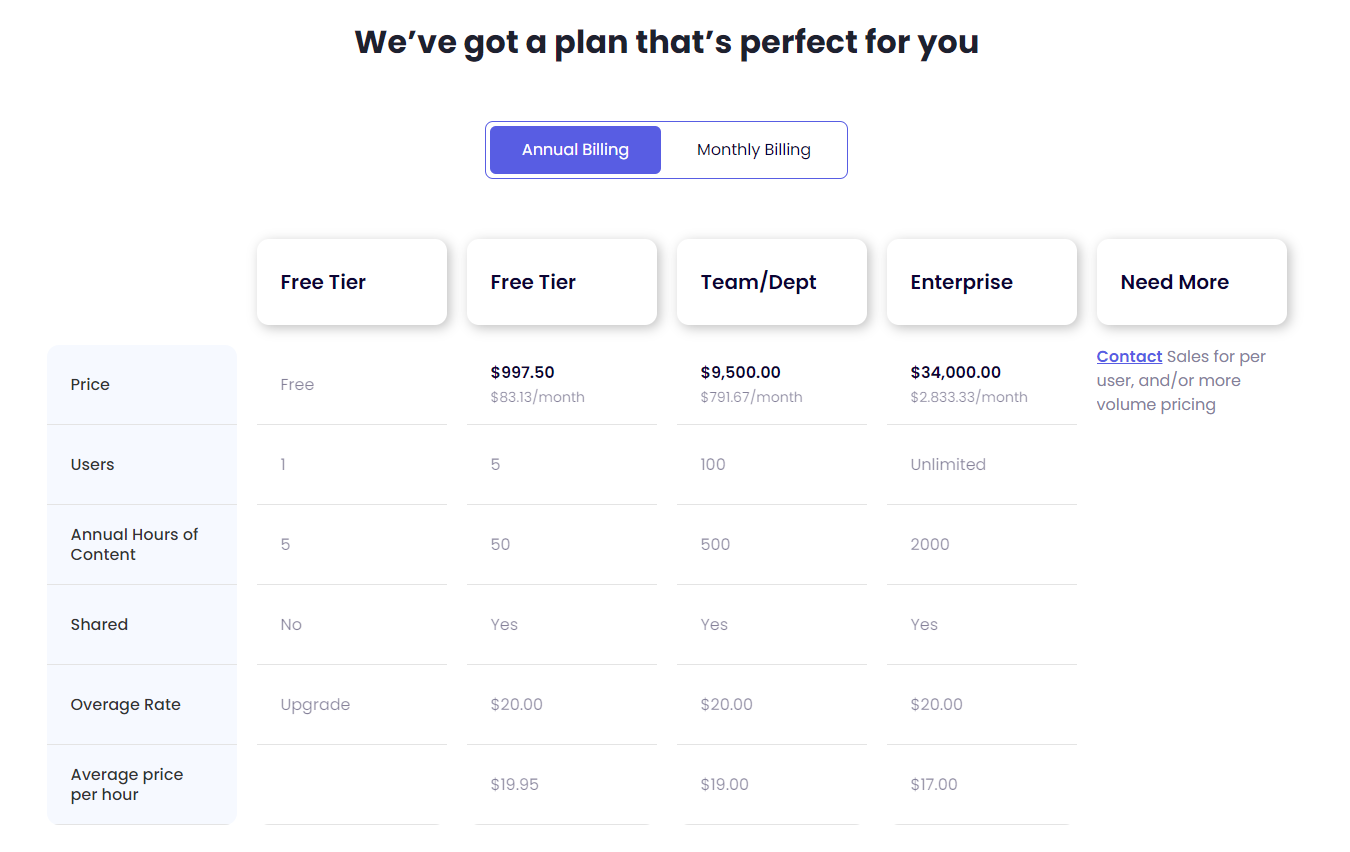
예, Riverside는 실시간 협업 기능을 제공하여 여러 사용자(각각 별도의 오디오 트랙을 보유)가 동일한 비디오 프로젝트를 동시에 작업할 수 있게 합니다. 이를 통해 팀원들은 음성 전문가를 고용하지 않고도 실시간으로 편집, 검토 및 현실적이고 매력적인 음성 녹음을 협업하기가 쉬워집니다.
네, Descript는 다국어 음성 텍스트 변환을 지원합니다. 자동 음성 인식(ASR) 기술을 활용하여 다양한 언어로 된 오디오를 텍스트로 변환하므로, 여러 언어 환경에서 음성 텍스트 변환 서비스가 필요한 사용자에게 유용한 도구입니다.

99%의 사람들이 화상 회의가 소통을 향상시킨다고 생각하는 세상에서, 올바른 플랫폼 선택은 매우 중요합니다. 현명한 선택을 하세요!
오늘날 디지털 시대에는 놀랍게도 99%의 사람들이 화상 회의가 커뮤니케이션을 개선했다고 생각합니다. 하지만 다양한 옵션이 존재하는 가운데, 콘텐츠를 녹화하기 위한 적합한 플랫폼을 어떻게 선택해야 할까요?
이것은 단순히 도구를 선택하는 문제가 아닙니다. 여러분의 고유한 요구에 맞는 솔루션을 찾는 것입니다. 바로 여기에 저희의 심층 분석이 Zoom 과 Riverside 에 대한 심층 분석이 바로 여기에 있습니다. 여러분의 결정을 돕기 위한 상세한 비교를 제공합니다.
이 글에서는 다음을 살펴보겠습니다:
추신: 소통 강화 얘기가 나와서 말인데, CLIPr을 간과해서는 안 됩니다. 이 혁신적인 플랫폼은 인공지능을 활용해 자동으로 동영상 콘텐츠를 분류, 색인화, 정리해 주므로, 방대한 Zoom 또는 Riverside 녹화본을 검토해야 하는 경우 기술 스택에 유용한 추가 도구가 될 수 있습니다.
{{cta}}
줌은 단순한 화상 회의 도구를 넘어 명성을 얻었습니다. 디지털 시대에 우리가 어떻게 연결을 유지하는지를 보여주는 상징이 되었죠. 2011년 에릭 위안(Eric Yuan )이 설립한 줌은 유망한 스타트업에서 글로벌 커뮤니케이션 플랫폼으로 변모했습니다. 2013년 출시된 줌은 사용자 경험과 연결성에 초점을 맞춘 디지털 상호작용의 새로운 시대를 열었습니다.
줌은 포괄적인 제품군으로 두각을 나타냅니다. 단순한 화상 통화 도구가 아닙니다. 팀 채팅, 클라우드 컨택 센터, 스마트 녹화 도구까지 모두 사용자 친화적인 패키지로 제공됩니다. 비즈니스와 개인 사용 모두를 위해 설계된 줌은 모든 상호작용을 더욱 매력적으로 만듭니다.
비평가와 사용자 모두 줌을 칭찬합니다. 탄탄한 4.5/5 별점을 기록했으며 가트너 피어 인사이트에서는 4.4/5 별점을 기록하며 "믿을 수 없을 정도로 편리하고 효율적"이라는 평가를 받고 있습니다. 줌의 강점은 단순함, 탁월한 녹화 품질, 그리고 다양한 화면 공유 기능에 있으며, 이는 다양한 커뮤니케이션 요구에 이상적입니다.
줌은 포괄적인 화상 회의 플랫폼으로서 다양한 사용자 기반을 지원하며, 각 사용자는 자신의 특정 요구에 맞춰 다각적인 기능을 활용합니다. 전문적인 환경부터 개인적인 연결에 이르기까지, 줌은 다양한 커뮤니케이션 시나리오에 손쉽게 적응합니다.
줌은 온라인 상호작용을 대면과 마찬가지로 매끄럽게 만들어주는 여러 기능으로 강력한 성능을 발휘합니다. 가상 커뮤니케이션의 모든 측면을 향상시키는 환경을 조성하는 것이 핵심입니다. 전 세계 사용자에게 줌을 탁월한 선택으로 만드는 몇 가지 기능을 소개합니다.
Zoom의 가격 구조는 개인 크리에이터부터 대기업에 이르기까지 다양한 사용자의 규모와 요구 사항에 맞춰 신중하게 설계되었습니다.
최상위에는 업계 거물들을 위해 맞춤화된 비즈니스 플러스 및 엔터프라이즈 플랜이 있습니다. 이 프리미엄 옵션들은 포괄적이고 대용량 솔루션을 제공하기 위해 맞춤형 가격으로 책정되어, 참가자 수 증가부터 전담 기업 지원에 이르기까지 모든 것을 제공합니다.
간단히 정리하면 다음과 같습니다:
리버사이드(Riverside)는 특히 방송급 화질의 녹화를 원하는 사용자들을 대상으로 화상 회의 분야의 강자로 빠르게 부상하고 있습니다. 2019년 에서 키슨(Keyson) 형제가 설립한 이 플랫폼은 암스테르담에서 시작해 현재 텔아비브의 기술 허브에서 성장하고 있습니다. 고품질 팟캐스트 및 영상 인터뷰 기능에 집중함으로써 차별화를 꾀하고 있습니다.
알렉시스 오하니안, 오렌 제브 등 주목할 만한 투자자들의 지원을 바탕으로 리버사이드는 신뢰를 쌓고 명성을 구축하고 있습니다. 이들의 지원과 함께 최상위 인플루언서들의 인정을 받는 것은 리버사이드의 잠재력과 성과를 입증하는 것입니다.
플랫폼의 G2에서 4.8/5점의 평점을 기록하며 G2에서의 평점은 사용자 만족도를 반영합니다. 리뷰들은 거의 완벽에 가까운 시스템이라며 극찬하며, "팟캐스팅을 위한 탁월한 시스템"이라고 칭송하고 고객 서비스를 높이 평가합니다. Riverside는 품질에 집중하는 크리에이터들이 선호하는 플랫폼으로 주목받고 있습니다.
리버사이드의 독보적인 기능 세트는 크리에이터 고객층에게 이상적인 선택지로 자리매김합니다. 특히 녹음에 스튜디오 수준의 품질을 추구하는 콘텐츠 제작 분야 종사자들에게 맞춤화된 솔루션을 제공합니다.
리버사이드의 강력한 플랫폼은 콘텐츠 제작 분야의 전문가 요구를 충족시키는 다양한 기능으로 가득합니다. 탁월한 녹음 기능부터 혁신적인 AI 기반 도구까지, 리버사이드가 제공하는 핵심 기능을 살펴보겠습니다.
리버사이드의 가격 정책은 막 시작하는 분부터 본격적인 제작사를 운영하는 분까지 다양한 요구에 맞춰 설계되었습니다. 각 요금제별 구성은 다음과 같으며, 여러분의 창작 여정에 딱 맞는 플랜을 쉽게 찾을 수 있도록 구성되었습니다.
기업 및 기관 고객은 영업팀에 문의하여 가격을 확인해야 하는 비즈니스 플랜을 선호할 수 있습니다. 이 플랜은 무제한 별도 트랙, 무제한 제작물, 게스트용 원격 기기 관리, 카메라 제어, 비동기 녹화, 다양한 프레임 레이트 지원, 전담 고객 성공 매니저 등 고급 제어 기능을 자랑합니다.
각 티어는 사용자를 고려하여 설계되었으며, 필요에 따라 기능과 지원이 확장됩니다. 캐주얼한 팟캐스트 제작이든 전문적인 마케팅 캠페인이든, Riverside의 가격 구조는 모든 수준의 크리에이터에게 적합한 도구를 제공하기 위해 마련되었습니다.
간단히 정리하면 다음과 같습니다:
가상 커뮤니케이션의 경쟁 환경에서 Zoom과 Riverside는 선두주자로 두각을 나타내며, 각 플랫폼은 자신만의 충성도 높은 사용자층을 확보하고 있습니다. 아래에 나열된 장단점은 광범위한 사용자 피드백, 종합적인 리뷰, 그리고 다양한 시나리오에서의 직접 사용 경험을 바탕으로 추출한 것입니다. 각 플랫폼이 어떻게 평가되는지 살펴보기 위해 이러한 통찰력을 자세히 살펴보겠습니다.
Zoom과 Riverside 사이에서 선택할 때는 목표와 요구사항과의 부합 여부가 결정적입니다.
팟캐스터나 콘텐츠 제작자로서 오디오와 비디오 품질을 타협할 수 없다면, Riverside가 최적의 선택입니다:
반대로, 비즈니스 회의부터 교육 세션에 이르기까지 다양한 형태의 가상 상호작용이 중심이 되는 세상이라면, Zoom이 당신의 동반자입니다.
자, 정리해보면:
최우선 선택은 콘텐츠 제작자의 세련된 기교든, 가상 커뮤니케이터의 역동적인 다재다능함이든, 가상 참여 전략의 미묘한 차이를 충족시켜야 합니다.
디지털 녹화물의 바다를 헤쳐나가는 일은 부담스러울 수 있습니다. CLIPr이 바로 그 해답입니다. 영상 속 중요한 순간으로 곧장 안내하는 나침반이 되어 드립니다. 단순한 미디어 관리가 아닌, 더 스마트하고 효율적으로 여러분을 위해 일하는 도구입니다.
CLIPr은 방대한 영상 자료를 일일이 살펴보는 번거로움을 없애줍니다. 고급 AI 기술이 여러분의 미디어와 만나 핵심 장면을 찾고 상호작용하는 방식을 간소화하는 플랫폼입니다. CLIPr을 사용하면 단순히 영상을 수동적으로 시청하는 것이 아니라, 중요한 부분에 적극적으로 참여하게 됩니다.
CLIPr의개발자들—험프리 첸, 에런 슬로먼, 신디 친—은영상 관리 혁신의 최전선에 서 있습니다. 그들은 CLIPr를 단순히 영상을 정리하는 도구가 아닌, 영상 작업 방식을 개선하는 플랫폼으로 설계했습니다. 이는 너무나 흔한 '줌 피로'에서 벗어나게 해줍니다.
수많은 영상에 압도된 리더와 마케터에게 CLIPr은 판도를 바꾸는 솔루션입니다. 영상 내 핵심 콘텐츠를 신속하게 식별하고 색인화하여 하이라이트 장면으로 바로 이동할 수 있게 합니다. 이는 효율성의 극치로, 긴 녹화물을 관리하기 쉽고 실행 가능한 클립으로 변환합니다.
닐 밀러는 CLIPr의 혁신적 잠재력에 주목하며, CEO 험프리 첸과 함께 이 플랫폼이 조직이 비디오 콘텐츠를 최대한 활용할 수 있도록 어떻게 지원하는지 논의했습니다. CLIPr은 단순한 도구를 넘어, 기록된 콘텐츠의 본질적 가치를 이해하는 이들에게 전략적 자산입니다. 이는 여러분의 비디오 속 모든 중요한 장면이 반드시 시청되고 들릴 수 있도록 보장합니다.
CLIPr의 영상 관리 역량은 특정 산업에 국한되지 않고 다양한 전문 분야에 걸쳐 확장됩니다. 다음은 CLIPr을 통해 가장 큰 이점을 얻을 수 있는 대상입니다:
CLIPr의 기능 세트는 영상 콘텐츠 처리를 한 단계 업그레이드하기 위해 세심하게 설계되었습니다. 각 기능은 CLIPr이라는 정교하게 조율된 기계의 톱니바퀴 역할을 하며, 사용자의 영상 상호작용을 최대한 유연하게 만드는 데 초점을 맞추고 있습니다.
CLIPr의 가격 구조는 개인 콘텐츠 제작자부터 대규모 기업에 이르기까지 다양한 사용자를 고려하여 세심하게 설계되었습니다. 주요 요금제 개요는 다음과 같습니다:
무료 이용권은 특히 개인 사용자에게 적합한 훌륭한 시작점입니다 . 연간 최대 5시간의 동영상 콘텐츠 관리를 무료로 제공하므로, 동영상 콘텐츠 분석 및 관리에 처음 접하는 분들에게 탁월한 선택입니다.
CLIPr는 표준 제공 범위를 초과하는 요구사항을 가진 고객을 위해'추가 필요' 옵션을 제공합니다. 이 플랜은 맞춤형으로 구성 가능하며, 가격은 요청 시 제공되어 특별한 요구사항에 맞춘 솔루션을 보장합니다.
이러한 요금제 외에도 CLIPr는 플랜 한도를 초과하는 콘텐츠에 대해 $20.00의 초과 요금을 부과합니다. 상위 요금제로 갈수록 시간당 평균 비용이 감소하므로, 동영상 콘텐츠 수요가 증가함에 따라 확장 가능하고 경제적인 선택지가 됩니다.
{{cta}}
다음은 우리가 논의한 제품들에 대한 간략한 요약입니다:
빠르게 변화하는 디지털 환경에서 적합한 커뮤니케이션 플랫폼을 선택하는 것은 매우 중요합니다. Zoom과 Riverside는 각자의 독보적인 강점으로 최고의 선택지로 꼽힙니다: Zoom은 다용도 가상 상호작용에 탁월한 반면, Riverside는 고품질 콘텐츠 제작에서 두각을 나타냅니다. 또한 CLIPr은 인공지능 기반 도구로 영상 콘텐츠 관리에 혁신을 가져옵니다.
주요 내용:
CLIPr 디지털 경험을 완성하며, 비디오 콘텐츠 관리 및 향상이라는 백스테이지 패스를 제공하여 디지털 생태계에서의 입지를 강화합니다.
줌 회의록을 신속하게 검색하고 분석해야 하든, Riverside.fm 녹음에서 발표자를 강조해야 하든 — 콘텐츠 여정에서 전략적 파트너로서 모든 픽셀과 매 순간이 의미 있게 활용되도록 보장합니다.
{{cta}}

비디오 경험을 한 단계 업그레이드할 준비가 되셨나요? 여러분에게 딱 맞는 비디오 플랫폼을 찾아보세요.
끊임없이 진화하는 비디오 콘텐츠 세계에서 '괜찮은 수준'에 만족하는 것은 선택지가 될 수 없습니다. Vimeo보다 여러분의 요구에 더 잘 맞는 서비스가 있을지 궁금해 본 적 있나요? 여러분만 그런 게 아닙니다.
완벽한 동영상 플랫폼을 찾는 것은 디지털 건초더미에서 바늘 찾기나 다름없습니다. 하지만 걱정하지 마세요. 여러분을 위해 Vimeo 대안 중 최고 중의 최고를 엄선해 왔습니다.
곧 공개될 내용을 살짝 미리 보여드립니다:
추신: 게임 체인저 얘기가 나와서 말인데, CLIPr은 한번 살펴보셨나요? 단순한 또 다른 동영상 플랫폼이 아닙니다. 동영상 콘텐츠를 경험하는 혁신적인 방식이죠. 개인 동영상 분석 비서라고 생각하시면 됩니다. 여러분의 동영상 라이브러리를 대신 시청하고, 주석을 달고, 색인화해줍니다. 함께 살펴보면서, 왜 여러분이 찾고 있던 대안이 될 수 있는지 알아봅시다.
{{cta}}

Vimeo는 포괄적인 동영상 호스팅 플랫폼입니다. 창의적인 전문가, 기업 및 동영상을 호스팅하고 공유하며 수익화하려는 모든 사람을 위해 설계되었습니다. Vimeo의 서비스는 기본적인 동영상 호스팅부터 동영상 제작, 협업 및 분석을 위한 고급 기능에 이르기까지 다양합니다.
Vimeo의 기능은 다음과 같습니다:
가격 및 요금제

Vimeo는 다양한 요금제를 제공하며, 각 요금제는 서로 다른 사용자 요구와 예산에 맞춰 설계되었습니다:
각 플랜은 기능과 성능이 단계적으로 확장되어 다양한 전문 및 비즈니스 요구 사항을 충족합니다.
비메오는 강력한 플랫폼이지만 단점이 없는 것은 아닙니다. 사용자들은 비메오가 부족한 점이 있다고 지적하며 대안을 찾고 있습니다:
이러한 요소들은 사용자들이 자신의 특정 요구와 기대에 더 부합하는 대안을 고려하도록 할 수 있습니다.
CLIPr는 특히 비디오 콘텐츠를 보다 효율적으로 관리하고 상호작용할 방법을 찾는 이들에게 Vimeo의 탁월한 대안으로 부상하고 있습니다.
동영상 색인 및 검색 기능
비교 우위
실제 효율성
간단한 마이그레이션
CLIPr는 사용자가 Vimeo에서 직면할 수 있는 특정 문제에 맞춤화된 솔루션을 제공합니다:
CLIPr는 특히 시간 효율성, 향상된 참여도, 영상 관리의 쉬운 탐색을 우선시하는 사용자에게 Vimeo의 유력한 대안으로 두각을 나타냅니다.
{{cta}}
Vimeo 대안을 찾을 때는 특정 기준을 평가하여 자신의 요구에 가장 적합한 서비스를 찾는 것이 중요합니다.
사용자 경험
비디오 관리 기능
업로드 및 저장
비용 효율성
고객 지원
고급 편집 및 사용자 지정
통합 및 협업 기능
이 가이드라인은 Vimeo의 기능을 충족할 뿐만 아니라 그 한계를 보완하여 원활한 동영상 관리 경험을 보장하는 플랫폼을 찾는 데 도움이 될 것입니다.
자신의 요구에 더 잘 맞는 기능이나 가격 모델을 찾는 사람들에게는 최고의 Vimeo 대안을 탐색하는 것이 필수적입니다. 각 대안은 고유한 기능, 가격, 사용자 경험을 제공합니다.
핵심 요점
상위 20개 옵션을 살펴보겠습니다. 각각 고유한 강점과 차별화된 장점을 지니고 있습니다.

CLIPr는 험프리 첸(Humphrey Chen), 에런 슬로먼(Aaron Sloman), 신디 친(Cindy Chin)이 공동 설립한 비디오 분석 및 관리(VAM) 플랫폼입니다. 2020년 워싱턴주 커클랜드에서 출범한 CLIPr는 인공지능(AI)과 머신러닝을 활용해 비디오 콘텐츠 처리에 혁신을 가져오고 있습니다. 비디오 콘텐츠의 효율적인 소비, 측정 및 관리를 가능하게 함으로써 생산성 향상을 목표로 합니다.
핵심 요약: CLIPr는 동영상에서 핵심 장면을 신속하게 식별하고 추출하는 능력으로 두각을 나타내며, 사용자의 동영상 콘텐츠 분석 시간을 크게 절약해 줍니다.


2006년 설립된 위스티아는 대표적인 동영상 호스팅 및 마케팅 플랫폼으로 부상했습니다. 매사추세츠주 케임브리지에 본사를 둔 이 회사는 동영상을 활용한 성장과 참여에 중점을 둔 기업을 대상으로 합니다. 사용자 친화적인 인터페이스와 강력한 기능으로 인정받는 위스티아는 성능과 사용성 측면에서 찬사를 받아왔습니다.
핵심 요약: Wistia는 다른 시스템과의 원활한 통합과 리드 확보, 분석, 동영상 마케팅을 위한 포괄적인 도구로 높이 평가받고 있습니다.

사용자 리뷰: "우리 회사의 모든 동영상은 Wistia에 저장 및 관리되며 웹사이트에 임베드됩니다. 여기에는 웨비나 녹화본도 포함됩니다. 가장 큰 장점은 웹사이트에서 브랜드 로고가 표시되는 동영상 플레이어의 방해 요소 없이 브랜드화된 동영상 경험을 제공한다는 점입니다. 소셜 채널에서 동영상이 더 잘 공유된다면 Wistia에 더 높은 점수를 주고 싶습니다."

다캐스트(DaCast)는 스테판 루랑(Stephane Roulland)과 알드릭 퓌이부아(Aldric Feuillebois)가 2008년 설립한 프랑스 기업용 라이브 스트리밍 및 온라인 비디오 플랫폼입니다. 캘리포니아주 샌프란시스코에 본사를 두고 런던, 베이징, 마닐라에 지사를 운영하는 다캐스트는 B2B 솔루션을 전문으로 하며, 전 세계 30만 명 이상의 비디오 제작자(TV 및 라디오 방송국, 이벤트 제작사, 교육 네트워크 포함) 가 활용하고 있습니다.
DaCast는 온라인 비디오 분야에 기여한 공로를 인정받아 스트리밍 미디어 독자 선택상 등의 상을 수상했습니다.
핵심 요약: DaCast는 비즈니스 요구에 중점을 둔 포괄적인 셀프 서비스 라이브 스트리밍 솔루션을 제공하며, 소비자 중심 플랫폼과 차별화됩니다.

사용자 리뷰: "저는 아주 긴 '평가' 과정을 거쳤는데, 그들은 제 요구를 수용하기 위해 매우 인내심을 보였고 심지어 '체험' 멤버십 기간도 여러 번 연장해 주었습니다. 결국 그 모든 것이 가치 있었습니다."

비디오 기술 분야의 선구자인 칼투라는 단순한 비메오 대안을 넘어선 존재입니다. 2006년 설립되어 뉴욕에 본사를 둔 칼투라는 디지털 환경에서 독보적인 입지를 구축했습니다. 미할 츠르와 론 예쿠티엘이 창립한 이 플랫폼은 단순한 도구가 아닌, 비디오 상호작용과 참여 방식에 혁명을 일으킨 혁신입니다.
전 세계에 걸쳐 방대한 사용자 기반을 보유한 Kaltura가 인상적인 평가와 찬사를 모은 것은 당연한 일입니다. 권위 있는 업계 상을 포함해 다양한 영예를 안았습니다. Kaltura의 차별화된 점은 무엇일까요? 기업, 교육 기관, 미디어 기업을 위해 맞춤화된 강력하고 유연한 비디오 경험입니다.
핵심 요약: 칼투라는 기업, 교육 기관 및 미디어 조직을 위한 맞춤형 비디오 솔루션을 제공하며 유연성과 맞춤 설정을 지원합니다.

사용자 리뷰: "사용하기 쉽고 고화질 동영상을 간편하게 삽입할 수 있습니다. 이는 비즈니스 계획에 동영상 서비스를 도입하려는 기업에게 추가적인 장점이 됩니다."

웨이브비디오는 영상 편집 및 마케팅 분야에서 역동적인 플레이어입니다. 애니마트론이 2017년 출시한 이 매사추세츠 기반 기업은 전 세계 마케터와 콘텐츠 제작자에게 필수 도구로 빠르게 자리매김했습니다. 사용자 친화적인 인터페이스와 30만 명 이상의 증가하는 사용자 기반을 바탕으로, 웨이브비디오는 효과성과 사용 편의성으로 꾸준히 긍정적인 평가를 받고 있습니다.
인기 자체가 모든 것을 말해줍니다. Wave.video는 사용자가 복잡한 영상 편집 과정에 깊이 빠져들지 않고도 영상 콘텐츠를 제작하고 재활용하며 확산시켜 최대의 도달률과 참여도를 보장하는 데 탁월합니다.
핵심 요약: Wave.video는 콘텐츠 제작자와 마케팅 전문가를 위해 완벽하게 설계된, 간편한 동영상 편집 및 마케팅을 위한 최적의 솔루션입니다.

사용자 리뷰: "제가 가장 좋아하는 동영상 제작 앱은 Wave입니다. 동영상을 정말 쉽게 만들 수 있게 해주거든요. 다양한 템플릿과 잘 어울리는 오디오 파일도 풍부하게 제공됩니다. 전문적인 동영상을 만들기 위해 별다른 노력 없이도 가능합니다."

JW 플레이어는 온라인 비디오 플랫폼 분야의 선구자로 자리매김하고 있습니다. 2005년 웹 최초의 오픈소스 비디오 플레이어로 탄생한 이 플랫폼은 2008년 Jeroen Wijering에 의해 JW 플레이어로 공식 출시되었습니다. 현재 뉴욕에 본사를 둔 JW 플레이어는 전 세계적으로 성장하여 백만 명 이상의 크리에이터와 기업가에게 힘을 실어주는 글로벌 거대 기업으로 발전했습니다 .
단순히 숫자만의 문제가 아닙니다. 이 플랫폼은 혁신성과 신뢰성으로 호평을 받고 있습니다. JW Player는 단순한 비디오 플레이어를 넘어, 시청자 참여도를 높이고 수익을 극대화하도록 설계된 비디오 호스팅, 스트리밍, 수익화를 위한 종합 솔루션입니다.
핵심 요약: JW Player는 전문적인 요구 사항을 가진 대규모 방송사 및 미디어 기업을 대상으로 하는 고급 라이브 및 주문형 스트리밍을 위한 최적의 선택입니다.

사용자 리뷰: "저는 공학 전공 학부생입니다. 평소 영화나 뮤직비디오를 시청하고 음악도 자주 듣곤 했습니다. 그래서 JW 플레이어를 선택했는데, 원하는 대로 설정을 쉽게 조정할 수 있는 다양한 옵션이 있고 시각적으로도 매우 편안하기 때문입니다."

스트림야드는 라이브 스트리밍 분야에서 빛나는 별과 같습니다. 2018년 게이게 반덴탑과 댄 브릭스에 의해 출시된 이 플랫폼은 간편함과 효율성으로 콘텐츠 제작자들의 마음을 단숨에 사로잡았습니다. 오리건주 투알라틴에 본사를 둔 스트림야드는 수많은 사용자들이 사용자 친화적인 인터페이스와 안정성을 칭찬하며 충성스러운 팬층을 확보했습니다.
비록 해당 분야에서 신생 업체이지만 그 영향력은 부인할 수 없습니다. StreamYard는 라이브 스트리밍을 손쉽게 접근 가능하고 매력적으로 만드는 데 주력하며, 여러 플랫폼에 걸친 간편한 방송, 상호작용형 라이브 세션 등 다양한 기능을 제공합니다.
핵심 요약: StreamYard는 커뮤니티 상호작용을 강화하는 데 중점을 둔, 상호작용적이고 매력적인 라이브 스트리밍을 전문으로 합니다.

사용자 리뷰: "스트림야드는 정말 놀라운 라이브 스트리밍 플랫폼입니다. 간편함과 사용 편의성 덕분에 매우 빠르게 익힐 수 있었고, 실시간 전송에 중점을 두면서도 인터넷 연결이 불안정한 상황까지도 잘 관리해 줍니다. 또한 방송 예약 기능, 소셜 미디어 공유 기능, 다중 방송 제작 기능 덕분에 스트림야드는 탁월한 도구입니다."
추신: StreamYard를 좋아하지만 조금 다른 것을 원하신다면, 최고의 StreamYard 대안을 종합적으로 분석한 저희 가이드를 확인해 보세요!

Restream은 라이브 스트리밍 업계의 판도를 바꾼 혁신적인 플랫폼입니다. 2015년 알렉스 쿠다(Alex Khuda)와 앤드류 수르진스키(Andrew Surzynskyi)가 설립한 이 플랫폼은 온라인 콘텐츠 방송 방식을 혁신적으로 변화시켰습니다. 텍사스주 오스틴에 본사를 둔 Restream은 전 세계 200만 명 이상의 스트리머를 지원하는 규모로 빠르게 성장했습니다.
전통적인 인증이나 수상 경력은 없지만, 방대한 사용자 기반과 높은 평점은 그 효과성과 인기를 입증합니다. Restream의 차별화된 장점은 멀티캐스트 기능으로, 여러 소셜 플랫폼에 동시에 라이브 스트리밍을 전송할 수 있어 스트리머와 마케터 모두에게 필수 도구로 자리매김했습니다.
핵심 요점: Restream을 활용하여 다양한 플랫폼에 방송하고 방대한 맞춤 설정 옵션을 통해 콘텐츠의 도달 범위를 극대화하세요.

사용자 리뷰: "2년 넘게 Restream을 통해 저는 인터넷 전반에 걸쳐 긍정적이고 상호작용적인 커뮤니티를 구축할 수 있었으며, 그 과정에서 시청자층과 우정을 넓혀왔습니다. Restream이 없었다면 지금의 제가 있을 수 없었을 거라 생각합니다."

와우자 미디어 시스템즈는 스트리밍 기술 분야의 거물 기업입니다. 2005년 데이비드 스터벤볼과 찰리 굿이 설립한 이 콜로라도 기반 회사는 라이브 스트리밍 및 비디오 전송 분야의 핵심 기업으로 성장했습니다. 중소기업부터 대기업에 이르기까지 다양한 고객층을 대상으로 서비스를 제공하는 와우자는 신뢰성과 혁신으로 명성을 쌓아왔습니다.
Wowza는 핵심적으로 라이브 스트리밍, 주문형 비디오, 인터랙티브 스트리밍 서비스를 포함한 강력한 스트리밍 솔루션 제품군을 제공하며, 모든 서비스는 높은 수준의 맞춤화와 확장성을 위해 설계되었습니다.
핵심 요약: Wowza는 대규모 행사나 대기업의 요구에 적합한 확장성 있는 고품질 스트리밍 솔루션을 제공합니다.

사용자 리뷰: "WSE는 정말 놀랍습니다. 설치가 쉽고 사용하기 편리합니다. 회사가 제공하는 지원은 빠르고 정중하며 항상 정확합니다."

뮤비는 올인원 OTT 플랫폼으로 주목받으며 스트리밍 서비스 업계에 새로운 지평을 열었습니다. 2013년 설립된 이 뉴욕 기반 기업은 화이트라벨 스트리밍 플랫폼 출시를 위한 원스톱 솔루션으로 빠르게 성장했습니다 .
Muvi는 포괄적인 접근 방식으로 두각을 나타내며, 비디오 및 오디오 스트리밍부터 라이브 방송과 수익화까지 모든 것을 단일 플랫폼에서 제공하며, 귀사의 브랜드에 맞춰 커스터마이징이 가능합니다.
핵심 요점: 다양한 기능을 갖춘 Muvi로 OTT 서비스를 손쉽게 출시하세요.

사용자 리뷰: "고객 지원 팀은 훌륭하고 항상 친절하며 매우 도움이 됩니다. 그들은 항상 최대한 도와주려고 노력합니다."

IBM 비디오 스트리밍은 디지털 세계에서 강력한 명성을 지닌 IBM의 광범위한 포트폴리오의 일부입니다. 2007년 Ustream의 창립으로 거슬러 올라가는 역사를 지닌 이 플랫폼은 2016년 IBM에 인수된 이후 기업용 비디오 스트리밍의 대명사가 되었습니다.
기술 중심지 실리콘밸리에 본사를 두고 전 세계 고객에게 서비스를 제공하는 IBM 비디오 스트리밍은 견고함과 고급 기능으로 유명합니다. 이 플랫폼은 안정적이고 확장 가능하며 안전한 라이브 및 주문형 비디오 스트리밍 서비스를 찾는 기업을 위해 설계되었습니다.
핵심 요약: IBM 비디오 스트리밍은 기업을 위한 최상급 비디오 솔루션을 제공하며, 품질, 보안 및 고급 스트리밍 기능을 강조합니다.

사용자 리뷰: "고객 지원 수준과 품질이 매우 우수합니다. 또한 인터페이스가 매우 간단해서 자원봉사자들도 시스템을 사용할 수 있습니다. 유일한 단점은 특히 가격입니다. Ustream은 기업용 수준에서는 매우 비쌀 수 있습니다."

StreamShark는 MetaCDN 계열사로서 라이브 스트리밍 서비스 업계에서 두각을 나타내는 기업입니다. 호주 멜버른에서 출발한 StreamShark는 2011년 첫 선을 보인 이후 꾸준히 성장세를 이어가고 있습니다.
제임스 브로버그와 마틴 라이언이 창안한 스트림샤크는 특히 기업 및 대규모 행사를 위한 원활한 라이브 스트리밍 경험 제공에 탁월합니다. 사용 편의성과 시청자 도달 범위에 중점을 둔 안정적이고 고품질의 스트리밍이 필요한 기업 및 기관을 위해 맞춤 설계되었습니다.
핵심 요점: StreamShark는 특히 전문적인 환경이나 기업 환경에서 중요한 라이브 스트리밍 요구 사항에 대해 신뢰할 수 있습니다.

사용자 리뷰: "StreamShark는 저희의 라이브 스트리밍 플랫폼이자 주문형 비디오(VoD) 콘텐츠 관리 솔루션입니다. 저희는 정기적으로 StreamShark를 통해 회사 타운홀 미팅과 외부 행사를 생중계합니다. 또한 StreamShark를 통해 VoD 라이브러리에 4000개 이상의 동영상을 호스팅하고 있습니다."

리시(Resi)는 과거 리빙 애즈 원(Living As One)으로 알려졌던 라이브 스트리밍 기술 분야의 떠오르는 스타 기업이다. 콜린 존스(Collin Jones)와 폴 마텔(Paul Martel)이 2016년 설립한 리시는 콜로라도에 본사를 두고 있으며 빠르게 입지를 다져왔다.
주로 교회 및 단체를 대상으로 서비스를 제공해 온 Resi는 그 범위를 확장하여 현재 인상적인 사용자 기반을 자랑합니다. Resi는 특허 받은 Resilient Streaming Protocol(탄력적 스트리밍 프로토콜)로 차별화되어, 인터넷 불안정 상황에서도 끊김 없는 고품질 스트리밍을 보장합니다.
핵심 요약: 레시는 특히 교회나 기업과 같은 단체를 대상으로 하는 안정적인 라이브 스트리밍 서비스로 두각을 나타냅니다.

사용자 리뷰: "Resi와 협력한 이후로 임베디드 플레이어에서 단 한 번의 스트리밍 장애도 발생하지 않았으며, 이는 자연스럽게 모든 소셜 미디어 플랫폼에서도 마찬가지였습니다. 코로나19로 인한 초기 스트리밍 폭주와 코로나19 시대 첫 크리스마스 기간을 포함해, 그들은 항상 견고하고 안정적이었으며, 항상 이용 가능하고 지원적이었습니다. 오디오와 비디오 품질은 모든 상황에서 탁월합니다."

브라이트코브는 비디오 스트리밍 및 호스팅 업계의 거대 기업입니다. 2004년 제레미 알레어와 밥 메이슨이 설립한 이 보스턴 기반 회사는 강력한 비디오 솔루션을 찾는 기업들에게 핵심 기업으로 자리매김했습니다.
브라이트코브는 다수의 유명 기업을 포함한 방대한 고객사로 유명하며 , 최상급 서비스와 혁신을 통해 입지를 공고히 해왔습니다. 브라이트코브는 대기업 및 미디어 기관의 다양한 요구를 충족하도록 설계된 강력한 비디오 마케팅 호스팅 솔루션, 스트리밍 및 수익화 도구를 전문적으로 제공합니다.
핵심 요약: Brightcove는 마케팅 및 수익화 도구를 포함한 기업 수준의 비디오 호스팅 및 스트리밍을 지원합니다.
사용자 리뷰: "전반적으로 매우 긍정적인 경험을 했으며, Brightcove라는 제품은 사용자 인터페이스, 동영상 업로드 과정, 개별 동영상 콘텐츠별 보고 기능, 지표 공유 및 내보내기 측면에서 제 기대를 훨씬 뛰어넘었습니다."

히포 비디오는 2017년 델라웨어주 뉴어크에 본사를 둔 라이시움 테크놀로지스(Lyceum Technologies)가 출시한 신선하고 역동적인 비디오 마케팅 솔루션입니다. 카르티 마리아판(Karthi Mariappan), 스리니바산 크리슈난(Srinivasan Krishnan), 닐람 찬드 자인(Nilam Chand Jain)이 창안한 히포 비디오는 사용자 친화적인 인터페이스로 마케터와 교육자들의 관심을 끌며 빠르게 성장해 왔습니다.
Hippo Video는 누구나 쉽게 동영상 제작 및 편집을 할 수 있도록 지원하는 전문 기업으로, 직관적인 패키지에 담긴 동영상 마케팅, 영업, 고객 지원 도구를 제공합니다.
핵심 요약: Hippo Video는 영상 제작과 마케팅을 간소화하여 마케터와 교육자에게 이상적인 간편한 플랫폼을 제공합니다.

사용자 리뷰: "Hippo Video를 사용해 화면 녹화를 쉽게 만들고, 다른 소프트웨어처럼 복잡한 단계 없이 공유할 수 있어 좋은 경험이었습니다. 또한 이 소프트웨어는 프로그램 구매 가격이 매우 합리적이며, 사용자 지원팀이 사용자 요구사항을 세심하게 챙겨줍니다."

Uscreen은 주문형 비디오(VOD) 및 OTT 플랫폼 분야의 선도 기업으로 부상하고 있으며, 2015년 PJ Taei에 의해 설립되었습니다. 워싱턴 D.C.에 본사를 둔 Uscreen은 급속히 성장하여 현재 전 세계 11,000명 이상의 크리에이터와 기업을 지원하고 있습니다.
유스크린의 특기는 사용자가 자체 동영상 스트리밍 서비스를 출시할 수 있도록 지원하는 데 있으며, 동영상 호스팅, 수익화, 마케팅, 분석을 위한 다양한 도구를 제공합니다. 모든 도구는 사용자 친화적이고 매우 효과적으로 설계되었습니다.
핵심 요약: Uscreen은 포괄적인 도구로 크리에이터와 기업가들이 VOD 서비스를 시작할 수 있도록 지원합니다.

사용자 리뷰: "사용 편의성과 고객 지원이 탁월했습니다. 초기 설정은 쉬웠으며, Uscreen을 통해 사이트를 처음 배포할 때도 아무런 문제가 발견되지 않았습니다."

스트리머블은 세련되고 효율적인 동영상 호스팅 서비스로 2014년에 출시되었습니다. 설립자와 조직적 배경에 대한 세부 정보는 다소 간결하게 소개되지만, 스트리머블이 동영상 공유 커뮤니티에 미친 영향력은 결코 작지 않습니다.
샌프란시스코에 본사를 둔 이 플랫폼은 동영상을 손쉽게 업로드, 편집, 공유하려는 사용자들 사이에서 빠르게 인기를 얻었습니다 . 스트리머블은 복잡한 기능 없이 직관적인 접근 방식으로 사용자 친화적인 경험을 제공한다는 점에서 두드러집니다. 대형 플랫폼의 복잡함 없이 번거로움 없이 동영상 콘텐츠를 관리하고 공유하려는 개인 및 기업을 위해 맞춤 설계되었습니다.
핵심 요약: Streamable은 기본적인 동영상 호스팅 및 공유를 위한 직관적인 선택으로, 단순성과 사용자 친화성을 강조합니다.

사용자 리뷰: "최근 스트리머블 구독 관련 문제가 있었는데, 스트리머블의 고객 서비스는 정말 탁월했습니다. 실수로 유료 플랜에 가입하게 되어 환불이 필요했는데, 응답이 빠를 뿐만 아니라 제 상황을 잘 이해해 주셨습니다. 스트리머블의 고객 서비스는 긍정적인 인상을 남겼으며, 이 플랫폼을 적극 추천합니다. 뛰어난 지원을 제공해 준 팀에게 박수를 보냅니다."

아딜로는 강력하고 다재다능한 동영상 호스팅 및 마케팅 플랫폼으로 두각을 나타내고 있습니다. 미국에 본사를 둔 아딜로는 동영상 호스팅과 고급 마케팅 도구를 독특하게 결합한 점으로 빠르게 주목을 받고 있습니다.
비디오 호스팅 이상의 기능을 원하는 기업과 마케터를 대상으로 합니다. Adilo는 비디오 콘텐츠를 통해 참여도 향상, 리드 생성 및 전환을 촉진하는 다양한 기능을 제공합니다.
핵심 요약: Adilo는 리드 생성 및 전환율 향상을 추구하는 기업을 대상으로, 동영상 호스팅과 고급 마케팅 전략을 결합합니다.

사용자 리뷰: "지금까지 정말 놀라운 경험이었어요. 다른 동영상 호스팅 플랫폼도 사용해봤는데, Adilo는 경쟁사들을 연구한 것 같아요. 우리의 모든 필요와 혜택을 하나로 모은 멋진 플랫폼을 제공해주네요!"

온라인 비디오 플레이어 분야에서 두각을 나타내는 플로우플레이어(Flowplayer)는 2004년에 설립되었습니다. 스웨덴에 본사를 둔 이 회사는 출판사, 방송사, 디지털 미디어를 대상으로 하는 비디오 기술 분야의 핵심 기업으로 자리매김했습니다. 아르비드 소르모(Arvid Sormo)와 스테판 하우크(Stefan Hauk)가 창립한 플로우플레이어는 높은 수준의 맞춤 설정과 가벼운 비디오 플레이어로 명성을 얻고 있습니다.
세계적으로 유명한 출판사들을 포함한 사용자 기반과 신뢰성으로 명성을 쌓은 Flowplayer는 단순한 동영상 호스팅을 넘어섭니다. 시청자 참여도와 수익 창출 기회를 극대화하는 데 중점을 두고 고품질 동영상 콘텐츠를 효율적으로 전달하기 위해 설계된 도구 모음을 제공합니다.
핵심 요약: Flowplayer는 맞춤형 비디오 플레이어와 정교한 기능을 필요로 하는 디지털 미디어 전문가에게 적합합니다.

사용자 리뷰: "몇 달 전에 FlowPlayer를 발견했습니다. 영상의 전반적인 관리, 편집, 처리 과정에서 어려움을 겪고 있었는데, FlowPlayer의 다양한 기능 덕분에 오디오비주얼 전문가에게 없어서는 안 될 필수 도구로 자리 잡았습니다."

비디오 호스팅 및 분석 분야의 선도 기업인 비디야드는 2010년 마이클 리트, 데본 갤러웨이, 에드워드 J.Z. 왕에 의해 설립되었습니다. 캐나다 온타리오주 키치너에 본사를 둔 비디야드는 비디오를 강력한 마케팅 및 영업 도구로 활용하는 데 주력함으로써 기업들 사이에서 빠르게 선호되는 플랫폼으로 자리매김했습니다.
Vidyard는 혁신적인 접근 방식으로 상당한 사용자 기반과 높은 평가를 받으며, 기업이 동영상을 활용하는 방식을 변화시키는 훌륭한 Vimeo 대안입니다. 이 플랫폼은 동영상 호스팅, 마케팅, 영업 지원 및 분석을 위한 강력한 도구 세트를 제공하며, 모두 참여도를 높이고 성과를 창출하도록 설계되었습니다.
핵심 요점: Vidyard는 특히 마케팅 및 영업 분야에서 전략적 비즈니스 도구로 동영상을 활용하며, 상세한 분석 기능으로 그 가치를 높입니다.

사용자 리뷰: "Vidyard는 제 경력에 큰 도움이 되었습니다. 영업 활동에 동영상을 활용하여 응답률을 9%나 높였습니다. Vidyard 덕분에 목표를 달성할 수 있었고, 이 도구 없이는 지금처럼 뛰어난 성과를 내지 못했을 겁니다!"
방대한 동영상 플랫폼의 바다를 헤쳐 나왔습니다. 각 플랫폼은 고유한 기능과 특색을 제공합니다. 이제 여러분은 특정 요구사항에 맞는 이상적인 도구를 선택할 수 있는 지식을 갖추게 되었습니다. 마케팅, 라이브 스트리밍, 교육용 동영상 콘텐츠 등 어떤 목적이든, 이 플랫폼들은 다양한 요구 사항을 충족시킵니다.
지금까지 다룬 내용을 간단히 정리하면 다음과 같습니다:
비디오 콘텐츠 제작 기술을 마스터하는 데 있어 CLIPr는 AI 기반 접근 방식으로 두각을 나타냅니다. 단순히 비디오를 관리하는 것을 넘어 콘텐츠를 깊이 있게 분석하고 가치 있는 인사이트를 추출하며 작업 흐름을 효율화하는 데 중점을 둡니다.
CLIPr는 기술이 비디오와의 상호작용을 어떻게 변화시킬 수 있는지 보여주는 증거로, 여러분의 비디오 도구 모음에 반드시 고려해야 할 도구입니다. CLIPr로 비디오 콘텐츠 관리의 미래를 받아들이고, 모든 프레임을 공유할 가치가 있는 이야기로 만들어 보세요.
{{cta}}

라이브 스트리밍 역량을 한 단계 업그레이드할 완벽한 StreamYard 대안을 만나보세요!
끊임없이 진화하는 라이브 스트리밍 세계에서 아무 도구나 선택하는 것은 마치 네모난 못을 둥근 구멍에 억지로 끼우려는 것과 같습니다. 따라서 여러분의 독특한 방송 요구에 딱 맞는 도구를 찾는 것이 매우 중요합니다. 노련한 전문가이든, 라이브 스트리밍을 막 시작하는 초보자이든, 올바른 플랫폼 선택이 모든 차이를 만들어 낼 수 있습니다. 하지만 문제는 모든 스트리밍 도구가 똑같이 만들어진 것은 아니라는 점입니다.
이 글에서는 StreamYard 대안을 깊이 있게 살펴보며 여러분을 안내합니다. 여러분은 다음을 발견하게 될 것입니다:
추신: 영상 콘텐츠 혁신에 관해 말하자면, CLIPr에 대해 들어보셨나요? 단순한 대안이 아닌, 영상 분석 및 관리 분야의 판도를 바꾸는 솔루션입니다. AI 기반 영상 인덱싱과 정교한 반응 제어 기능 등을 통해 CLIPr은 여러분의 스트림 콘텐츠를 완전히 새로운 차원으로 끌어올립니다. 그 방법을 함께 살펴보시죠.
{{cta}}

스트림야드는 2018년부터 웹 기반 라이브 스트리밍 플랫폼으로 주목받아 왔습니다. 시청자와 소통하고 개인 브랜드를 구축하려는 이들에게 최적의 선택지입니다. 스트림야드의 주요 기능과 모든 상황에 딱 맞는 만능 솔루션이 아닐 수 있는 이유를 살펴보겠습니다:
스트림야드의 매력은 무엇인가요?
하지만... 스트림야드가 당신에게 완벽한 선택이 아닐 수도 있는 이유는 무엇일까요?

분석 기능, 필요하신 분?: 안타깝게도 StreamYard에는 심층 분석 기능이 부족합니다. 이를 위해서는 외부 도구가 필요합니다.
무료 플랜 제한 사항:
유료 플랜:
요약하자면, StreamYard는 사용자 친화적이고인기가 있지만, 특히 분석 기능과 무료 플랜의 제한 사항과 같은 한계점 때문에 다른 대안을 찾게 될 수도 있습니다.
라이브 스트리밍에 있어서, 단일 솔루션이 모든 상황에 적합하지는 않습니다. StreamYard도 장점이 있지만, 다른 대안을 고려해야 할 몇 가지 이유는 다음과 같습니다:
따라서 이러한 제한 사항이 스트리밍 여정에서 장애물로 느껴진다면, 여러분의 필요에 더 부합하는 대안을 모색할 때가 된 것일 수 있습니다. 기억하세요, 올바른 도구는 시청자와 공감대를 형성하는 콘텐츠 제작에 결정적인 차이를 만들어 낼 수 있습니다.
CLIPr는 특히 라이브 스트리밍 후 콘텐츠를 최대한 활용하려는 사용자에게 StreamYard의 탁월한 대안으로 부상하고 있습니다. 그 이유는 다음과 같습니다:
우수한 비디오 색인 및 검색 기능
시청자 참여도 향상
{{cta}}
경제적이고 효율적인
쉬운 탐색 및 맞춤 목록
CLIPr는 단순한 StreamYard의 대체품이 아닙니다. 영상 콘텐츠 관리 및 상호작용 방식에 있어 획기적인 발전을 이루었으며, 진화하는 콘텐츠 제작자와 기업의 요구를 충족시키는 다양한 도구 세트를 제공합니다.
StreamYard의 최적 대안을 탐색할 때 고려해야 할 주요 기준은 다음과 같습니다:
이러한 측면을 평가함으로써, StreamYard가 제공하는 기능을 충족할 뿐만 아니라 뛰어넘는 스트리밍 솔루션을 찾을 수 있습니다.
이상적인 라이브 스트리밍 플랫폼을 찾는 과정에서, 특정 요구사항에 더 부합할 수 있는 옵션을 탐색하는 것이 필수적입니다. 향상된 영상 품질, 더욱 강력한 편집 도구, 또는 고급 참여 기능 등 각 대안은 고유한 장점을 제공합니다.
다양한 스트리밍 요구사항과 선호도를 충족시키는 상위 11개 StreamYard 대안을 살펴보겠습니다. 저렴한 옵션부터 기능이 풍부한 플랫폼까지, 이 목록은 완벽한 스트리밍 솔루션을 찾는 데 도움이 될 것입니다.

CLIPr는 AI와 머신러닝을 활용하여 사용자의 동영상 콘텐츠 이용 방식을 혁신하는 동적 동영상 분석 및 관리(VAM) 플랫폼입니다. 2020년 설립되어 워싱턴주 커클랜드에 본사를 둔 CLIPr는 험프리 첸(CEO), 에런 슬로먼(CTO), 신디 친(COO) 등 경험 많은 창업자들이 함께 만들었습니다.
이 혁신적인 플랫폼은 영상 분석 시간을 획기적으로 단축하도록 설계되어, 사용자에게 영상 콘텐츠를 보다 효율적으로 정리하고, 검색하고, 상호작용하며, 공유할 수 있는 방식을 제공합니다.
핵심 요약 CLIPr는 커뮤니케이션과 학습에 영상에 점점 더 의존하는 세상에서 효율적인 영상 콘텐츠 관리에 대한 증가하는 수요를 해결합니다.
관련 기능
가격 책정

장점
단점

OBS Studio는 비디오 녹화 및 라이브 스트리밍을 위한 유명한 무료 오픈소스 소프트웨어입니다. 휴 "짐" 베일리가 개발했으며, 2012년 출시 이후 스트리밍 커뮤니티의 핵심 도구로 자리매김했습니다. 강력한 성능과 방대한 기능 세트로 인해 OBS Studio는 전 세계 콘텐츠 제작자들에게 널리 사용되고 있습니다.
핵심 요약 OBS Studio는 라이브 스트리밍과 동영상 녹화를 위한 강력하면서도 무료인 도구가 필요한 콘텐츠 제작자에게 가장 선호되는 선택입니다.
관련 기능
가격 책정
OBS Studio는 완전히 무료로 사용할 수 있습니다.
장점
단점
사용자 리뷰: "자동화 기능을 원하는 방식으로 여전히 수행할 수 있다는 점을 깨닫고, 팀과 함께 자동화와 사용 편의성을 쉽게 누릴 수 있었습니다. OBS는 강력하고 다이나믹한 비디오 도구로, 이 분야의 유사 서비스 제공업체라면 누구에게나 추천할 수 있습니다. 단순하고 일관되며, 고급 기능들은 매혹적이며 오픈 소스입니다."

Riverside.fm은 고품질 팟캐스트 및 영상 녹음을 위해 설계된 다목적 플랫폼입니다. 스튜디오 수준의 녹음 품질로 유명하며 미셸 오바마, 가이 라즈 등 저명한 인사들의 신뢰를 받고 있습니다. Riverside.fm은 누구나 어디서나 최고 품질의 녹음 및 편집을 가능하게 하는 데 주력하고 있습니다.
핵심 요약 Riverside.fm은 고품질 오디오 및 비디오 녹화 기능으로 두각을 나타내며, 팟캐스터와 비디오 제작자 모두에게 최고의 선택지입니다. 여러분의 팟캐스트를 돋보이게 할 훌륭한 도구입니다 !
관련 기능
가격 책정

Riverside.fm은 다양한 가격 플랜을 제공하며, 각 플랜은 서로 다른 사용자 요구를 충족시킵니다:
장점
단점
사용자 리뷰: "전반적으로, 리버사이드를 원격 팟캐스트 녹음에 정말 좋아합니다. 오디오와 비디오 품질 모두 훌륭하고, 아직 사용해보진 않았지만 새로 추가된 AI 기능들도 매우 기대됩니다!"

Restream은 종합 라이브 스트리밍 솔루션으로, 2015년 알렉산더 쿠다(Alexander Khuda)와 앤드류 수르진스키(Andrew Surzhynskyi)가 설립했습니다. 텍사스주 오스틴에 본사를 둔 이 회사는 넷플릭스(Netflix)와 어도비(Adobe) 같은 유명 기업을 포함해 600만 명 이상의 스트리머들에게 신뢰받고 있습니다. Restream을 통해 사용자는 30개 이상의 소셜 플랫폼에 동시에 라이브 콘텐츠를 방송할 수 있습니다.
핵심 요약 Restream은 멀티스트리밍 분야의 강자로, 다양한 플랫폼을 통해 광범위한 시청자에게 도달하는 과정을 간소화합니다.
관련 기능
가격 책정

장점
단점
사용자 리뷰: "Restream에 만족합니다. Stream을 2년간 사용하면서 단 한 번의 문제만 겪었습니다. 문제는 제 인터넷 연결 상태는 양호한데, ISP 연결과 Restream 사이에 문제가 있는 것 같았습니다. 지원팀이 Stream Amplifier의 베타 기능에 대한 접근 권한을 제공해 주셔서 문제를 해결할 수 있었습니다. 그래서 전반적으로 Restream에 대한 경험은 매우 좋습니다. 다만 비영리 단체로서 월 299달러 패키지를 구독하지 않고도 안정적인 스트림 백업 기능을 제공하는 추가 옵션에 대해 좀 더 유연하게 접근해 주길 바랍니다."

VEED.IO는 간편함과 강력한 기능으로 유명한 다목적 온라인 동영상 편집 플랫폼입니다. 자막 및 번역부터 마케팅 및 소셜 미디어 콘텐츠 제작에 이르기까지 다양한 동영상 편집 요구를 충족시킵니다.
핵심 요약 VEED.IO는 사용하기 쉬운 포괄적인 동영상 편집 도구 모음을 제공하여 초보자와 전문가 모두에게 이상적인 선택입니다.
관련 기능
가격 책정
장점
단점
사용자 리뷰: "VEED로 경험한 전반적인 사용감은 정말 놀라웠습니다. 온라인으로 동영상을 편집하니 일상생활이 훨씬 수월해졌어요. 이제 동영상 편집을 위해 큰 소프트웨어를 다운로드할 필요가 없어졌습니다."

라이브리액팅은 소셜 플랫폼에서 시청자 참여도를 높이기 위해 설계된 인터랙티브 라이브 스트리밍 앱입니다. 인터랙티브 게임, 투표, AI 호스트 등 독특한 기능을 제공하여 역동적인 라이브 스트림을 생성합니다.
핵심 요약 라이브리액팅은 상호작용 요소에 집중함으로써 라이브 스트림을 더욱 흥미롭고 재미있게 만들어 차별화됩니다.
관련 기능
가격 책정

장점
단점
사용자 리뷰: "매주 라이브 퀴즈를 진행할 수 있어서 많은 고객들이 쉽게 참여할 수 있습니다. 이를 통해 고객들과 계속 소통하면서 동시에 사업을 홍보할 수 있게 되었습니다."

크라우드캐스트는 상호작용형 라이브 이벤트와 웨비나를 주최하기 위한 혁신적인 플랫폼으로, 참여 유도 및 커뮤니티 구축을 위해 설계되었습니다. 콘텐츠 제작자, 교육자, 기업을 위해 맞춤화된 다양한 기능을 제공하여 매력적인 가상 이벤트를 개최할 수 있도록 지원합니다.
핵심 요점 Crowdcast는 역동적이고 상호작용적인 라이브 이벤트 경험을 창출하는 데 탁월하며, 발표자와 관객을 의미 있는 방식으로 연결합니다.
관련 기능
가격 책정

장점
단점
사용자 리뷰: "전반적으로 서비스가 마음에 들고 추천할 만합니다. 원하는 방식으로 라이브 세션을 쉽게 생성하고 디자인할 수 있습니다. 웨비나, 스크린캐스트 튜토리얼, 인터뷰, 청중과의 라이브 세션을 만드는 데 유용한 도구입니다. 기술적 문제를 피하려면 구글 크롬을 사용하는 것을 추천합니다."

Be.Live는 상호작용형 및 브랜딩 콘텐츠를 통해 사용자 참여도를 높이기 위해 설계된 라이브 스트리밍 플랫폼입니다. 별도의 설치 없이 브라우저에서 바로 다양한 소셜 네트워크에 걸쳐 전문적인 라이브 스트림을 생성할 수 있는 직관적인 인터페이스를 제공합니다. Be.Live는 맞춤형 브랜딩 및 AI 기반 댓글 지원과 같은 독특한 기능을 제공하여 콘텐츠 제작자와 기업에게 매력적인 선택지입니다.
핵심 요약 Be.Live는 시청자 상호작용과 브랜드 콘텐츠에 중점을 두어 라이브 스트리밍 경험을 간소화합니다.
관련 기능
가격 책정

장점
단점
사용자 리뷰: "Be.Live는 사용법이 간단하고 기능 이해 및 관리가 쉬워서 정말 마음에 듭니다. 하지만 가장 큰 단점은 인스타그램을 지원하지 않는다는 점입니다."

Dacast는 포괄적인 라이브 스트리밍 및 동영상 호스팅 플랫폼입니다. 기업과 전문 방송사에게 안정적이고 고품질의 스트리밍 서비스를 제공하기 위해 설계되었습니다. Dacast는 라이브 이벤트, 스포츠, 기업 커뮤니케이션 등 다양한 스트리밍 요구 사항을 위한 안전하고 확장 가능한 솔루션 제공에 주력합니다.
핵심 요약 Dacast는 강력하고 확장 가능한 라이브 스트리밍 솔루션을 제공하며, 전문 방송사와 기업에 이상적입니다.
관련 기능
가격 책정
장점
단점
사용자 리뷰: "가장 큰 장점은 안정성인데, 이 점이 다른 서비스와 비교해 큰 차이를 만듭니다. Vimeo와 비교하면 가성비가 더 높지만... Vimeo 역시 전 세계적인 서비스 중단을 겪은 적이 있습니다. 전문적인 환경에서는 가장 신뢰할 수 있는 서비스입니다."

라이브스트림 스튜디오는 컴퓨터를 전문적인 라이브 제작 제어실로 변환하는 강력한 라이브 제작 소프트웨어입니다. 하나의 통합 패키지로 여러 피드 입력, 그래픽 추가, 오디오 마스터링 및 스트리밍을 지원합니다. 라이브스트림 스튜디오는 디지털 비디오 분야의 선도 기업인 Vimeo의 제품입니다.
핵심 요약 라이브스트림 스튜디오는 전문적인 제작 요구를 충족시키는 다용도이며 강력한 라이브 스트리밍 솔루션을 제공합니다.
관련 기능
가격 책정

라이브스트림 스튜디오 소프트웨어는 모든 라이브스트림 및 Vimeo 프리미엄 구독자에게 무료로 제공됩니다. Vimeo 구독 요금에 대한 자세한 내용은 Vimeo 요금 페이지를 참조하십시오.
장점
단점
사용자 리뷰: "인터페이스가 깔끔하고 논리적입니다. 사용자를 혼란스럽게 할 불필요한 잡음이 없습니다. 콘텐츠 제작 방법을 아는 사람들이 주로 사용하는 플랫폼이라서 바로 여기서 양질의 콘텐츠를 찾을 수 있다는 점이 마음에 들었습니다. 플랫폼 자체의 분위기는 비즈니스 환경을 연상시킵니다. 다른 곳에서는 찾을 수 없는, 수정처럼 맑은 품질의 자료들을 여기서 활용하고 있습니다."

OnTheFly는 혁신적인 라이브 동영상 스트리밍 플랫폼으로, 다용도이며 사용자 친화적인 스트리밍 경험을 제공하는 데 중점을 둡니다. 다양한 플랫폼에서 원활한 방송을 위해 설계된 다양한 기능을 제공합니다.
핵심 요약 OnTheFly를 통해 라이브 스트리밍이 손쉽고 효율적으로 가능해지며, 다양한 소셜 미디어 채널에 방송하려는 사용자에게 원활한 경험을 제공합니다.
관련 기능
가격 책정
OnTheFly의 가격 정보는 웹사이트에 제공되지 않습니다. 자세한 내용은 OnTheFly를 방문해 주십시오.
장점
단점
사용자 리뷰: "OnTheFly는 뛰어난 스트리밍 기능을 갖춘 사용자 친화적인 플랫폼을 제공하며, 제 라이브 쇼핑 경험을 크게 혁신했습니다. 개선할 여지는 있지만, 여전히 관객과 소통하고 판매를 촉진하는 데 제가 선호하는 선택입니다."
결론적으로, 우리는 모든 콘텐츠 제작자의 요구를 충족시키는 다양한 스트리밍 도구를 살펴보았습니다. 라이브 리액팅(LiveReacting)의 인터랙티브 기능, 라이브스트림 스튜디오(Livestream Studio)의 전문적인 제작 환경, 레스트림(Restream)의 원활한 멀티스트리밍을 원하시든, 여러분에게 맞는 솔루션이 있습니다. 하지만 새롭게 발견한 동맹인 CLIPr도 잊지 마세요. CLIPr은 여러분이 비디오 콘텐츠 정글을 정복할 수 있도록 힘을 실어줍니다.
자, 이제 핵심 요점을 정리해 보겠습니다:
이제 모든 것이 시작된 곳으로 돌아가 보겠습니다. 영상 콘텐츠의 든든한 파트너인 CLIPr은 스트리밍 환경에서 효율적인 영상 관리의 중요성을 잘 이해하고 있습니다. AI 기반 영상 인덱싱, 자막 검색, 고급 분석 기능을 통해 CLIPr은 영상 콘텐츠가 항상 접근 가능하고 체계적으로 정리되도록 보장하여 시간을 절약하고 시청자 참여도를 높여줍니다.
따라서 영상 콘텐츠의 세계를 정복할 때, CLIPr이 여러분의 든든한 조력자가 되어 스트리밍 여정을 더욱 원활하고 생산적으로 만들어준다는 점을 기억하세요. CLIPr과 함께 더 스마트하게 스트리밍하고 콘텐츠 역량을 한 단계 업그레이드하세요.
{{cta}}

비용 효율적인 솔루션부터 강력한 방송 기능까지, 라이브 스트리밍 요구 사항에 완벽하게 부합하는 솔루션을 찾아보세요!
라이브U 외에도 생방송에 더 나은 방법이 있을지 궁금해 본 적 있나요? 효율성과 혁신이 완벽하게 조화된 방식으로 여러분의 생방송 요구를 충족시키는 세상을 상상해 보세요. 바로 그 세계를 오늘 함께 탐구해 보겠습니다.
이 글에서는 다음과 같은 내부 정보를 확인하실 수 있습니다:
추신: 혁신 얘기가 나와서 말인데, CLIPr 들어보셨나요? 영상 콘텐츠 처리 방식을 혁신하고 있어요. AI 기반 영상 인덱싱과 정교한 반응 제어 같은 기능으로 CLIPr은 단순한 대안이 아니라 영상 분석 및 관리 분야의 판도를 바꾸는 게임 체인저입니다.
{{cta}}
라이브유(LiveU)는 실시간 영상 전송 및 스트리밍 솔루션 분야의 선두주자로, 방송사부터 공공 안전 담당자에 이르기까지 다양한 사용자에게 최상의 선택지입니다. 라이브유가 인기 있는 이유를 살펴보겠습니다:
간단히 말해, LRT™와 같은 혁신적인 기술과 5G 적용을 기반으로 한 LiveU의 포괄적인 솔루션 제품군은 라이브 영상 전송 및 스트리밍 분야에서 탁월한 품질, 안정성, 유연성을 제공합니다. 뉴스 방송, 스포츠 생중계, 공공 안전 확보 등 어떤 용도에서든 LiveU의 역량은 라이브 영상 솔루션 분야에서 선호되는 선택지가 되게 합니다.
라이브U는 라이브 영상 전송 및 스트리밍 시장에서 강력한 경쟁사이지만 단점이 없는 것은 아닙니다. 이러한 한계를 이해하는 것이 대체 솔루션을 모색하는 것이 유익할 수 있는 이유를 깨닫는 핵심입니다. 사용자 리뷰를 바탕으로 한 몇 가지 단점은 다음과 같습니다:
이러한 단점들은 더 사용자 친화적인 인터페이스, 더 나은 글로벌 지원, 과도한 추가 비용 없이 포용적인 기능을 제공하며 개별적인 지역적·조직적 요구에 더 맞춤화된 솔루션을 찾을 필요성을 강조합니다.
라이브 비디오 전송 및 스트리밍을 위한 LiveU의 대안을 고려할 때, 정보에 기반한 결정을 내리기 위해 염두에 두어야 할 몇 가지 기준이 있습니다. 이러한 기준은 특정 요구 사항에 따라 옵션을 평가하고 LiveU 사용 시 경험했을 수 있는 단점을 피하는 데 도움이 될 것입니다.
이러한 기준을 염두에 두면 방송, 스포츠 중계, 공공 안전, 교육 또는 기타 실시간 스트리밍 요구 사항에 더 적합한 LiveU 대안을 찾을 수 있습니다.
완벽한 라이브 스트리밍 및 영상 전송 솔루션을 찾는 과정에서 다양한 옵션을 파악하는 것이 중요합니다. LiveU의 각 대안은 고유한 기능, 강점, 그리고 특정 요구사항에 대한 적합성을 제공합니다. 시장을 꼼꼼히 조사하여 상위 12개 대안을 선정했으며, 각각이 제공하는 독특한 장점이 여러분이 찾고 있는 바로 그 솔루션이 될 수 있습니다.
핵심 요약
탐험할 준비가 되셨나요? 함께 시작해 보세요.

CLIPr는 첨단 영상 분석 및 관리(VAM) 플랫폼으로, AI와 머신러닝의 혁신적인 활용으로 디지털 환경에서 두각을 나타내고 있습니다. 험프리 첸(전 아마존 웹 서비스 컴퓨터 비전 이니셔티브 책임자), 에런 슬로먼, 신디 친 등 경험 많은 기업가 팀이 설립한 CLIPr는 영상 콘텐츠 관리의 혁신을 사명으로 삼고 있습니다.
이 플랫폼은 혁신적인 접근 방식으로 인정받으며, 사용자가 동영상 콘텐츠 내 핵심 순간을 신속하게 식별할 수 있도록 하여 동영상 상호작용 및 공유의 효율성을 높여줍니다.
핵심 요점: CLIPr는 AI 기반 인사이트를 통해 비디오 콘텐츠를 보다 접근 가능하고 활용 가능하게 만들어 콘텐츠 처리 방식을 혁신하고 있습니다.
관련 기능
가격 책정

CLIPr는 다양한 요구와 규모에 맞춰 여러 가격 플랜을 제공합니다:
장점
단점
{{cta}}

TVU Networks는 라이브 방송 미디어 워크플로우 분야의 선도 기업으로, 디지털 미디어 운영을 혁신하는 포괄적인 클라우드 및 하이브리드 솔루션을 제공합니다. 18년 이상의 업계 경험을 바탕으로 TVU Networks는 전 세계 4,000개 이상의 미디어 기관으로부터 신뢰를 얻으며, 1,000만 건 이상의 라이브 전송 및 제작을 지원해 왔습니다.
이들의 기술은 뉴스 방송, 스포츠, 라이브 스트리밍, 이벤트 제작, 종교 행사, 공공 안전 등 다양한 분야에서 판도를 바꾸는 혁신을 가져옵니다.
핵심 요약: TVU Networks는 다양한 미디어 워크플로우를 위해 혁신적인 클라우드 및 하이브리드 솔루션을 활용합니다.
관련 기능
가격 책정
자세한 가격 정보는 TVU Networks 공식 웹사이트를 참조하시거나 영업팀에 문의해 주시기 바랍니다.
장점
단점

브랜드라이브는 디지털 이벤트와 콘텐츠 제작을 한 단계 끌어올리기 위해 설계된 역동적인 플랫폼입니다. 오리건주 포틀랜드에 본사를 둔 이 플랫폼은 매력적이고 상호작용적인 영상 경험을 통해 브랜드가 고객과 소통하는 방식을 혁신적으로 변화시킨 것으로 유명합니다.
웹세미나부터 전사 회의 및 기업급 이벤트에 이르기까지, Brandlive의 혁신적인 접근 방식은 현대 디지털 커뮤니케이션의 진화하는 요구를 충족시킵니다. 공감을 불러일으키고 영감을 주는 콘텐츠 제작에 중점을 둔 Brandlive는 영향력 있는 디지털 경험을 창출하고자 하는 마케터, 기업 및 다양한 조직을 위한 맞춤형 솔루션을 제공합니다.
핵심 요점: Brandlive는 매력적이고 상호작용적이며 고품질의 영상 콘텐츠로 디지털 이벤트의 미래를 선도하는 것을 목표로 합니다.
관련 기능
가격 책정
자세한 가격 정보는 Brandlive 공식 웹사이트를 참조하시거나 영업팀에 문의해 주시기 바랍니다.
장점
단점

캐스트 (Castr)는 다양한 플랫폼에 콘텐츠를 방송하기 위한 다양한 기능을 제공하는 종합 라이브 스트리밍 솔루션입니다. 페이스북, 유튜브 및 사용자 지정 RTMP 목적지를 포함한 30개 이상의 플랫폼으로의 멀티스트리밍을 지원합니다. 고품질 스트리밍과 사용자 친화적인 인터페이스에 중점을 둔 캐스트는 게임부터 교육, 라이브 이벤트 방송에 이르기까지 광범위한 용도에 적합합니다.
핵심 요약: Castr는 다용도 고품질 멀티스트리밍 솔루션으로 라이브 방송을 간소화합니다.
관련 기능
가격 책정

장점
단점

DaCast는 전문적인 수준의 기능과 포괄적인 솔루션으로 유명한 다목적 라이브 스트리밍 및 동영상 호스팅 플랫폼입니다. 라이브 이벤트 중계부터 온라인 교육, 종교 예배에 이르기까지 다양한 방송 요구를 충족시킵니다. DaCast를 통해 사용자는 고품질 스트리밍, 안전한 동영상 호스팅, 다양한 통합 및 분석 도구를 한데 모아 이용할 수 있습니다.
핵심 요약: DaCast는 전문적인 수준의 안전하고 다용도 비디오 호스팅 솔루션으로 라이브 스트리밍을 지원합니다.
관련 기능
가격 책정

DaCast는 다양한 스트리밍 요구에 맞춰 설계된 다양한 가격 플랜을 제공합니다:
장점
단점

시스코의 제품인 Webex는 화상 회의 및 협업 분야에서 확고한 입지를 가진 플랫폼입니다. 가상 회의, 팀 협업, 웨비나를 위한 다양한 기능을 제공합니다. 안정성과 보안성으로 유명한 Webex는 개인 전문가부터 대기업에 이르기까지 다양한 사용자를 대상으로 합니다.
핵심 요약: Cisco의 Webex는 안전하고 효율적인 가상 협업 및 커뮤니케이션을 위한 포괄적인 솔루션입니다.
관련 기능
가격 책정

장점
단점

Restream은 강력한 라이브 스트리밍 플랫폼으로, 여러 플랫폼에 동시에 방송할 수 있는 기능으로 유명합니다. 특히 콘텐츠 제작자, 마케터, 그리고 도달 범위를 극대화하려는 기업들 사이에서 인기가 높습니다.
핵심 요약: Restream의 핵심 기능은 다양한 플랫폼에 걸쳐 멀티스트리밍을 통해 라이브 스트리밍의 도달 범위를 확장하는 것입니다.
관련 기능
가격 책정

Restream은 다양한 스트리밍 요구에 적합한 다양한 가격 플랜을 제공합니다:
장점
단점

StreamYard는 브라우저에서 바로 사용할 수 있는 라이브 스트리밍 스튜디오입니다. 특히 간편한 사용법과 Facebook, YouTube, LinkedIn 등 다양한 플랫폼으로의 직접 방송 기능으로 인기를 얻고 있습니다. StreamYard는 인터뷰, 웨비나, 전문적인 느낌의 라이브 쇼 제작에 널리 활용됩니다.
핵심 요약: StreamYard는 브라우저에서 바로 직접적이고 전문적인 방송을 제공하여 라이브 스트리밍을 간편하게 만들어 줍니다.
관련 기능
가격 책정

StreamYard는 여러 가격 옵션을 제공합니다:
장점
단점
추신, 예산 범위 내에서 StreamYard와 유사한 플랫폼을 찾고 계시다면, 저희가 제공하는 StreamYard 대안 서비스에 대한 종합적인 분석을 확인해 보세요.

Vimeo는 고품질 동영상 호스팅 및 라이브 스트리밍 서비스로 널리 인정받고 있습니다. 크리에이터, 기업, 전문 동영상 제작자를 대상으로 하는 Vimeo는 동영상 업로드, 공유, 수익화 플랫폼을 제공합니다. 광고 없는 모델로 유명한 Vimeo는 깔끔한 시청 경험 제공에 중점을 두는 점에서 두각을 나타냅니다.
핵심 요약: Vimeo는 크리에이터와 전문가들을 위한 고품질 동영상 호스팅, 공유 및 라이브 스트리밍을 위한 최고의 플랫폼입니다.
관련 기능
가격 책정

Vimeo는 개인부터 대기업까지 다양한 사용자 요구를 충족시키기 위해 설계된 여러 가격 플랜을 제공합니다.
장점
단점

BoxCast는 2013년 오하이오주 클리블랜드에서 고든 데일리, 저스틴 하트만, 론 호퍼가 설립한 첨단 라이브 스트리밍 플랫폼입니다.
이 혁신적인 기업은 방송 업계에서 상당한 발전을 이루었으며, 특히 BoxCaster와 BoxCast Flow 같은 독보적인 제품들을 통해 열악한 인터넷 환경에서도 고품질 방송을 보장합니다. 사용자 친화적인 기술로 전 세계 사람들을 연결하며 확고한 명성을 쌓아왔습니다.
핵심 요약: BoxCast는 라이브 스트리밍 분야의 선도 기업으로, 광범위한 시청자층을 대상으로 한 독특하고 사용자 친화적인 솔루션을 제공합니다.
관련 기능
가격 책정

BoxCast는 다양한 요금제를 제공하며, 스트리밍 플랜은 월 109달러부터 시작합니다. 또한 월 49달러부터 시작하는 사이트 플랜과 일회성 설정 비용이 별도로 부과됩니다. 플랜을 결합하면 10% 이상의 할인을 받을 수 있는 번들 할인도 제공합니다. 모든 구독 플랜은 연간 약정이 필요하며, 월별 결제 또는 연간 선결제 옵션이 있습니다.
장점
단점

소셜라이브는 디지털 방송계에 파장을 일으키고 있는 기업용 라이브 스트리밍 플랫폼입니다. 미국에서 설립된 소셜라이브는 라이브 영상 콘텐츠의 수준을 높이고자 하는 기업 및 기관들에게 빠르게 필수 솔루션으로 자리매김했습니다.
사용하기 쉬운 인터페이스와 강력한 기능을 갖춘 Socialive는 소규모 스타트업부터 대기업에 이르기까지 다양한 사용자에게 서비스를 제공합니다. 주요 소셜 미디어 플랫폼과의 원활한 통합과 고품질 영상 제작 능력으로 유명합니다.
핵심 요약: 소셜라이브는 직관적인 디자인과 포괄적인 라이브 스트리밍 기능으로 두각을 나타내며, 모든 규모의 기업에 적합합니다.
관련 기능
가격 책정

Socialive의 가격 정책은 공개적으로 명시되어 있지 않습니다. 좌석 기반 라이선싱 모델을 따르며, 잠재 고객에게 맞춤형 가격 솔루션을 위해 직접 문의할 것을 권장합니다. 이러한 접근 방식은 개인 또는 조직의 요구 사항에 기반한 맞춤형 가격 계획을 의미합니다. 구체적인 내용은 Socialive의 가격 정책 페이지를 참조하십시오.
장점
단점

데제로는 연결성 솔루션 분야에서 두각을 나타내며, 라이브 영상과 데이터의 안전한 교환을 위한 혁신적인 기술을 제공합니다. 2008년 설립되어 캐나다 온타리오주 워털루에 본사를 둔 데제로는 장비, 소프트웨어 및 클라우드 서비스 제공 분야에서 판도를 바꾼 기업입니다.
보그단 프루시나의 아이디어로 탄생한 이 회사는 독특한 솔루션과 기여로 인정받으며 업계의 핵심 기업으로 성장해 왔다.
핵심 요점: Dejero는 저널리즘, 기상학, 긴급 대응 분야에서 특히 가치 있는, 안정적이고 고품질의 영상 및 데이터 전송을 위해 여러 네트워크를 결합한 탄력적인 연결 솔루션을 제공하는 데 탁월합니다.
관련 기능
장점
단점
우리는 다양한 라이브 스트리밍 솔루션의 풍경을 탐험하며 각 도구의 독특한 기능과 강점을 발견했습니다. 이제 여러분은 자신의 스트리밍 요구에 맞는 플랫폼을 선택할 수 있는 지식을 갖추게 되었습니다.
다음은 주요 발견 사항에 대한 간략한 요약입니다:
라이브 스트리밍의 세계로 뛰어드는 CLIPr는 특히 영상 콘텐츠 관리에 AI의 힘을 활용하려는 이들에게 두드러진 도구로 부상합니다. 이는 기술이 디지털 미디어와의 상호작용 방식을 어떻게 재구성하여 더 접근하기 쉽고 실행 가능하게 만드는지 보여주는 완벽한 사례입니다.
CLIPr를 통해 단순히 스트리밍하는 것이 아니라 콘텐츠를 전략적으로 활용하여 영향력과 효율성을 극대화합니다. 이는 오늘날 이용 가능한 라이브 스트리밍 솔루션의 진화와 다양성을 부각시키며, 우리의 탐구 본질과 완벽하게 부합합니다.
{{cta}}